

The LENGTH() function in SQL is a string function used to return the length of a string. Depending on the database system, it may return the number of characters or bytes in the given string.
- Used to determine the length of string values.
- Useful for validating and analyzing text data stored in database tables.
- Behavior of LENGTH() can differ across SQL database systems.
Syntax
LENGTH(Input_String)- Input_String: The string or column whose length you want to find.
Examples
Now let us see some examples of the LENGTH() function to understand its working better.
Example 1: Find the Length of a String
In this example, we will find the length of a simple string.
Query:
SELECT LENGTH('Hello World') AS string_length;Output:

- Counts the characters/bytes present in the string according to the database system.
- The space between Hello and World is also included.
Example 2: Use LENGTH() with a Table Column
Let us create a table containing the names of users.
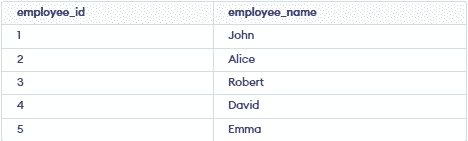
Now, we can use the LENGTH() function to find the length of each name.
Query:
SELECT name,
       LENGTH(name) AS name_length
FROM users;
Output:
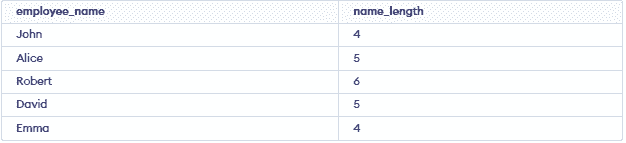
- Returns the length of each value in the name column.
- The result is displayed as name_length.
Example 3: LENGTH() with Empty String
The LENGTH() function can also be used with an empty string.
Query:
SELECT LENGTH('') AS string_length;Output:

- An empty string contains no characters or bytes.
- Therefore, LENGTH('') returns 0.
Note: LENGTH() is supported by databases such as MySQL, PostgreSQL and Oracle. In MySQL, LENGTH() returns the number of bytes, while CHAR_LENGTH() returns the number of characters. SQL Server uses LEN() instead of LENGTH().
