

The REPLACE() function in SQL is a string function used to replace all occurrences of a specified substring with another substring in a string.
- Used to modify or clean text data
- Searches for a specified substring within a string.
- Replaces every occurrence of the specified substring with the given replacement string.
- The original value is not changed unless the result is used in an UPDATE statement.
Syntax
REPLACE(input_string, search_string, replacement_string)- input_string: The original string in which the replacement is performed.
- search_string: The substring that you want to search for.
- replacement_string: The substring that will replace the searched value.
Examples
Now let us see some examples of the REPLACE() function to understand its working better.
Example 1: Replace a Word in a String
In this example, we will replace the word SQL with MySQL.
Query:
SELECT REPLACE('Learn SQL with examples', 'SQL', 'MySQL') AS updated_string;Output:

- Searches for SQL in the given string.
- Replaces it with MySQL.
- Returns the modified string as updated_string.
Example 2: Replace Specific Characters
In this example, we will replace hyphens with spaces.
Query:
SELECT REPLACE('John-Doe', '-', ' ') AS updated_name;Output:

- Searches for the - character.
- Replaces it with a space.
- Returns the updated value as updated_name.
Example 3: Use REPLACE() on a Table Column
Let us create an employees table containing employee names.
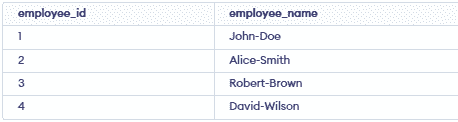
Now, we can replace the hyphen with a space in the employee_name column.
Query:
SELECT employee_name,REPLACE(employee_name, '-', ' ') AS updated_nameFROM employees;
Output:

- Replaces - with a space in each employee name.
- The original employee_name column remains unchanged.
- The modified values are displayed as updated_name.
Note: The REPLACE() function is supported by MySQL, SQL Server, PostgreSQL and Oracle. The basic syntax is similar across these database systems.
