

In this system design interview, we need to design a platform like YouTube that allows users to upload, stream, search, and share videos. Since YouTube serves billions of users worldwide, the system must be highly scalable, fault tolerant, and capable of delivering high-quality video streams with minimal latency.
We will design the complete YouTube system step by step, including its architecture, database design, APIs, scalability techniques, and low-level design.
- Design a scalable video streaming platform capable of handling millions of concurrent users.
- Understand how video uploads, transcoding, streaming, recommendations, and CDN-based content delivery work at scale.
1. Problem Statement
We need to design a YouTube-like video streaming platform that allows users to upload videos, watch videos, search for content, and interact with creators. Since millions of users may upload and stream videos simultaneously, the system must remain highly scalable, fault tolerant, and capable of delivering videos with minimal latency.
- Users should be able to upload videos, stream videos, search for content, subscribe to channels, and interact through likes, comments, and shares.
- The system should support adaptive video streaming, video processing, recommendations, and global content delivery.
- The design should focus on scalability, efficient storage, fast video delivery, fault tolerance, and overall system performance.
2. System Requirements
Before designing the system, we need to identify its functional and non-functional requirements. These requirements define the expected features and quality attributes of the YouTube platform.
Functional Requirements
Functional requirements describe the core features that the system must support.
- Users should be able to register, log in, and authenticate securely.
- Users should be able to upload, process, and share videos.
- Users should be able to stream videos with adaptive video quality.
- Users should be able to search for videos, channels, and playlists.
- Users should be able to subscribe to channels and receive notifications.
- Users should be able to like, dislike, comment on, and share videos.
- Users should be able to create playlists and save videos to Watch Later.
- The system should generate personalized video recommendations.
- Creators should be able to view analytics for their uploaded videos.
Non-Functional Requirements
Non-functional requirements define how well the system should perform under different conditions.
- Availability: The platform should remain available with minimal downtime.
- Scalability: It should support millions of concurrent users, video uploads, and streaming requests.
- Reliability: Videos and user data should be stored safely without data loss.
- Low Latency: Videos should start playing quickly with minimal buffering.
- Performance: The system should provide fast search results and smooth video playback.
- Security: User authentication, authorization, and data transmission should be secure.
3. Capacity Estimation
Before designing the architecture, we need to estimate the expected traffic, storage, bandwidth, and infrastructure requirements. These estimations help us choose the right databases, storage systems, CDNs, and scaling strategy.
Assumptions
| Parameter | Assumption |
|---|---|
| Registered Users | 3 Billion |
| Daily Active Users | 500 Million |
| Videos Uploaded per Day | 5 Million |
| Videos Watched per Day | 1 Billion |
| Average Video Size | 500 MB |
| Average Video Length | 10 Minutes |
| Read : Write Ratio | 200 : 1 |
3.1 Storage Estimation
Assume 5 million videos are uploaded every day, and the average video size is 500 MB.
Daily Storage = 5 Million × 500 MB= 2,500,000,000 MB= 2.5 PB/day
For 30 days,
Monthly Storage = 30 × 2.5 PB= 75 PB
Estimated Storage: 75 PB/month (excluding thumbnails and metadata).
3.2 Bandwidth Estimation
Assume users watch 1 billion videos per day, and the average streamed video size is 500 MB.
Daily Streaming Data = 1 Billion × 500 MB= 500 PB/day
Bandwidth = 500 PB / 86,400 seconds≈ 46 Tb/s
Estimated Bandwidth: ~46 Tb/s
3.3 Server Estimation
Assume one streaming server can handle 5 million concurrent streaming sessions.
Number of Servers
= 500 Million / 5 Million
= 100 Servers
Estimated Streaming Servers: 100 Servers (excluding CDN edge servers).
3.4 Requests Per Second (RPS) Estimation
Assume YouTube processes 1 billion video play requests per day.
Requests Per Second (RPS)= 1 Billion / 86,400≈ 11,574 requests/second≈ 11.5K RPS
Estimated Traffic: The platform should be capable of handling approximately 11.5K requests per second, while supporting significantly higher traffic during peak hours.
Note: These are average estimations. During viral events or peak hours, the actual traffic can be several times higher, so the system should be designed to handle traffic spikes efficiently.
4. High Level Design
The High-Level Design (HLD) describes the overall architecture of the YouTube system and explains how different components work together to provide scalable, reliable, and low-latency video streaming.
Core Components
After the architecture diagram, explain each component one by one.
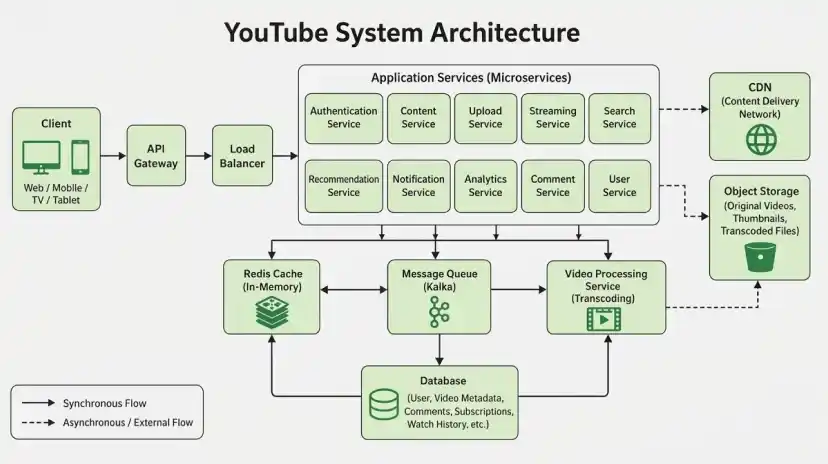
- Client: The client represents the YouTube application running on mobile devices, web browsers, smart TVs, and tablets. It allows users to upload videos, stream content, search for videos, and interact with creators.
- API Gateway: The API Gateway acts as the single entry point for all client requests. It authenticates users, applies rate limiting, and routes requests to the appropriate backend services.
- Load Balancer: The Load Balancer distributes incoming requests across multiple application servers, ensuring high availability and preventing server overload.
- Authentication Service: The Authentication Service verifies user identities and manages login sessions.
- Content Service: The Content Service manages video metadata, titles, descriptions, categories, and channel information.
- Upload Service: The Upload Service handles video uploads and stores original video files in Object Storage.
- Streaming Service: The Streaming Service generates secure streaming URLs and coordinates video playback.
- Search Service: The Search Service indexes videos, channels, and playlists to provide fast search results.
- Recommendation Service: The Recommendation Service generates personalized video recommendations based on watch history, subscriptions, and user activity.
- Notification Service: The Notification Service sends notifications for new uploads, subscriptions, live streams, and user interactions.
- Video Processing Service: The Video Processing Service transcodes uploaded videos into multiple resolutions and bitrates for adaptive streaming.
- Redis Cache: Redis stores frequently accessed data such as trending videos, user sessions, recommendations, and content metadata to reduce database queries.
- Message Queue: A Message Queue processes video transcoding, notifications, analytics, recommendation updates, and background tasks asynchronously.
- Database: The database stores user accounts, channel information, video metadata, subscriptions, comments, and watch history.
- Object Storage: Object Storage stores original videos, transcoded video files, thumbnails, and subtitles.
- CDN (Content Delivery Network): The CDN caches video segments at edge locations and delivers them to users with low latency.
Request Flow
After explaining the components, describe how a video streaming request travels through the system.
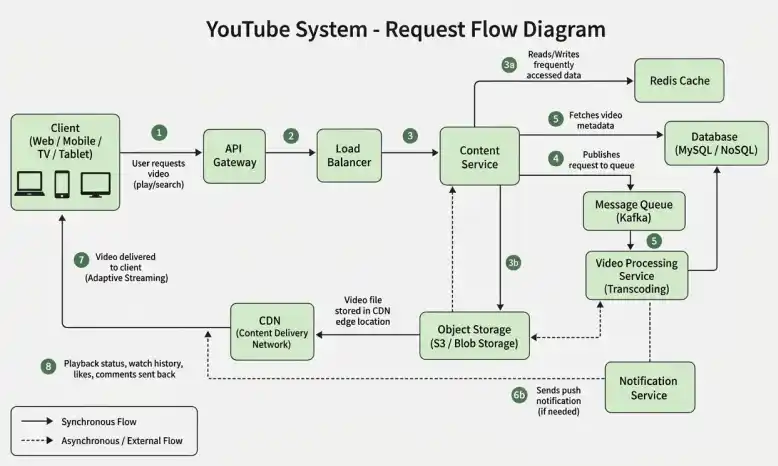
- A user selects a video from the YouTube application.
- The request reaches the API Gateway, which authenticates the user.
- The Load Balancer forwards the request to the Content Service.
- The Content Service retrieves the video metadata from the Database or Redis Cache.
- The Streaming Service generates a secure streaming URL and redirects the client to the nearest CDN.
- The CDN delivers video segments to the user's device with low latency.
- If the requested video is unavailable in the CDN cache, it is fetched from Object Storage and cached for future requests.
- User watch history, playback progress, and analytics events are processed asynchronously through the Message Queue.
- The Recommendation Service updates personalized recommendations based on the user's viewing activity.
Data Flow
The data flow shows how videos and user requests move through different components of the YouTube system after a user performs an action.
- The client sends a request to the API Gateway, which authenticates the user and forwards it to the appropriate service.
- The Content Service retrieves video metadata from Redis Cache or the Database.
- Uploaded videos are stored in Object Storage and processed by the Video Processing Service to generate multiple resolutions.
- The processed videos are delivered through the CDN to provide smooth and low-latency streaming.
- Watch history, recommendations, notifications, and analytics are processed asynchronously using the Message Queue.
- The Recommendation Service continuously updates personalized recommendations based on user activity and stores the results in Redis Cache and the Database.
5. Technology Stack
The Technology Stack defines the technologies used to build a scalable, reliable, and high-performance YouTube system.
| Component | Technology |
|---|---|
| Frontend | React.js, Android, iOS, Smart TV Apps |
| Backend | Java, Spring Boot, Node.js, Go |
| API Gateway | NGINX, Kong |
| Load Balancer | HAProxy, AWS ELB |
| Database | MySQL (Users), Cassandra/MongoDB (Video Metadata) |
| Cache | Redis |
| Message Queue | Apache Kafka |
| Object Storage | Amazon S3, Google Cloud Storage |
| CDN | CloudFront, Akamai, Cloudflare |
| Authentication | OAuth 2.0, JWT |
| Monitoring | Prometheus, Grafana |
6. Data Model Design
The Data Model defines how YouTube stores and manages users, videos, channels, playlists, subscriptions, and viewing history. A well-designed schema ensures efficient storage, fast retrieval, and scalability for billions of videos and users.
Core Entities
The YouTube system consists of the following core entities:
- User: Stores user profile, authentication details, and account information.
- Channel: Represents a creator's channel and its metadata.
- Video: Stores video metadata such as title, description, duration, category, and visibility.
- Playlist: Stores user-created playlists and watch later collections.
- Subscription: Maintains relationships between users and channels they follow.
- WatchHistory: Tracks videos watched by users for recommendations and resume playback.
Database Selection
A combination of SQL and NoSQL databases can be used depending on the system requirements.
- SQL Database is suitable for storing structured data such as user accounts, channels, subscriptions, and authentication information.
- NoSQL Database is better suited for storing video metadata, comments, likes, and watch history because it provides horizontal scalability and high write throughput.
- Video files, thumbnails, and other media assets should be stored in Object Storage, while only their metadata is maintained in the database.
7. API Design
The API design defines how the client communicates with the backend services to perform operations such as authentication, video streaming, uploading, searching, and playlist management.
- Design REST APIs that are simple, scalable, and easy to consume.
- Use appropriate HTTP methods for different operations.
- Secure APIs using authentication mechanisms such as JWT or OAuth.
Authentication APIs
| Method | Endpoint | Description |
|---|---|---|
| POST | /api/v1/auth/register | Register a new user |
| POST | /api/v1/auth/login | Authenticate a user |
| POST | /api/v1/auth/logout | Logout the current user |
Video APIs
| Method | Endpoint | Description |
|---|---|---|
| POST | /api/v1/videos/upload | Upload a new video |
| GET | /api/v1/videos/{videoId} | Get video details |
| GET | /api/v1/videos/stream/{videoId} | Stream a video |
| DELETE | /api/v1/videos/{videoId} | Delete a video |
Search APIs
| Method | Endpoint | Description |
|---|---|---|
| GET | /api/v1/search?q={keyword} | Search videos |
| GET | /api/v1/recommendations | Get personalized recommendations |
Playlist APIs
| Method | Endpoint | Description |
|---|---|---|
| POST | /api/v1/playlists | Create a playlist |
| POST | /api/v1/playlists/{playlistId}/videos | Add video to playlist |
| GET | /api/v1/playlists/{playlistId} | Get playlist details |
Sample Request
POST /api/v1/videos/upload
{
"title": "System Design Tutorial",
"description": "Complete HLD of YouTube",
"visibility": "public",
"channelId": "channel_101"
}
Sample Response
{
"videoId": "video_567",
"status": "uploaded",
"uploadTime": "2026-07-30T10:30:45Z"
}
8. Low Level Design
The Low-Level Design (LLD) describes the internal structure of the system by defining the key classes, their responsibilities, and their interactions. It helps organize the application into modular and maintainable components.
Core Classes
The YouTube system can be designed using the following core classes:
- User: Manages user profile information and account settings.
- Video: Stores video metadata, streaming information, and engagement statistics.
- Playlist: Manages collections of videos created by users.
- Comment: Stores comments associated with videos.
- RecommendationService: Generates personalized video recommendations.
- StreamingService: Handles video streaming requests and playback.
SOLID Principles
The YouTube system follows SOLID principles to keep the code modular, maintainable, and easy to extend.
- Single Responsibility Principle (SRP): Each class has a single responsibility. For example, the StreamingService handles video playback, while the RecommendationService generates recommendations.
- Open/Closed Principle (OCP): New content types or recommendation algorithms can be added without modifying existing business logic.
- Liskov Substitution Principle (LSP): Different video types (ShortVideo, LiveVideo, StandardVideo) can be used wherever a generic Video object is expected.
- Interface Segregation Principle (ISP): Services expose only the operations they require, avoiding unnecessary dependencies.
- Dependency Inversion Principle (DIP): High-level services depend on abstractions rather than concrete implementations, making databases, caches, and storage providers easy to replace.
Design Patterns
The following design patterns can be used in the YouTube system:
| Design Pattern | Usage |
|---|---|
| Singleton | Database, Redis Cache, CDN connection management |
| Factory | Create different content types (Video, Shorts, Live Stream) |
| Strategy | Video recommendation and adaptive bitrate streaming algorithms |
| Observer | Notify subscribers when creators upload new videos or go live |
9. Scalability & Performance
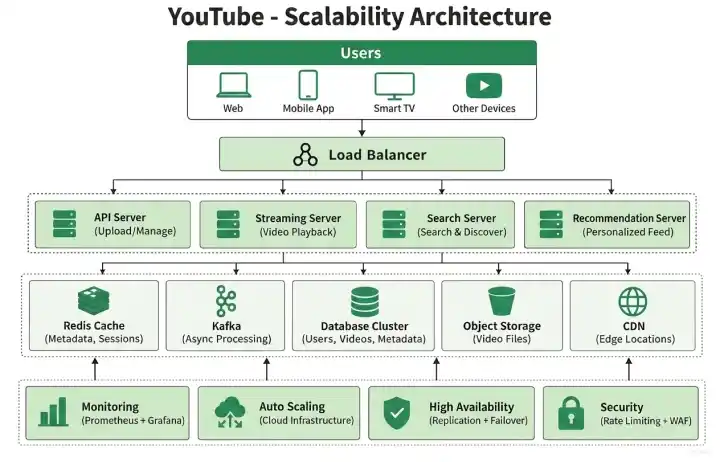
Scalability and performance ensure that the YouTube system can handle millions of concurrent users while delivering high-quality video streaming with low latency and high availability.
- Caching: Redis Cache stores frequently accessed data such as video metadata, user sessions, recommendations, and trending videos to reduce database load and improve response time.
- Load Balancing: A Load Balancer distributes incoming requests across multiple application servers to prevent overload and ensure high availability.
- Database Replication: Database replication improves read performance and provides fault tolerance by maintaining multiple copies of data.
- Database Sharding: User data, video metadata, comments, and watch history are distributed across multiple database servers to support horizontal scaling.
- Asynchronous Processing: Kafka processes background tasks such as video transcoding, recommendations, notifications, analytics, and watch history updates asynchronously.
- Horizontal Scaling: Additional Streaming Servers, Search Servers, Recommendation Servers, and API Servers can be added dynamically to handle increasing traffic.
- CDN: A Content Delivery Network (CDN) caches video segments closer to users, reducing latency and improving playback performance.
- Adaptive Bitrate Streaming: Videos are streamed at different resolutions based on the user's network speed to provide smooth playback.
- Rate Limiting: Rate limiting protects the platform from excessive requests, abuse, and denial-of-service attacks.
- Auto Scaling: Cloud infrastructure automatically adds or removes servers based on traffic demand.
10. Bottlenecks & Improvements
This section discusses the common performance challenges that a YouTube-like video streaming platform may face at scale and the techniques used to improve scalability, reliability, and user experience.
Common Bottlenecks
As the number of users, videos, and streaming requests increases, the YouTube system may encounter several bottlenecks.
- CDN Cache Misses: If a requested video is not available in the CDN, it must be fetched from Object Storage, increasing startup latency.
- Database Bottleneck: A single database may become overloaded due to billions of users, videos, comments, and watch history records. Replication and sharding help distribute the load.
- Video Transcoding Delays: High video upload traffic may create a backlog in transcoding jobs, delaying video availability.
- Recommendation Engine Load: Generating personalized recommendations for millions of users requires significant computation and can become a bottleneck.
- Search Index Updates: Frequent uploads require continuous indexing, which may slow down search if not processed efficiently.
- Streaming Server Overload: During live events or viral videos, streaming servers may experience sudden spikes in traffic.
- Message Queue Backlog: Kafka queues may accumulate events during peak traffic. Increasing partitions and consumers improves throughput.
Possible Improvements
The following techniques further improve the scalability and reliability of the YouTube platform.
- Auto Scaling: Automatically add or remove servers based on traffic demand.
- Global CDN Expansion: Deploy CDN edge servers in more geographic regions to reduce video latency.
- Pre-fetch Popular Videos: Cache trending videos proactively before large traffic spikes.
- Adaptive Bitrate Streaming: Automatically adjust video quality based on network bandwidth for smooth playback.
- Distributed Recommendation Engine: Run recommendation models across multiple servers to improve response time.
- Failover Mechanism: Redirect traffic to healthy servers during failures to maintain high availability.
- Monitoring & Alerting: Continuously monitor system health, streaming quality, cache hit ratio, and server performance to detect issues early.
- Background Processing: Use Kafka and worker services for transcoding, analytics, notifications, and recommendation updates instead of synchronous processing.
