Summary: This article explains how to accurately attach sources from web search responses in Gemini 4 Neon and GPT‑6.2 Sol to the corresponding sentences, then render them as clickable inline citations. Information verified as of November 25, 2026, Beijing time; scope is limited to the Google Gemini API and OpenAI’s first-party API.
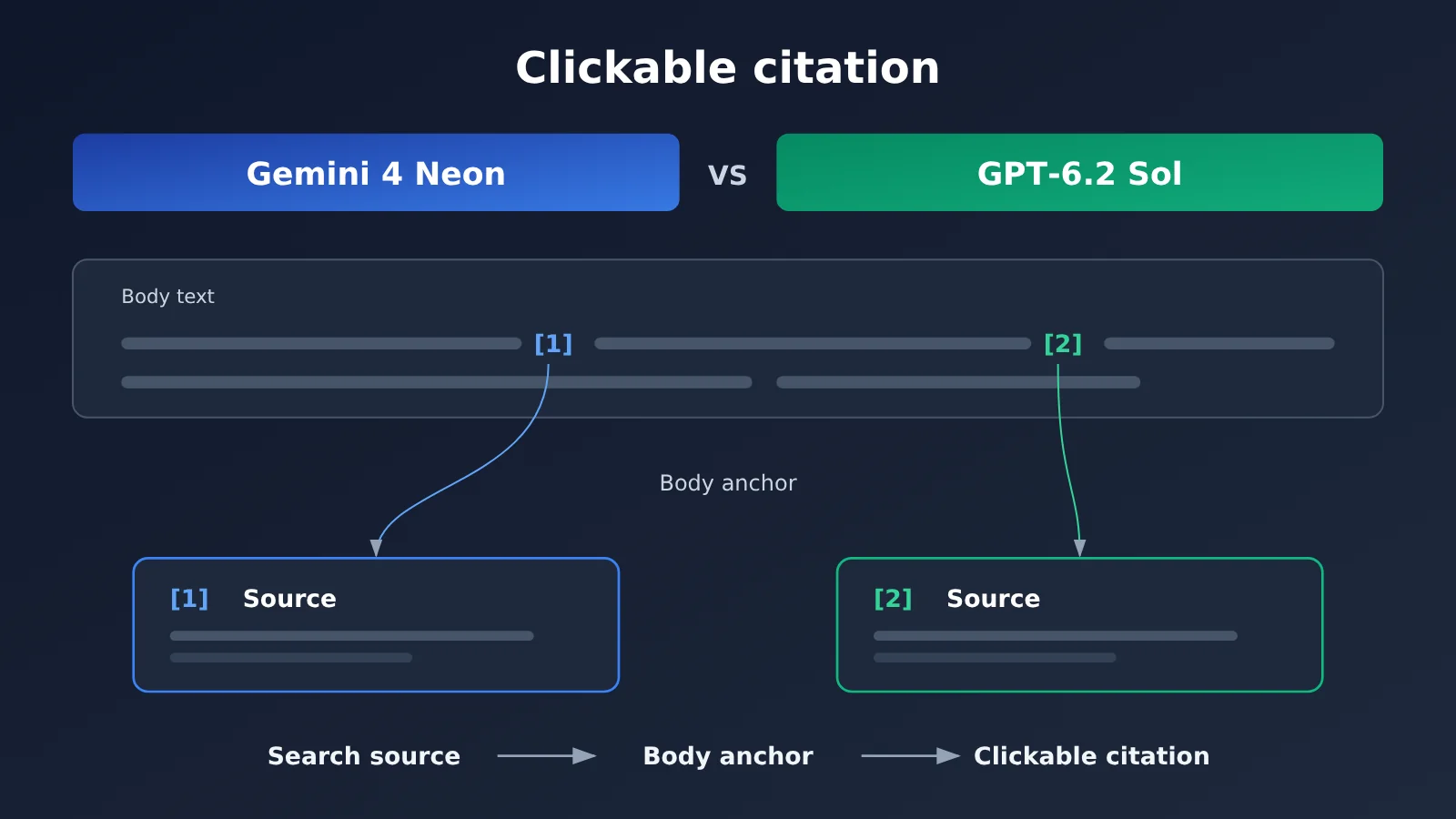
Bottom line up front: Both can produce clickable citations, but the data paths are different. When Gemini 4 Neon uses GenerateContent, you need to use the byte offsets inside the part from groundingSupports, then look up groundingChunks in the same candidate result. When GPT‑6.2 Sol uses Responses, you need to read the url_citation annotations from the output_text block of the message.
Three conditions determine how you implement this. First is the endpoint version: Google’s GenerateContent and Interactions have different structures, so you need to identify by endpoint—the model name can’t stand in for that check. Second is the offset unit: Google uses UTF-8 bytes, while JavaScript uses UTF-16 code units, and Chinese characters and emoji can make the two diverge. Third is the display obligation: OpenAI requires inline citations to be prominent and clickable, while Google also requires you to show the search suggestions component returned by the first-party API.
Knowledge Map: The Gemini 4 Neon and GPT‑6.2 Sol Citation Rendering Pipeline
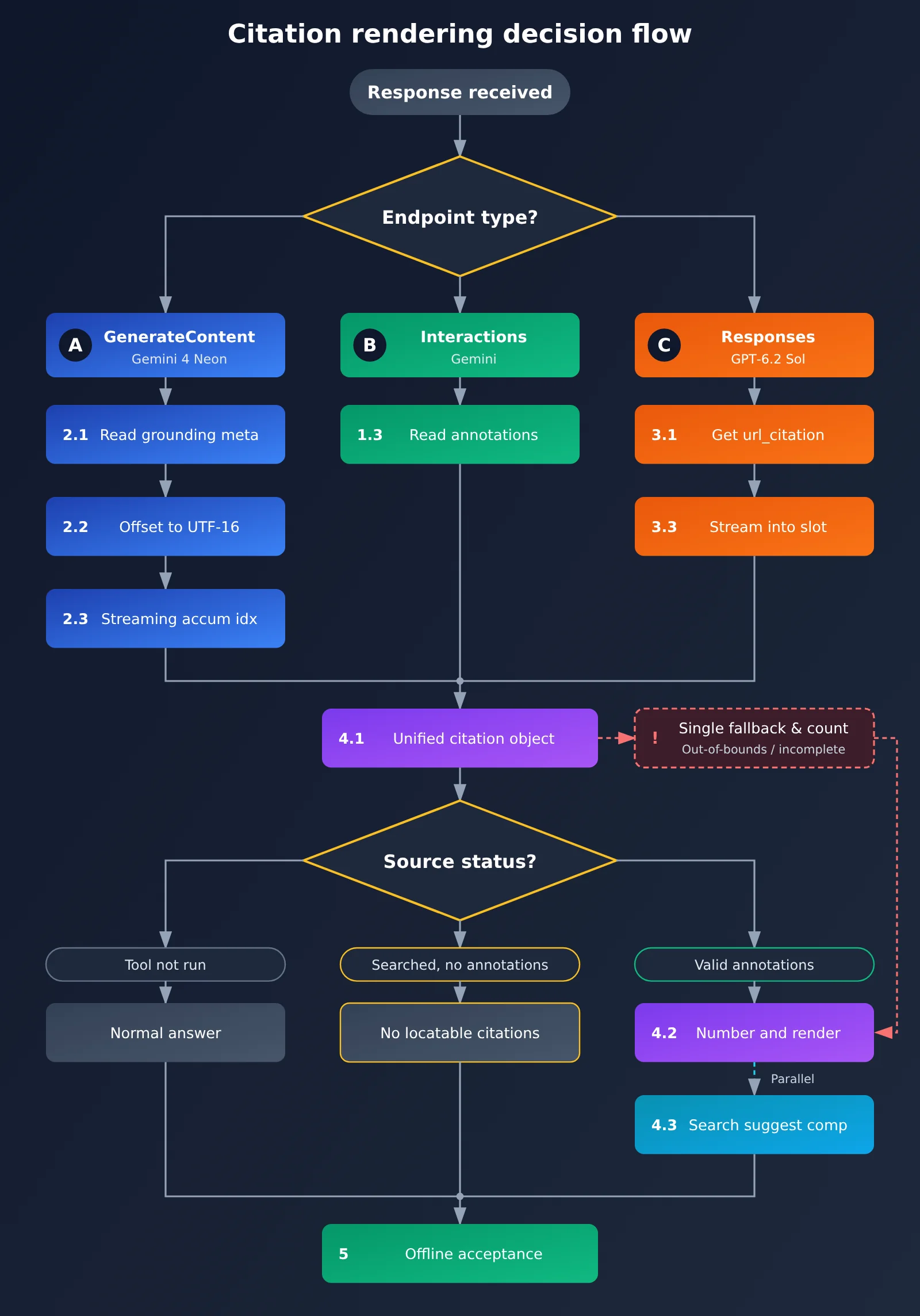
Figure notes: read top to bottom. First you split by endpoint type into three parsing paths; Sections 2 and 3 expand on how Google and OpenAI locate citations, respectively. All three paths eventually flow into the unified object in Section 4, which then decides — based on source status — whether to render links, mark “no locatable citation,” or keep the plain answer. Section 5 validates the whole chain with offline samples, no live calls required.
Index: How the sections of this Gemini 4 Neon vs GPT‑6.2 Sol article fit together
- 1 API and response evidence: start by confirming how to write the request and which fields in the response prove a search “really happened.” Everything parsed later depends on this.
- 2 Google GenerateContent mapping and 3 OpenAI Responses annotations: these two sections sit side by side — just read the one matching the endpoint you’re integrating.
- 4 Unified object and rendering: builds on the output of Sections 2 and 3; covers numbering, merging, compliant display, and safety handling.
- 5 Offline acceptance test: synthetic samples cover the edge cases from the first four sections, validating the parsing and display contract.
To Know: Terms you need to understand Gemini 4 Neon and GPT‑6.2 Sol citations
| Term | Brief explanation |
|---|---|
| Grounding | After a model invocation triggers a search, the answer is tied back to the retrieved web sources |
| part | A single segment in Google’s content.parts response; offsets are computed relative to it |
Half-open interval [a, b) |
Range notation where the start is included and the end is excluded |
| UTF-16 code unit | The index unit of a JavaScript string; one emoji usually takes 2 |
| annotation | Metadata OpenAI attaches to output_text blocks; url_citation means a web citation |
| Search suggestion component | Content returned by Google that must be presented to end users as-is |
1. Interface and Response Evidence for Gemini 4 Neon and GPT‑6.2 Sol
1.1 Gemini 4 Neon: GenerateContent with Google Search Enabled
According to the vendor catalog, gemini-4-neon supports Google Search grounding, and the model spec is listed as a stable release. If you already have a generateContent client, all you need to do is add googleSearch to the tools array, then parse groundingMetadata from the corresponding candidate result. In the JavaScript SDK, the tool object is written as {googleSearch: {}}; here’s how it looks in the Python SDK:
from google.genai import types

config = types.GenerateContentConfig(
    tools=[types.Tool(google_search=types.GoogleSearch())]
)
# Pass config into your existing generate_content call, with "gemini-4-neon" as the model
Once the tool is configured, whether a search actually happens is up to the model, decided per question. That means “the answer text contains the answer” and “search was invoked” are two independent acceptance signals. You should only light up the source status when actual search evidence shows up in the response — for example webSearchQueries or groundingChunks.
1.2 GPT‑6.2 Sol: Responses with Web Search Turned On
The model spec for gpt-6.2-sol lists Web search in the Responses tool table. Requests go to /v1/responses, with the question in the input field:
{
  "model": "gpt-6.2-sol",
  "tools": [{ "type": "web_search" }],
  "input": "下一届会议在哪里举行?",
  "include": ["web_search_call.action.sources"]
}
Two things to watch for. The vendor’s model page notes that setting reasoning.effort to none will be rejected, so check that field when migrating old configs. Also, if your code relies on the expanded output_text convenience property, you have to keep the raw output as well, since annotations only exist in the raw structure. The include line is optional; see section 3.2 for what it does.
1.3 Gemini Interactions: the default example in Google’s current docs
Google’s current docs have switched their default examples to Interactions. The tool is written as {"type":"google_search"}, and the search call, search results, and model output each show up in steps. The body text lives in the text content block of model_output, and annotations go in that block’s annotations, again using url_citation and range fields. Search suggestions come from search_suggestions inside google_search_result.
From a parsing standpoint, Interactions looks a lot like OpenAI Responses; search suggestions still have to be handled separately according to Google’s docs. So an internal adapter needs to recognize at least three input types: GenerateContent, Interactions, and OpenAI Responses. The discriminator is the endpoint version, not the model name.
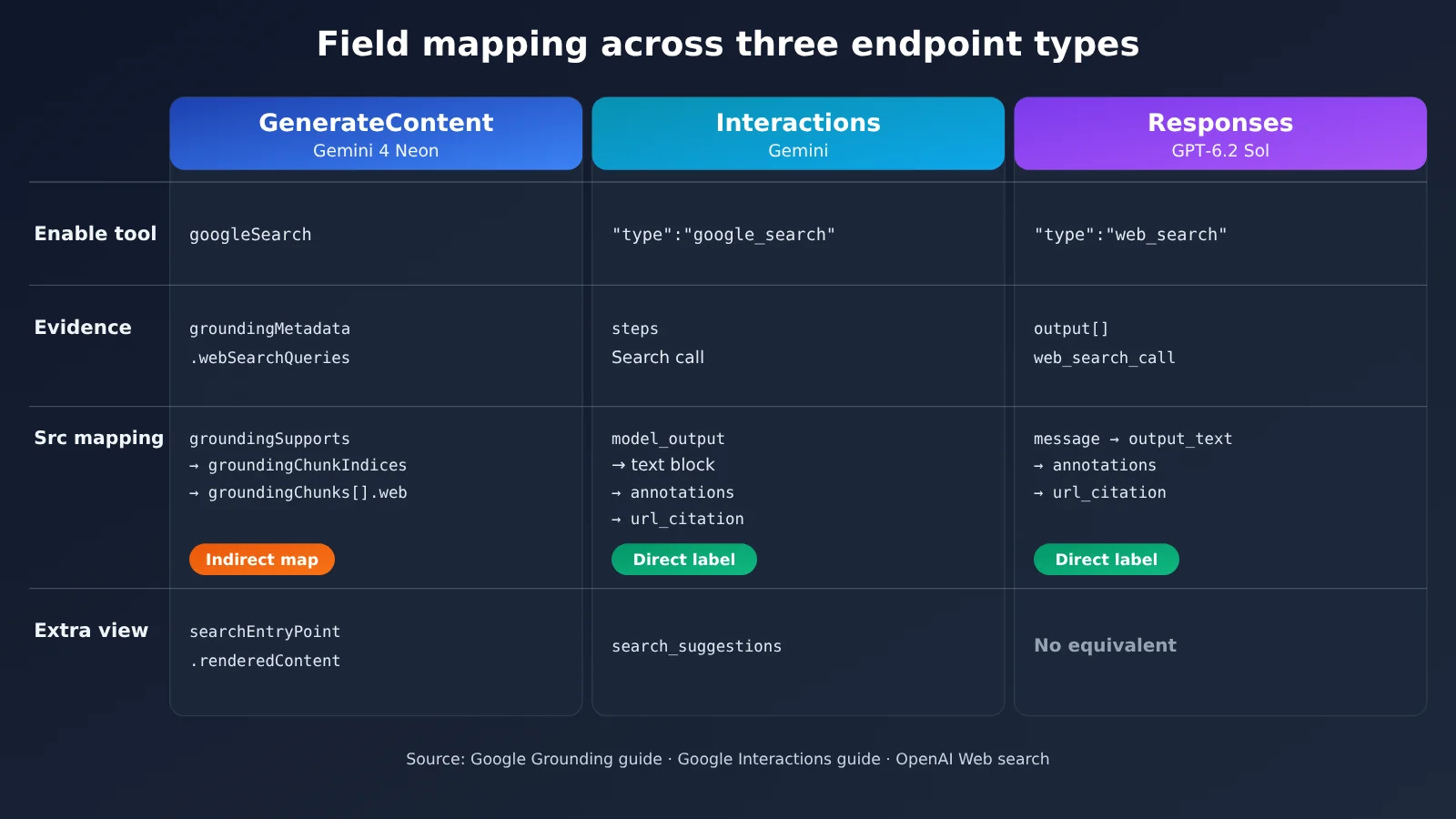
The chart above lines up the same dimension across all three endpoint types in one row. The main difference sits in the third row: GenerateContent uses an indirect mapping of “supporting segment → source index → source array”, while the other two endpoint types write the source directly into the text block’s annotations.
| Comparison dimension | GenerateContent (Gemini 4 Neon) | Interactions (Gemini) | Responses (GPT‑6.2 Sol) |
|---|---|---|---|
| Tool declaration | googleSearch |
{"type":"google_search"} |
{"type":"web_search"} |
| Body text location | candidates[n].content.parts |
model_output text block in steps |
output_text of the message in output[] |
| Source location | groundingSupports[].segment + groundingChunkIndices |
Range fields in the text block’s annotations |
start_index / end_index in annotations[] |
| Offset unit | Zero-based UTF-8 bytes within the part, half-open range | See Google’s docs; verify against your own samples | Verify against your own raw samples (see 3.3) |
| Must be presented as-is | Search suggestions in searchEntryPoint |
Search suggestions in search_suggestions |
Prominent, clickable inline citations |
Table note: fields come from each vendor’s guide and API reference, verified on 2026-11-25. “Verify against your own samples” means the doc description and implementation details should be checked against the raw response you actually receive.
2. Mapping GenerateContent segments to sources in Gemini 4 Neon
2.1 Read three sets of fields from the same candidate
All data must be read from the same candidates[n]: content.parts holds the body text, while groundingMetadata holds the evidence. webSearchQueries records the search terms that were executed and can be used to show “what was searched”; link addresses must come from the uri and title of groundingChunks[].web. searchEntryPoint.renderedContent contains search suggestions and should be handled separately from body citations (see 4.3).
The mapping works in three steps:
- Iterate over
groundingSupports[k]and usesegment.partIndexto find the corresponding part. - Use
segment.startIndexandsegment.endIndexto locate the text range within that part. - Read
groundingChunkIndicesand visit thegroundingChunksof the same candidate one by one.
A single text range can be associated with multiple sources, and the same source can support multiple ranges. You need to preserve both many-to-many relationships; when rendering, the same source can reuse one display number.
2.2 Converting byte offsets to JavaScript indices
The REST reference defines these two positions as zero-based byte offsets within a part, start inclusive and end exclusive. JavaScript strings count in UTF-16 code units, so when you hit Chinese characters, emoji, or combining characters, slicing with raw integers will land you in the wrong place. The right approach is to first confirm the boundary is valid against the UTF-8 byte sequence of the original text, then convert it to a string index, and cross-check against segment.text.
The function below is for development and debugging — it doesn’t make any network requests:
const encoder = new TextEncoder();
const strictDecoder = new TextDecoder("utf-8", { fatal: true });

// Convert a UTF-8 byte offset within a part to a UTF-16 index; throw if it isn't on a valid boundary
function byteOffsetToUtf16(text, byteOffset) {
  const bytes = encoder.encode(text);
  if (!Number.isInteger(byteOffset) || byteOffset < 0 || byteOffset > bytes.length) {
    throw new RangeError(`offset ${byteOffset} out of range`);
  }
  // In fatal mode, truncating inside a multi-byte character throws a TypeError
  return strictDecoder.decode(bytes.subarray(0, byteOffset)).length;
}

function sliceByBytes(text, start, end) {
  const s = byteOffsetToUtf16(text, start);
  const e = byteOffsetToUtf16(text, end);
  return { s, e, text: text.slice(s, e) };
}
Check it against the sample from the reference: the part is 杭州🙂站, and the byte range for “🙂站” is [6, 13). “杭” and “州” each take 3 bytes, the emoji takes 4, and “站” takes 3. The converted JavaScript half-open range is [2, 5), because the emoji occupies two UTF-16 code units. Slicing directly with 6 and 13, or stripping the emoji first and then applying the range, will both land you in the wrong place.
There’s also an ordering requirement: the conversion must happen before you concatenate body text, clean up whitespace, or render Markdown, and the raw ranges must be stored per part. The offsets are relative to a single part — treat them as whole-document offsets and everything drifts as soon as you have more than one part.
View the complete GenerateContent citation collection code
// Input: a single candidate object; output: anchor list and error counts
// Note: proto3 JSON serialization may omit zero-valued fields, so we treat
// missing partIndex / startIndex as 0. This is an inference — verify it against real response samples.
function collectGoogleCitations(candidate, candidateId) {
  const parts = candidate?.content?.parts ?? [];
  const meta = candidate?.groundingMetadata ?? {};
  const chunks = meta.groundingChunks ?? [];
  const supports = meta.groundingSupports ?? [];
  const anchors = [];
  const errors = { badIndex: 0, badRange: 0, textMismatch: 0 };

  for (const support of supports) {
    const seg = support.segment ?? {};
    const partIndex = seg.partIndex ?? 0;
    const partText = parts[partIndex]?.text;
    if (typeof partText !== "string") { errors.badRange++; continue; }

    let range;
    try {
      range = sliceByBytes(partText, seg.startIndex ?? 0, seg.endIndex);
    } catch {
      errors.badRange++;
      continue;
    }
    if (seg.text && seg.text !== range.text) { errors.textMismatch++; continue; }

    const sources = [];
    for (const idx of support.groundingChunkIndices ?? []) {
      const web = chunks[idx]?.web;
      if (!web?.uri) { errors.badIndex++; continue; } // degrade this single entry
      sources.push({ uri: web.uri, title: web.title ?? "", vendorType: "web" });
    }
    if (sources.length === 0) continue;

    anchors.push({
      candidateOrItemId: candidateId,
      partId: partIndex,
      rawRange: [seg.startIndex ?? 0, seg.endIndex],
      offsetType: "utf8-byte",
      jsRange: [range.s, range.e],
      sources,
    });
  }
  return { anchors, errors, queries: meta.webSearchQueries ?? [] };
}
Note that the code above looks up sources by raw index during the parsing stage. If you sort and dedupe groundingChunks first and then go back to fetch them by index, links will end up attached to the wrong sentences. Display ordering must happen after all index resolution is finished.
2.3 Streaming Responses: Sources Must Accumulate Across Chunks
According to the streaming reference definition, the chunk index spans response chunks and is globally numbered. The frontend should append groundingChunks to the same array in the order they’re returned, not reset it on every callback. If the part that contains a support’s range hasn’t finished arriving, mark it as “pending” first, and only generate the link after the body text and metadata are complete.
3. Annotation Positioning in GPT‑6.2 Sol Responses
3.1 Traverse output and distinguish search calls from messages
The output[] in Responses mixes entries of different types. The action field of web_search_call records actions like querying, opening a page, or in-page search, and the query wording is sometimes omitted. For message entries, iterate through each content[]; when you hit a block of type output_text, pick out annotations with type: "url_citation" from that block’s own annotations[] and read title, url, start_index, and end_index.
Annotations are attached to the block, so record which block they belong to first, then assemble the final display text. The docs provide examples for both Responses and Chat Completions, and the annotation hierarchy is different between them; in the Responses sample, these fields sit at the same level as type.
function collectOpenAICitations(response) {
  const searchCalls = [];
  const anchors = [];
  for (const [outputIndex, item] of (response.output ?? []).entries()) {
    if (item.type === "web_search_call") {
      searchCalls.push({ id: item.id, action: item.action ?? null });
      continue;
    }
    if (item.type !== "message") continue;
    for (const [contentIndex, block] of (item.content ?? []).entries()) {
      if (block.type !== "output_text") continue;
      for (const ann of block.annotations ?? []) {
        if (ann.type !== "url_citation") continue; // Other types such as file citations are handled by other components
        anchors.push({
          candidateOrItemId: item.id,
          partId: `${outputIndex}:${contentIndex}`,
          rawRange: [ann.start_index, ann.end_index],
          offsetType: "openai-index", // Unit should be confirmed against the sample
          sources: [{ uri: ann.url, title: ann.title ?? "", vendorType: "url_citation" }],
        });
      }
    }
  }
  return { searchCalls, anchors };
}
3.2 The source collection and per-sentence citations serve different purposes
Adding include: ["web_search_call.action.sources"] to the request gives you the set of sources the tool actually visited; it’s useful for panels like “View search scope.” This set may include more addresses than the body text cites, and it doesn’t contain the mapping between sources and sentences. Only url_citation annotations can pin a source to the answer text.
So when a search has run but a sentence has no annotation, the UI can honestly show “Search ran; no locatable citation for this sentence,” but it must not spread every visited address across every sentence.
3.3 Streaming events: place annotations by slot
In streaming mode, there’s a response.output_text.annotation.added event that carries item_id, output_index, content_index, and annotation_index. The first three fields are enough to place the annotation into exactly the same slot as the incremental body text, and annotation_index is used for deduplication. If an annotation arrives before its corresponding text, put it in a buffer first, and create the anchor once the text in its range has fully arrived.
After the response ends, verify the results accumulated during streaming against the final response, merging them using item_id + content_index + annotation_index as the key, so the same annotation isn’t inserted once from the event and once from the final snapshot. The event reference describes OpenAI’s positions as “first character” and “last character.” The adapter should confirm the counting unit here with its own raw samples: put English, Chinese, and emoji at each end of a range and run the same acceptance test; if offset units get mixed up, you’ll catch it early.
4. Unified Citation Objects and Rendering for Gemini 4 Neon and GPT‑6.2 Sol
4.1 Internal Objects Keep the Original Coordinates
The output from the previous two sections is normalized into a single internal object. The field design follows one principle: “always be able to trace back to the vendor’s raw response.”
| Field | Meaning | Why keep it |
|---|---|---|
candidateOrItemId |
Google candidate index or OpenAI item id | Prevents mixing sources across candidates or items |
partId |
Part index or the output:content slot |
Offsets are only valid within that fragment |
rawRange + offsetType |
Original range and its unit | Lets you go back to the raw data when debugging |
sources[].uri |
Link returned by the vendor | Used verbatim at render time, never rewritten |
sources[].title |
Source title | Displayed as plain text |
sources[].vendorType |
Vendor-defined type | Distinguishes web citations from file citations |
4.2 Assigning Display Numbers and Merging Duplicate Sources
Display numbers can be assigned in order of first citation. When the same vendor URL shows up again, the display layer for the current result may reuse the existing number, but every anchor still has to point to its corresponding source. Sources with the same title but different URLs may correspond to different versions of a page, so by default each keeps its own separate link.
When inserting links, process from the end toward the front within the same part, so earlier indices aren’t shifted by the inserted markers. Here’s a numberer that only merges at the display layer:
function assignDisplayNumbers(anchors) {
  const numberByUri = new Map();
  const ordered = [...anchors].sort((a, b) =>
    String(a.partId).localeCompare(String(b.partId)) || a.jsRange[0] - b.jsRange[0]);
  for (const anchor of ordered) {
    anchor.labels = anchor.sources.map((src) => {
      if (!numberByUri.has(src.uri)) numberByUri.set(src.uri, numberByUri.size + 1);
      return { n: numberByUri.get(src.uri), ...src }; // only reuse the number; keep the link as-is
    });
  }
  return ordered;
}
4.3 Display Requirements from Both Vendors
The two vendors emphasize different aspects of the UI. OpenAI requires that: whenever the interface displays search results or information generated from search, the inline citations must be prominent and clickable. Google requires that grounded responses be shown to the end user who initiated the request, together with the corresponding search suggestions, using the vendor-provided search suggestions component, and complying with the terms’ restrictions on results, links, storage, and click tracking.
From an engineering standpoint, it’s best to split this into two rendering paths: one handles inline body citations, and the other renders searchEntryPoint.renderedContent or search_suggestions verbatim. Merging must stay at the display layer only; the original ranges, vendor links, and original suggestions must be presented unchanged. Use Google’s returned URIs exactly as given: don’t rewrite redirects to deduplicate, don’t strip any unknown parameters, and don’t insert an intermediate redirect page. The following practices exceed what the terms allow: dropping the search suggestions and replacing them with your own curated source list; aggregating the returned links into a new source database.
4.4 Security and Accessibility Handling
Both body text and link titles must be inserted as plain text, and only valid web addresses may enter the anchor components. For accessibility, citations must be openable via keyboard, and links with identical names must be distinguishable by screen readers — for example, by adding the number to the accessible label.
function safeHref(raw) {
  try {
    const u = new URL(raw);
    return u.protocol === "https:" || u.protocol === "http:" ? raw : null; // return the original string, don't rewrite
  } catch {
    return null;
  }
}
5. Gemini 4 Neon vs GPT‑6.2 Sol: Offline Acceptance for Citation Rendering
5.1 Synthetic samples and source states
Offline acceptance only verifies the parsing and rendering contracts — it doesn’t make real API calls. Try constructing a piece of text like this: “The meeting was held in Hangzhou. The next edition hasn’t been announced yet.” The first sentence links to two URLs, and the second has no citations. Then make the same URL show up in another part to check whether the numbering can be reused and whether each citation lands in the right place. Finally, add an emoji and some Markdown markup to the text and confirm that no original characters are dropped after inline links are inserted.
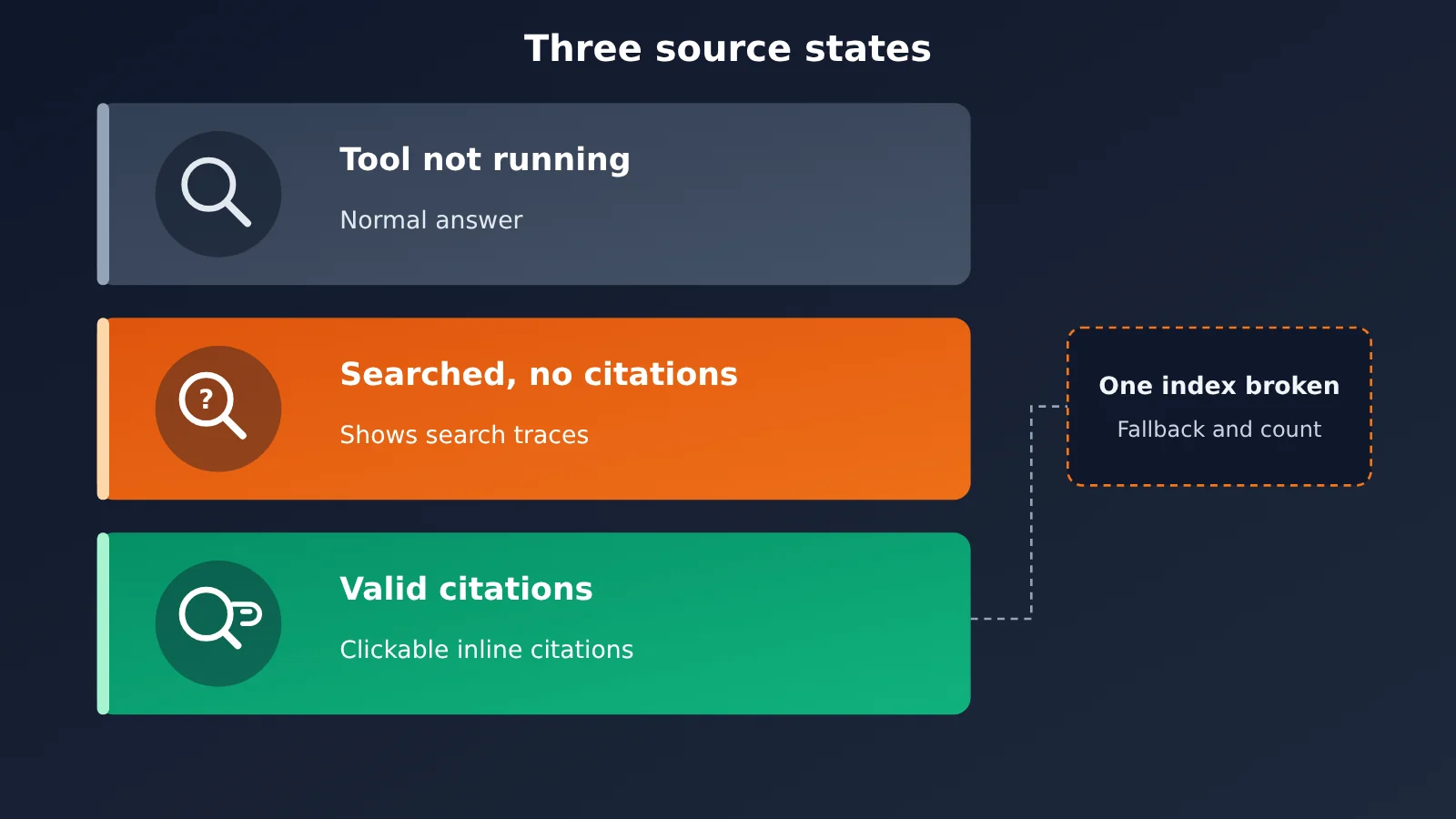
The figure above maps to three source states. The judgment rests on whether the response contains search evidence and valid annotations — it has nothing to do with whether the body text actually contains an answer. Annotations coming from local attachments are a separate type; even when they show up in the same output block as web citations, the web component only handles web citations.
| Test sample | How it’s constructed | Expected result |
|---|---|---|
| Multiple sources in one sentence | The first sentence links to two URLs | Two numbers appear at the end of the sentence, each clickable |
| Numbering reuse | The same URL appears in another part | Reuses the existing number, positioned correctly |
| Emoji boundary | 杭州🙂站, bytes [6, 13) |
JS range [2, 5), link inserted after “站” |
| Index out of range | groundingChunkIndices points to a nonexistent item |
That one degrades and is counted; other citations work normally |
| Unterminated stream | Range spans text that hasn’t arrived yet | Stays pending, no anchor generated |
| Missing candidates or empty annotations | Delete candidates or clear annotations |
Degrades by source state, no error thrown |
| Multiple citations at the same position | Two annotations have identical ranges | Both links preserved, order stays stable |
| Streaming vs snapshot duplicate | Event and final response contain the same annotation | Inserted only once |
Table note: The samples are synthetic data used for front-end acceptance; they don’t represent actual measured results.
5.2 Final check method
Finally, run one assertion across every sample: each link appears only within its original range, and no unrelated sentence carries a link. Once this assertion passes and all three conditions hold, the citation rendering for Gemini 4 Neon and GPT‑6.2 Sol is ready to ship:
- the sliced text of the emoji sample matches
segment.text; - the streaming result and the final snapshot, once merged, contain no duplicates;
- the Google search suggestions component renders as-is.
References
- Gemini 4 Neon Model Specifications:
aistudio.google.com/docs/models/gemini-4-neon - Google Search Grounding Guide (GenerateContent):
aistudio.google.com/docs/google-search?generate-content=true - Google GenerateContent API Reference (Candidate):
aistudio.google.com/api-reference/generate-content - Google Interactions Search Grounding and Migration Guide:
aistudio.google.com/docs/google-search,aistudio.google.com/docs/migrate-to-interactions - Google Gemini API Terms (Grounding with Google Search):
aistudio.google.com/docs/terms - GPT‑6.2 Sol Model Specifications:
developers.openai.com/api/docs/models/gpt-6.2-sol - OpenAI Web Search Guide (Output, Citations, and Sources):
developers.openai.com/api/docs/guides/tools-web-search - OpenAI Responses Streaming Events Reference:
developers.openai.com/api/reference/resources/responses/streaming-events