Author’s note: the 4 settings to change first in Orca, the exact config for wiring Claude Code and Codex into APIYI, and how to estimate daily token cost per parallel agent based on worker count.
Plenty of people write code with Claude Code or Codex, and by the third agent things start falling apart. One terminal is refactoring, one is adding tests, one is fixing a bug, and you’re switching between three windows. Changes overwrite each other, so you git stash to bail yourself out and copy diffs by hand. By the time you snap back to attention, you’ve forgotten which run finished and which is still sitting at a confirmation prompt.
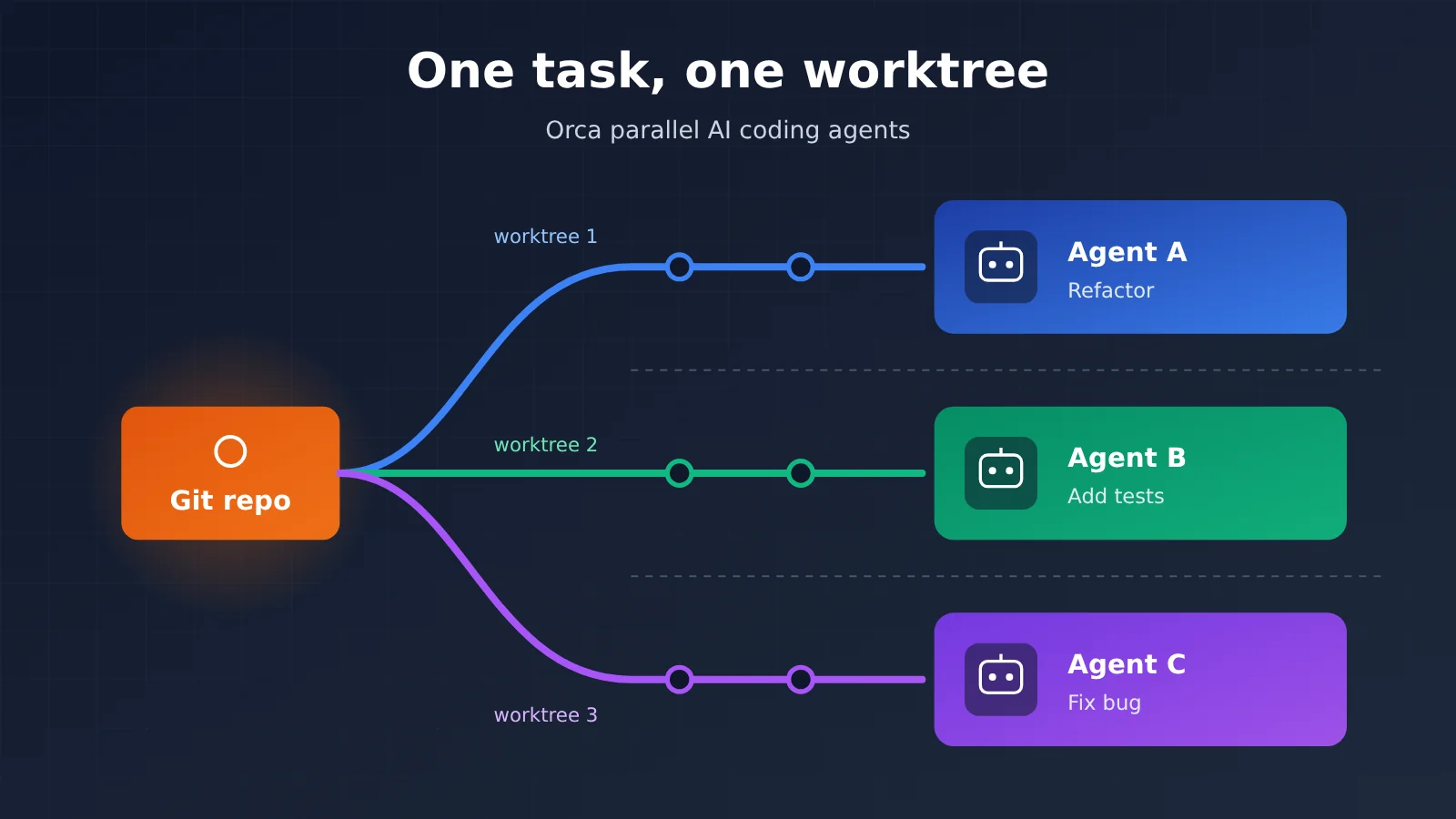
This article is about using Orca to give each task its own worktree, and keeping an eye on the token bill yourself. This isn’t an Orca pitch, and it’s not a comparison review. Running parallel agents isn’t hard. Three things are: several tasks fighting over the same workspace, agents waiting on your confirmation while you’re away from the keyboard, and nobody keeping score of the tokens.
The core value: by the end of this article you’ll know which 4 settings to change first in Orca, how to wire CLI agents into APIYI, and how to use a single formula to figure out roughly how much you’ll spend in a day.
Key points for running AI coding agents side by side with Orca
Based on Orca’s GitHub README and official docs (read on 2026-11-27; the latest release was v1.4.278, published 2026-11-26), Orca describes itself as an agent development environment (ADE). It runs Claude Code, Codex, OpenCode and other CLI agents side by side, each with its own git worktree, and the interface bundles a terminal, diff review, a built-in Chromium browser, and SSH remote development. The project is MIT licensed, and the README states it’s free. Orca doesn’t sell inference itself — it uses the subscriptions or accounts you already have.
Mapping the three headaches from the intro against what Orca actually handles:
- Workspaces stepping on each other: one worktree per task, so changes are isolated by design and you no longer need
git stashto free up room. - You’re away from the computer: the iOS / Android app has a Needs you list, so when an agent stops and waits for confirmation, you can answer with one tap.
- Where the work comes from: Bots can pick up work from Slack, Linear, and GitHub, then hand back a PR when done.
- Where it runs: locally, on an SSH host, on a Remote Orca Server, or one cloud VM per workspace.
The third item — the bill — is something Orca can only roughly estimate for you; the actual accounting is still on you. Here are the 4 settings worth changing first once you’re up and running:
| Setting | Default | Recommended | Why |
|---|---|---|---|
| worktree strategy | Parallel worktrees supported | Strictly one task, one worktree | Changes stay isolated; discarding one doesn’t affect the main branch |
| Agent Permissions | Yolo (pre-fills flags to skip confirmations) | Manual | Keeps an agent from running wild on your machine |
| per-agent environment variables | Empty | Set a key and base URL per agent | Different agents can go through different providers and accounts |
| Look around / Memory upkeep | Runs on a timer | Lower the frequency or turn it off | Both background jobs burn tokens |
Why Orca’s worktree isolation is the main event
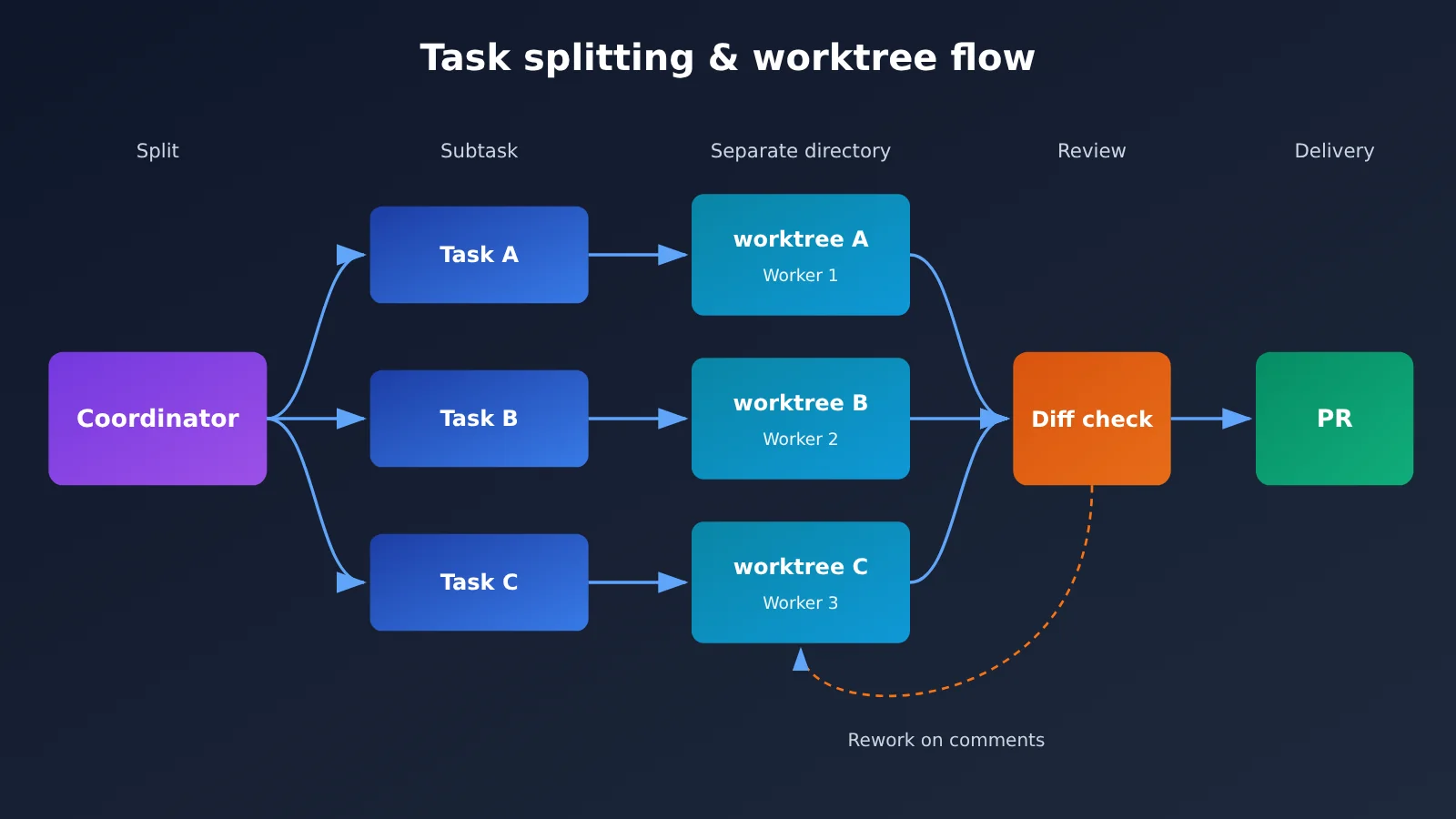
A worktree is a native git capability: the same repo can check out multiple working directories, each tied to its own branch. Orca treats this as the basic unit of parallelism — an agent only touches files in its own directory and can’t write into anyone else’s. When it’s time to review, you annotate the diff line by line, send those annotations back to the relevant agent to fix, and once it’s done, use the Git integration to generate a draft commit and PR.
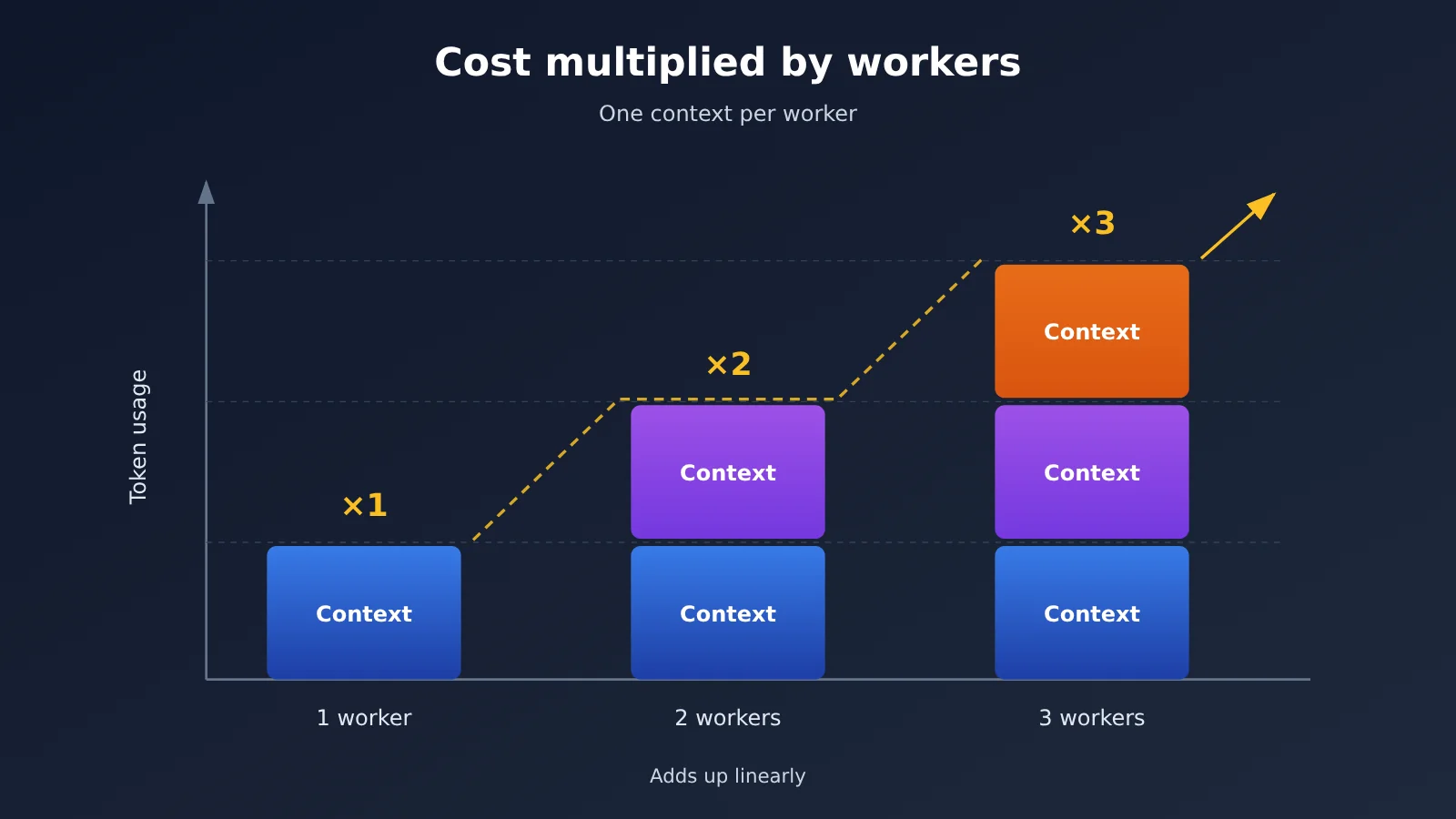
There’s also a detail here that’s easy to miss. The README notes that the Orca CLI lets agents call commands like orca worktree create to spin up new workers — in other words, an agent can pull up another agent. In Orchestrate mode, a coordinator breaks the work down and distributes it to workers. That’s genuinely fast, but the more workers you have, the more the costs we’ll get to later multiply right along with them.
Orca Quick Start: Set Up Your First Parallel Task in 5 Steps
Step 1: Install Orca and open a repo
Head to the official site at orca.dev or the Releases page of the GitHub repo github.com/stablyai/orca and download the installer for your OS. Once it’s installed, open a local git repo. Orca’s official docs say it can connect to any CLI agent, and there are 41 in the preset list — the usual suspects like Claude Code, Codex, Aider, Goose, and Cline are all there. The catch is that those CLIs need to already be installed on your machine and working properly.
Step 2: Create the first worktree for the repo
Under the repo, create a new worktree for the current task. It’s best to name it after the task itself, like fix-login-timeout, so a glance at the list tells you what each agent is up to. Do the same for the second and third tasks. The rule is simple: one worktree, one live task. Don’t let two agents share the same directory, or you’re right back to the old problem of overwriting each other.
Step 3: Change Orca’s agent permissions from Yolo to Manual
This is the most important step. The official docs state that Orca pre-fills each CLI’s skip-confirmation arguments for new sessions, on the grounds that a worktree can be thrown away at any time:
| Agent | Orca default pre-filled argument | What it actually means |
|---|---|---|
| Claude Code | --dangerously-skip-permissions |
Skips all tool-call confirmations |
| Codex | --dangerously-bypass-approvals-and-sandbox |
Skips approvals and bypasses the sandbox |
| Gemini / Cursor / Crush / Kimi, etc. | --yolo |
Executes automatically without asking |
A worktree is disposable, but the shell commands an agent runs act on the whole machine — they don’t stay inside that directory. Recommendation: go to Settings → Agents → Agent Permissions and switch to Manual. Once you’re comfortable, you can turn on Auto for low-risk tasks only. After switching to Manual, the agent will stop and ask you more often — which is exactly where the Needs you list in the mobile app comes in handy.
Step 4: Configure environment variables in Orca’s Settings → Agents
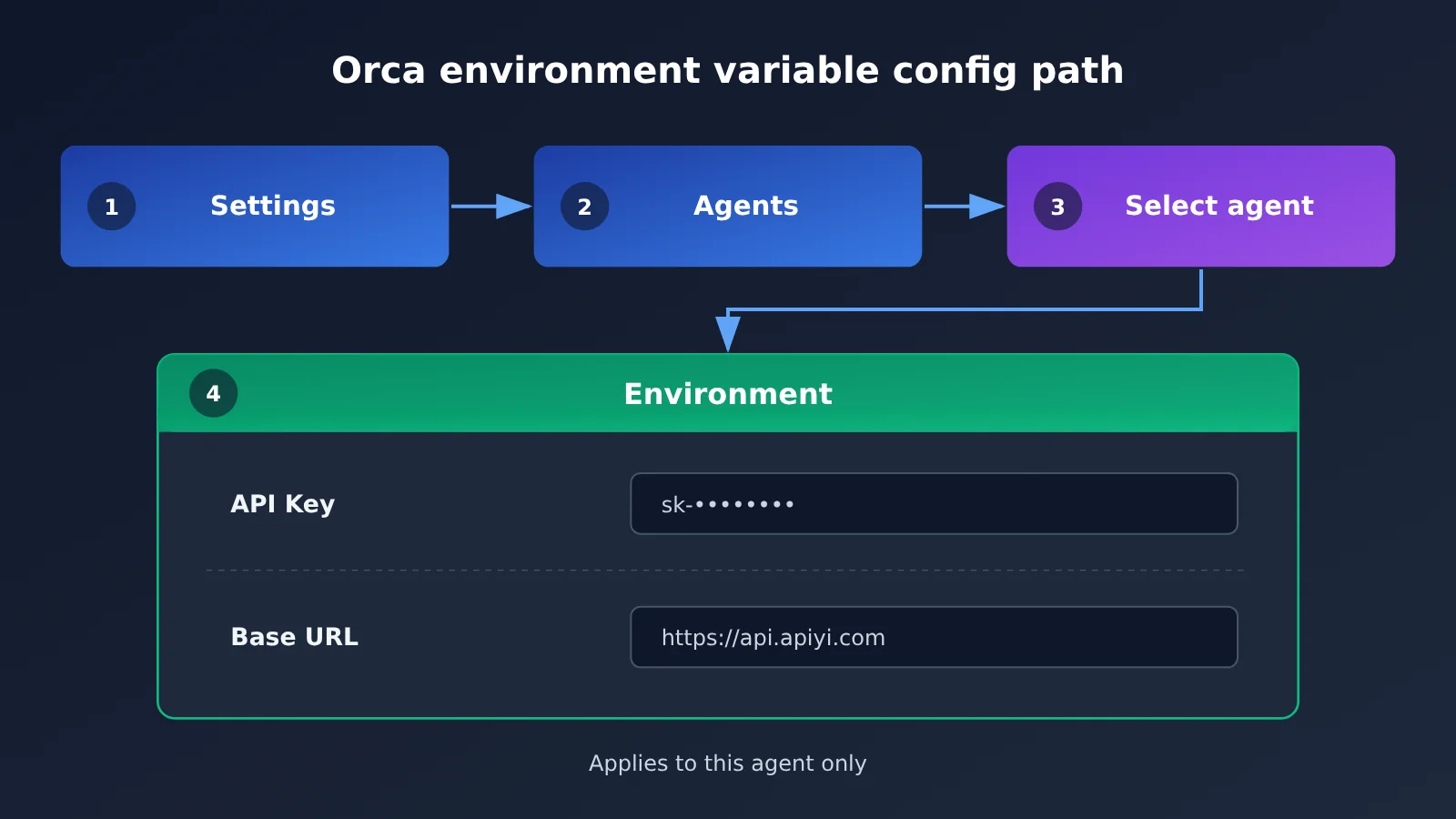
Under Settings → Agents there are per-agent launch defaults where you can change the binary path, Command, Arguments, and environment. One thing to keep in mind: these settings are saved per “machine that runs it.” SSH or remote workspaces read the config on that machine — setting it up locally won’t sync over automatically, so you’ll need to configure it again on the remote.
Step 5: Throttle Orca Bots’ background tasks
If you use Bots, two self-running tasks will eat into your agent quota:
- Look around: by default weekdays 8:00 to 20:00, scans the repo every 4 hours. Read-only, with results listed under Suggestions.
- Memory upkeep: by default tidies up memory after 3 a.m. The bot’s soul and memory are stored as plaintext
SOUL.mdandMEMORY.mdrespectively.
Both tasks can be rescheduled or turned off in the bot settings. If you’re on usage-based billing, it’s worth turning them off for now and re-enabling when you actually need them, at a lower frequency.
🚀 Quick start tip: The environment variables coming up need an API key. You can sign up at APIYI apiyi.com first and run a small task with the free trial credit for new users, to see how fast tokens actually pile up when running in parallel, then decide whether to go with a subscription or pay-as-you-go long term.
Connecting CLI Agents in Orca to APIYI
This step itself burns tokens, so get the protocol right first—you don’t want to pay for retries caused by errors. Claude Code and Codex use two different protocols, so their configuration looks different too.
Claude Code configuration
In Orca’s Settings → Agents, find Claude Code and add two variables under environment: set ANTHROPIC_AUTH_TOKEN to your key, and ANTHROPIC_BASE_URL to https://api.apiyi.com. Use only the root domain here—do not add /v1. As the APIYI docs explain, adding it results in /v1/v1/messages, which returns a 404. You can also skip the Orca setup and write these into the env field in ~/.claude/settings.json.
When you create the token, the group must be ClaudeCode. This group comes with a default 5% discount, and you can stack top-up bonuses on top. Besides the Claude family, you can also switch to deepseek-v4-pro, glm-5.1, kimi-k2.6, and similar models to run lightweight workers.
Codex configuration
Codex’s key goes in OPENAI_API_KEY inside ~/.codex/auth.json. Then add model_provider = "apiyi" and preferred_auth_method = "apikey" to ~/.codex/config.toml, and add a new [model_providers.apiyi] section: base_url = "https://api.apiyi.com/v1", wire_api = "responses", and put the key in experimental_bearer_token.
APIYI’s docs specifically point out that env_key reads environment variables from the process that starts it, so desktop clients can’t see variables you export in a terminal. Orca is a desktop app, so either use experimental_bearer_token in the config or set things up directly in Orca’s per-agent environment.
| Item | Claude Code | Codex |
|---|---|---|
| Key location | ANTHROPIC_AUTH_TOKEN |
~/.codex/auth.json or experimental_bearer_token |
| Base URL | Root domain, no /v1 |
Includes /v1 |
| Protocol | Anthropic messages | wire_api = "responses" |
| Token group | Must select ClaudeCode | Default group is fine |
| Common errors | Adding /v1 causes a 404 |
Desktop app can’t read terminal export |
How Orca Parallel Agent Costs Add Up
Pricing Baseline
The prices below come from the APIYI apiyi.com price table, updated 2026-11-26, in USD per 1 million tokens:
| Model | Input | Output | Cache Read | Best-Fit Role |
|---|---|---|---|---|
| claude-opus-5-5 | $4 | $20 | $0.2 | Coordinator, hard problems |
| claude-sonnet-5-5 | $2 | $10 | $0.1 | Main worker |
| claude-haiku-5-5 | $0.1 | $0.5 | $0.01 | Retrieval, small edits |
| gpt-6.1-terra | $1 | $5 | $0.05 | Codex worker (responses recommended) |
The Estimate Formula: Multiply by Worker Count
Every worker has to read its own copy of the context, so the cost of parallel agents scales with the number of workers — spin up three workers and the repo code gets read three times. Here’s how to calculate a single worker’s cost:
Single worker cost = uncached input × input price + cached input × cache-read price + output × output price
Add up the coordinator plus all workers to get the cost of one task, multiply by tasks per day, then add the consumption from Bots background tasks, and you have your daily estimate.
A Hypothetical Example (Not Measured)
The following is hypothetical: one medium-sized task with a coordinator plus two workers, totaling 1.2 million input tokens, 60% of which hits cache, plus 80,000 output tokens.
| Setup | Estimated Cost per Task | 20 Tasks per Day |
|---|---|---|
| All Opus 5.5 | About $3.66 (about $3.48 after the ClaudeCode 5% discount) | About $73 |
| All Sonnet 5.5 | About $1.83 | About $37 |
| All Haiku 5.5 | About $0.095 | About $1.9 |
| All gpt-6.1-terra | About $0.92 | About $18 |
Taking all-Opus as an example: 0.48M × $4 + 0.72M × $0.2 + 0.08M × $20 ≈ $3.66. As you can see, model choice affects cost more than worker count does. The more practical approach is to use a strong model for the coordinator and drop workers down a tier based on task difficulty.
One more thing to be clear about: pay-as-you-go for heavy workloads isn’t necessarily cheaper than a subscription. APIYI states on both the Claude Code and Codex access pages that long-context tasks like coding consume a lot on a pay-as-you-go basis, and overall value for money is usually worse than an official subscription. If you use a lot and can connect directly to the official site, buying a subscription is the better deal. If your network is restricted, or you just want to pay for what you use, then go with the API.
The cost shown in Orca’s status bar and Stats is estimated from a local price table — the official wording is “refer to the provider console.” For your actual spend, check the usage details in the APIYI apiyi.com console.
Orca’s risks and boundaries
- Hands-off execution by default: Claude prefills
--dangerously-skip-permissionsand Codex prefills--dangerously-bypass-approvals-and-sandbox, so the agent is effectively running commands directly on your machine. A worktree can be thrown away, but side effects on the machine can’t be undone. - Usage-based billing has no hard cap: An agent can spin up more agents through the Orca CLI, and Bots also keep running on a timer, so a single night’s consumption can far exceed what you expected. You need to cap your top-up amount yourself and check the bill regularly.
- Once an API key is connected, the subscription quota bar isn’t very accurate: The status bar shows subscription quota by 5-hour / day / week window, and alerts you when it passes 80%. That logic is designed for subscriptions; once you go through an API key, it’s not worth much as a reference.
- Remote configuration has to be done separately: Environment variables are saved per machine, so on an SSH host you have to set them up again, otherwise the remote agent falls back to the default account or just errors out.
FAQ
Q1: What is Orca?
Orca is an open-source agent development environment, MIT licensed, and its README states it’s free. It runs multiple CLI coding agents side by side, each in its own git worktree, and provides terminals, diff review, a browser, and remote development capabilities.
Q2: Does Orca charge extra for inference?
No. Orca doesn’t sell inference — the bots use your existing subscription or account, and the official statement is no markup. As of 2026-11-27, there’s no pricing page on the official site. All your spending comes from the token billing of the model provider you connect.
Q3: After isolating with a worktree, do I still need to set permissions to Manual?
Yes. A worktree only isolates file changes; the shell commands the agent runs, its network requests, and package installs all act on the whole machine. The extra confirmation steps that come with switching to Manual can be handled through the Needs you list in the mobile app.
Q4: What should I do if Claude Code returns 404 after connecting?
Most likely you added `/v1` after `ANTHROPIC_BASE_URL`. Claude Code only takes the root domain, while Codex needs `/v1` — the two are exactly the opposite. Also check whether the token group is set to ClaudeCode.
Q5: How can I measure my real consumption with the least cost?
First turn on just one worker, run a typical task, note the input, output, and cache-hit token counts, then apply the formula in this article and multiply it by the number of workers and tasks per day. You can use the free credit for new users at APIYI apiyi.com for this test, and calibrate the estimate against the details in the console.
Q6: Does every worker in a parallel-agent setup need the strongest model?
No. The coordinator is responsible for splitting work and sign-off, so a strong model like Opus fits well there. Tasks like retrieval, reformatting, and adding tests can go to Sonnet or Haiku — in the hypothetical example above, the cost difference can reach one to two orders of magnitude.
Q7: Are the cost figures in Orca’s status bar trustworthy?
They’re for reference only. They’re calculated from the local price list, and don’t factor in discounts, bonuses, or tiered pricing — the provider’s console is the source of truth.
Orca Parallel Agents: Key Takeaways
- One task, one worktree: use git-native isolation instead of
git stashand manually copying diffs. - Switch permissions to Manual first: Orca pre-fills the skip-confirmation flag by default, but worktree isolation can’t contain side effects across the whole machine.
- Save environment variables per machine: configure them separately for your local machine and the SSH remote.
- Background tasks burn tokens: consider turning off Look around and Memory upkeep, or lowering their frequency, before anything else.
- Costs multiply per worker: every worker reads its own copy of the context, so tiering your models saves more money than simply running fewer workers.
- Match the protocol when connecting: Claude uses the root domain, while Codex uses
/v1with responses — you can check model names and pricing at APIYI apiyi.com.
Summary
There are three key points to running AI coding agents side by side with Orca:
- Isolation: one worktree per task, with acceptance handled through diff annotations and PRs.
- Restrict permissions: set permissions to Manual, lower the frequency of background tasks, and configure remotes separately.
- Do the math: take the “uncached input + cache read + output” formula, multiply it by the number of workers and tasks, and treat the vendor console as the source of truth.
If you use it heavily and can connect directly to the official site, a subscription might be the better deal. If you’d rather pay as you go, or you need to switch between Claude, GPT, and other models under a single key, you can run a round with the free quota at APIYI apiyi.com first, then decide on a plan once you’ve got real data.
📚 References
-
Orca GitHub Repository: README, releases, and license information
- Link:
github.com/stablyai/orca - Note: Read on 2026-11-27; the Orca capability descriptions in this article are based on this source.
- Link:
-
Orca Official Documentation: Agent support list, permission defaults, usage statistics, Bots
- Link:
onorca.dev/docs/agents/supported - Note: The original source for the permission pre-fill parameters and the “subject to the vendor’s console” wording.
- Link:
-
APIYI Claude Code Integration Docs: Token groups and Base URL configuration
- Link:
docs.apiyi.com/scenarios/programming/claude-code - Note: ClaudeCode group, root domain requirements, and cost reminders.
- Link:
-
APIYI Codex CLI Integration Docs: How to write config.toml
- Link:
docs.apiyi.com/scenarios/programming/codex-cli - Note: The responses protocol and desktop environment variable caveats.
- Link:
Author: APIYI Technical Team
Technical Support: If you run into any issues during configuration, feel free to reach out to us through the APIYI homepage.