Summary: This article explains what the 1092 Elo score of Tencent Hunyuan Hy-Image 3.5 Preview on AA-Image-Editing v2.1 does—and doesn’t—prove about its image-editing capabilities, and which capabilities need separate evidence.
Conclusion: As verified on November 25, 2026, HunyuanImage 3.5 (Preview) on the Artificial Analysis editing leaderboard scores 1092 ± 13, with a point rank of 28 and a rank range of 27–33. This score represents a relative preference: across a test set that mixes many scenarios and editing actions, judges more often picked its output in blind comparisons using 1024×1024 square images. It’s useful for comparing models on the same leaderboard—for example, it’s 28 and 64 Elo higher than the two Hunyuan 3.0 entries, respectively.
It doesn’t directly tell you three things: how well it handles a specific type of action (say, editing Chinese text or preserving a person’s identity), whether the details hold up on 4K originals, and how many of your own hundred images it will edit correctly. For those three, you need the category-specific leaderboard, the original dimensions of the delivered file, and your own image-by-image review on your business samples.
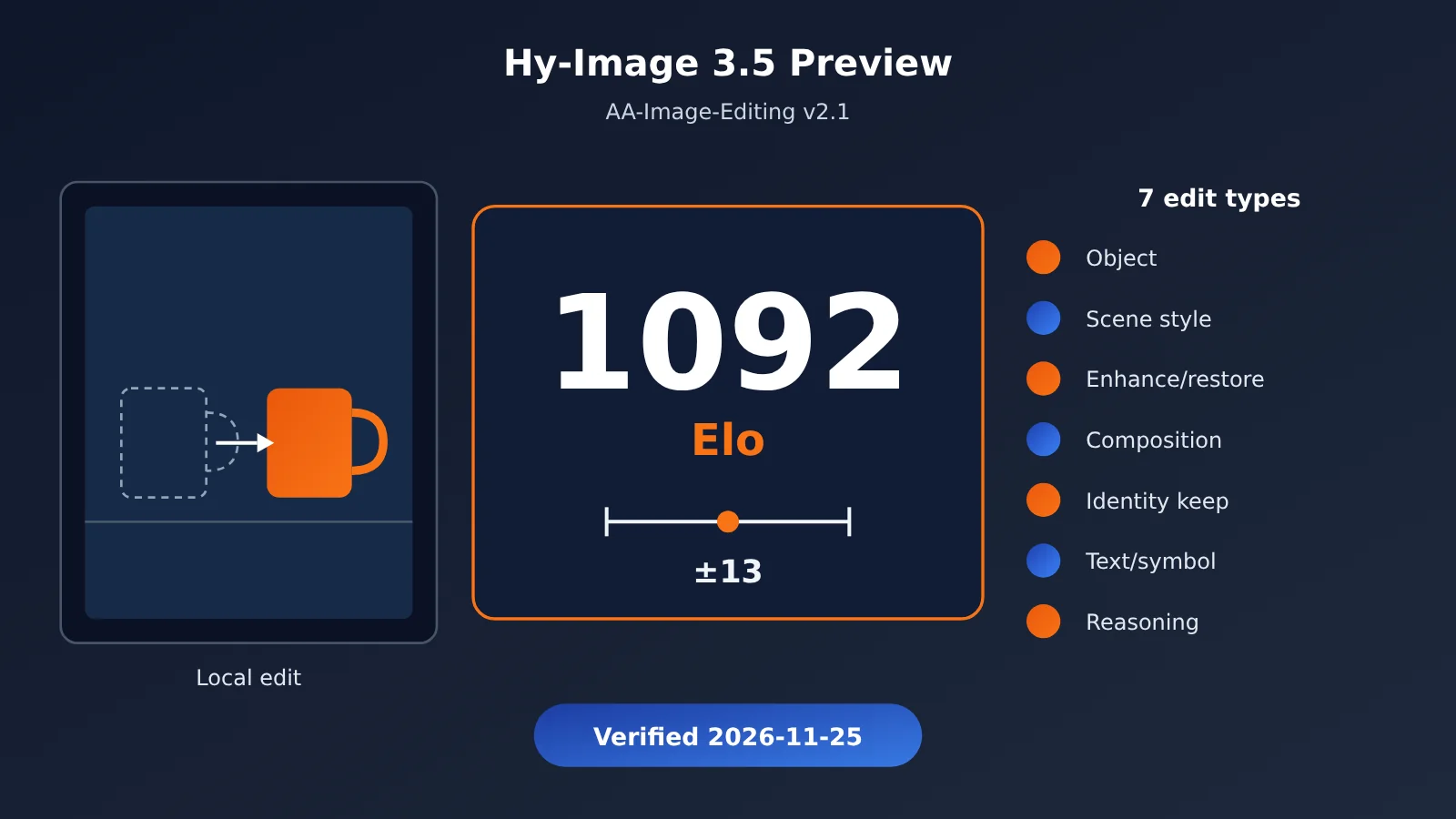
Tencent Hunyuan Hy-Image 3.5 Preview Image Editing Capability Knowledge Map
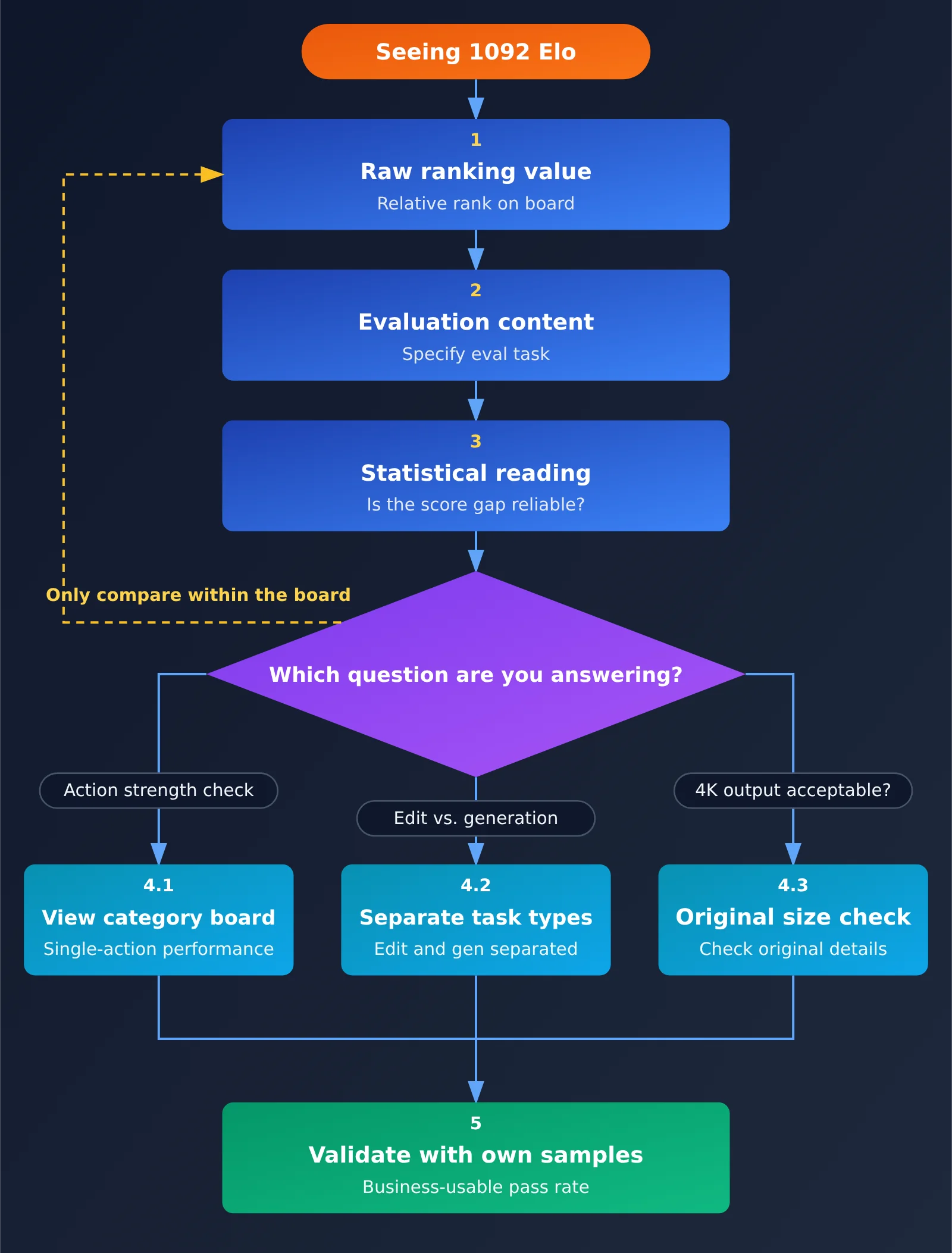
Diagram description: The entry point is the score 1092. Sections 1 to 3 answer in sequence “what the score is”, “what is being compared”, and “how to read it statistically”. After reading these three sections, choose a branch in Section 4 based on the question you want to answer: for a single capability, go to 4.1; for task type, go to 4.2; for 4K final output, go to 4.3. All three branches ultimately land in Section 5, completing validation with your own samples. If you only want to compare highs and lows on the same leaderboard, Sections 1 and 3 are enough.
Reading Guide
| No. | Short section name | What it sets up for later sections | What you’ll get after reading |
|---|---|---|---|
| 1 | Raw leaderboard values | Score, interval, rank, and same-leaderboard reference | Where 1092 sits on the same leaderboard |
| 2 | What the evaluation covers | Prompt composition, scenarios, seven action categories | Which image-editing tasks the score covers |
| 3 | Reading the statistics | Elo, intervals, sample definitions | How much a score gap can actually tell you |
| 4 | Capability limits | Category leaderboards, task types, size differences | What the overall score doesn’t capture |
| 5 | Practical validation | Scripts, acceptance checklist | A usability judgment for your own business |
Sections 1–3 build on one another, so read them in order. The three subsections in Section 4 are parallel—consult them as needed. Section 5 relies on the definitions from the earlier sections.
Key Terms
| Term | Brief explanation |
|---|---|
| Elo | A relative score derived from pairwise blind comparisons; it can only be compared within the same leaderboard |
| Bradley–Terry model | A statistical model that jointly estimates the relative strengths of all models from votes such as “A beats B” |
| Anchor | Both the overall editing leaderboard and the category leaderboards set FLUX.2 [dev] to 1000, and other scores are calculated relative to it |
| 95% interval | A description of the uncertainty around the Elo point estimate; 1092 corresponds to 1079–1105 |
| Rank range | The rank range a model may fall into once score uncertainty is taken into account |
| Samples | The number of pairwise comparisons this entry took part in; not the same as the number of judges or prompts |
| Targeted editing | Make local edits to the original image while preserving as much of the rest as possible |
| Reference-based image generation | Bring part of the input image’s features into a brand-new scene |
1. Hy-Image 3.5 Preview Leaderboard Raw Value: Where 1092 Elo Sits on the Same Leaderboard
1.1 Hy-Image 3.5 Preview’s Score, Interval, and Sample Size
The entry on the Artificial Analysis leaderboard is HunyuanImage 3.5 (Preview), which corresponds to Hy-Image-3.5-preview in Tencent Cloud documentation; the leaderboard lists a release date of September 2026. When checked on November 25, 2026, it ranked 28th by point estimate on Overall, with a rank range of 27–33.
Its Elo is 1092 ± 13, with a 95% interval of 1079–1105 and 7,273 samples. Within the editing tasks and model set tested that day, you can put it this way: the preview version scores 1092 Elo, with a point rank ahead of the two Hunyuan 3.0 entries.
1.2 Hy-Image 3.5 Preview vs. Same-Family and Nearby Entries
When citing same-family entries, write out the full entry name so readers can tell which deployment version you’re comparing. The table below shows the public values on the verification date.
| Entry | Point rank | Rank range | Elo | 95% interval | Pairwise comparisons |
|---|---|---|---|---|---|
| HunyuanImage 3.5 (Preview) | 28 | 27–33 | 1092 ± 13 | 1079–1105 | 7,273 |
| Qwen-Image-3.0-Pro | 29 | 27–33 | 1092 | Not listed in source | Not listed in source |
| HunyuanImage 3.0 Instruct | 39 | 36–44 | 1064 ± 12 | 1052–1076 | 7,023 |
| HunyuanImage 3.0 (Tencent Cloud) | 52 | 49–53 | 1028 ± 14 | 1014–1042 | 3,966 |
Based on public point estimates, 3.5 Preview is 28 Elo higher than 3.0 Instruct and 64 Elo higher than 3.0 (Tencent Cloud). The neighboring Qwen-Image-3.0-Pro also shows a score of 1092, with the same rank range of 27–33. Once rounded, the scores and rank ranges are identical; the 28 vs. 29 distinction only reflects the ordering at that moment. That order can change after new votes, new models entering the leaderboard, or models being removed, so when citing it, include the sample size, rank, and verification date.
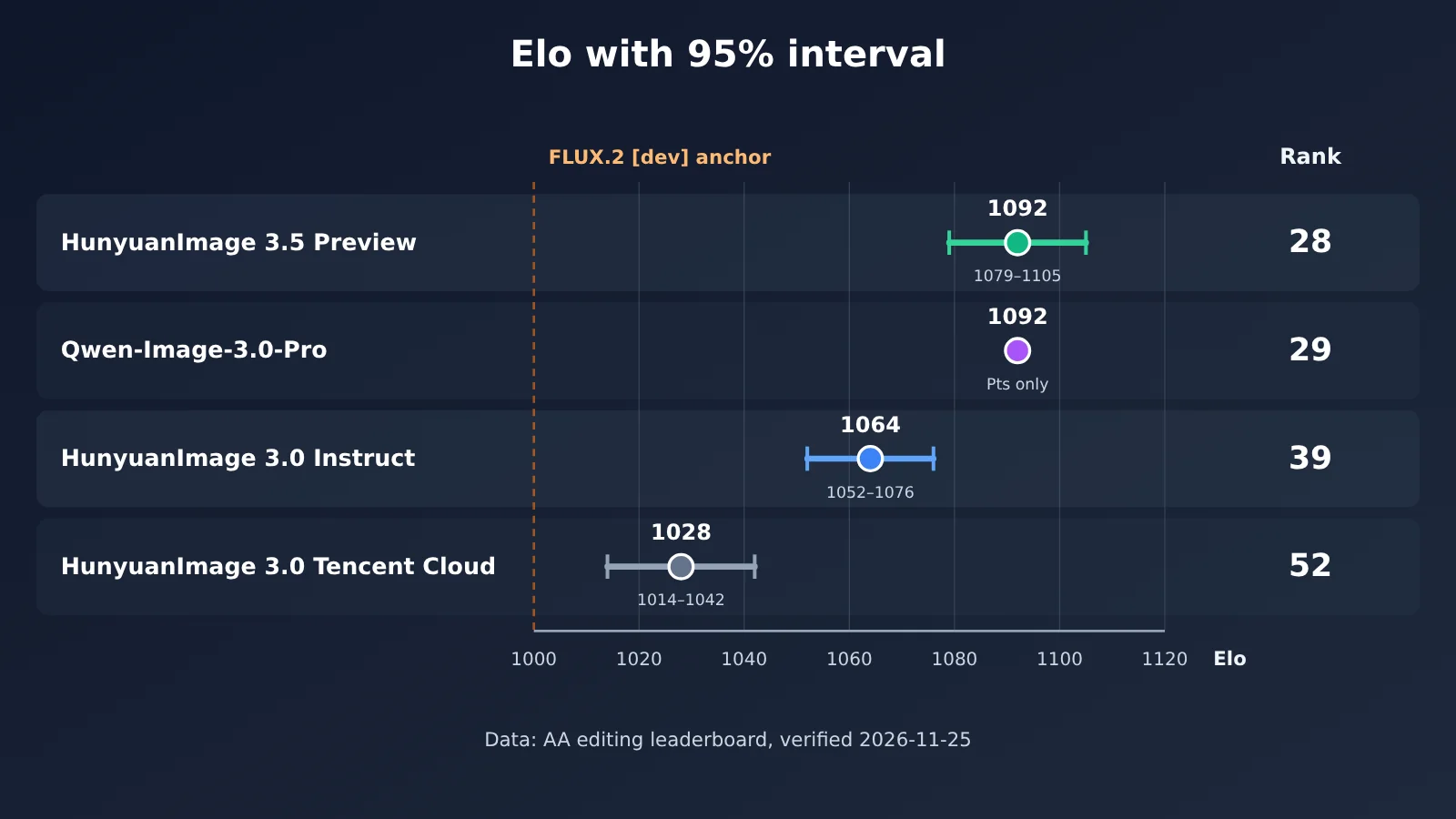
Figure note: Data comes from public values on the AA editing leaderboard as of November 25, 2026. Leaderboard scores reflect blind preference voting; for how it performs on your specific image editing tasks, you can verify with your own samples on APIYI apiyi.com.
2. What the AA-Image-Editing v2.1 Judges Compare: Image-Editing Tasks Under Test for Hy-Image 3.5 Preview
2.1 What Makes Up an Editing Task
Each task consists of one input image and an editing instruction written specifically for that image. Both models process the same image-text pair, and screened evaluators compare the two results and choose the one they prefer. The left-right placement is randomized, and model identities are revealed only after voting.
The shared goal for both models is to make the requested edit while preserving as much of the rest as possible. Take this instruction, for example: “Replace the cup on the left side of the desk with a glass cup, and keep the book on the right and the background unchanged.” Whether the cup is correctly replaced and whether the book and background remain unchanged both affect the evaluator’s choice. So 1092 captures preferences on both fronts: getting the edit right and not breaking anything else.
2.2 Task Bank Sources and the Ten Scenario Categories
The source images are selected by the evaluation team and include both real and synthetic images. Instructions are written with reference to anonymized crowdsourced data and a manually maintained prompt corpus. Each task is tagged by both use case and editing action, and Arena samples evenly across these categories. The task bank is refreshed monthly; when rotating tasks, the team considers how well a task distinguishes between models and how closely it matches how users actually phrase requests.
There are ten scenario categories: marketing and advertising, retail and e-commerce, live-action film and TV, animation and games, architecture and real estate, knowledge work, UI design, consumer use, social content, and frontier use cases. Because sampling is balanced, the overall leaderboard can serve as a common reference point across teams. But real-world business task distributions are often highly concentrated. For example, one team’s requests may mostly be outfit changes that preserve a person’s identity, while another team mainly edits prices and wording in product ads. Their acceptance criteria are completely different, so each should validate its own high-frequency operations separately.
2.3 Seven Editing Action Types and What Evaluators Observe for Hy-Image 3.5 Preview
| Editing action | Typical operations | What evaluators mainly check |
|---|---|---|
| Object-level edits | Add, remove, replace, or alter objects | Whether the target object is correct and whether surrounding areas are affected |
| Scene and style | Change background, relight, style transfer | Whether the new environment or style looks natural and whether the subject is preserved |
| Enhancement and restoration | Denoising, retouching, damage repair | Whether image quality improves and whether artifacts are introduced |
| Composition and framing | Cropping, outpainting, perspective changes | Whether the expanded area is coherent and whether subject proportions are reasonable |
| Identity preservation | Preserve the person, face, or character after editing | Whether identity features are still recognizable |
| Text or symbols | Text, typography, logos, symbols | Whether the content is correct and whether the layout is harmonious |
| Reasoning-based edits | Infer what should change from the scene | Whether it understands the intent behind the instruction |
On the same product image, “remove a prop,” “change the lighting,” and “replace packaging text” belong to three different observation categories. 1092 is the result of combining votes across these seven action types and ten scenario categories.
3. Reading AA-Image-Editing v2.1’s Statistics: How to Interpret Hy-Image 3.5 Preview’s Elo
3.1 Elo represents relative position within the comparison network
Artificial Analysis fits a Bradley–Terry model jointly over all the blind pairwise votes on the leaderboard, then converts the result to Elo. The overall editing leaderboard and each category leaderboard use FLUX.2 [dev] at 1000 as their anchor. So 1092 describes where this model sits relative to everything else in the comparison network. The gap between two entries on the same leaderboard is the estimated difference in voter preference.
If what you actually want to know is “out of a hundred images, how many were edited correctly,” the statistical object has changed: you’d first need to define what counts as a pass, then record the result image by image. That number can’t be derived from Elo.
3.2 What the 7,273 comparisons actually measure
7,273 is the number of pairwise comparisons this entry took part in — it reflects the scale of comparison the score rests on. The number of voters, the number of distinct prompts, the number of wins, and the sample size for each category each rest on their own basis, and none of them can be swapped in for 7,273.
The evaluation platform sets a minimum viewing time, and for complex tasks it also shows observation hints tied to the prompt’s tags. The methodology page specifies that only comparisons between the v2.1 candidate models on the edit v2 test set count. If the Arena changes a model’s hosting endpoint, votes earned by results produced through the old endpoint no longer count. So when you cite an Elo, it’s best to state the evaluation target, the prompt set, and the voting network alongside it.
3.3 The 95% interval and the rank range
1079–1105 is the 95% interval around the estimate of 1092. When computing intervals, v2.1 accounts for the uncertainty in other models’ ratings and treats each vote as independent. The methodology page also notes that if votes from the same voter or the same prompt are correlated with one another, the interval may be somewhat narrow.
The Overall rank range comes from a simulation of the entire leaderboard, while filtered views and category leaderboards compute rank ranges from each model’s own rating interval. So “27th–33rd” and “±13 Elo” can be cited separately. When comparing two specific models, look at the gap between them and its uncertainty. Also, the sample sizes on those two rows alone won’t tell you how many times the two models faced each other directly.
4. Hy-Image 3.5 Preview’s Editing Capability Boundaries: What to Look At Beyond the Overall Score
4.1 For single-item editing capability, check the category leaderboards
The overall score of 1092 aggregates votes across many scenarios and many actions. The same total score can hide very different category-level performance. Local object replacement, Chinese text editing, and character identity preservation each have their own category tasks, so when you’re judging a single capability, cite the numbers that come from the corresponding category leaderboard on its own.
Take “change the price while preserving the original letterforms on the packaging” as an example. At acceptance time, check the target text, the letterforms, and the rest of the image separately. Text capability can be broken down further by font size, language, and layout — each of those needs its own prompt and its own results.
4.2 Specified editing, reference-based generation, and text-to-image need to be looked at separately
AA’s methodology separates specified editing from reference-based generation: the former makes local changes to an original image, while the latter carries some features of the input image into an entirely new scene. Keeping product shape, art style, or composition unchanged across multi-turn sequential edits is really a question of conversational workflow and turn-by-turn stability, which the overall editing leaderboard doesn’t cover.
On the text-to-image overall leaderboard from the same day, 3.5 Preview ranks 76th with a score of 972 ± 11, a 95% interval of 961–983, based on 6,516 comparisons. Text-to-image takes text as input; editing takes an original image plus an instruction. The two leaderboards are fitted independently, and scores only mean something within their own comparison networks. You can’t subtract 972 from 1092 or compare them side by side.
4.3 The difference between 1024 square images and 4K delivery
Arena’s default setup is one image per prompt, a 1:1 ratio, and a 1024×1024 size. For models whose minimum generatable size is larger than that, it first generates at the minimum supported size, then downscales to 1024×1024 for display. So 1092 measures relative preference at this viewing scale.
| Dimension | Arena evaluation conditions | 4K delivery scenario |
|---|---|---|
| Size | 1024×1024 square image | 4096×4096 square image (16× the area) |
| Channel notes | Uniform display by AA | TokenHub docs allow explicitly setting 4096x4096; APIYI apiyi.com lists 4096×4096 as the default square size for the 4K tier |
| What can be compared | Subject layout, overall revision preference | Fine lines, edges, small font sizes, texture |
| Composition | 1:1 | Landscape and portrait need recomposition, each with its own acceptance criteria |
| Recorded items | Verification date, sample, ranking | Channel used and pixel specification |
Taking packaging text editing as the example again: standardized square images let you compare subject layout and the overall revision result; when you need print-ready files, you have to check strokes, outline fringing, and background texture after enlargement, region by region, at the original size.
5. Validate Hy-Image 3.5 Preview’s image editing capabilities with your own samples
5.1 What two public examples can tell us
APIYI apiyi.com’s listing notes disclosed the trial runs before launch: 31 test cases produced 26 successful images. In one case, a composition made of red circles and blue squares was used as a reference and asked to be changed into watercolor style; the report says the result preserved the relative positions and colors of the shapes. This example shows how style adjustment can also require preserving composition, but it only represents the effect of that public demo.
Tencent Cloud ADP showed product still lifes, event posters, and concept art with transparent materials, and demonstrated a workflow on the workbench: upload a product reference, generate a key visual, then revise the composition, material, or scene. ADP also requires that prices, dates, and product parameters in formal deliverables use copy confirmed by business systems or humans. This shows that in real business there are acceptance criteria that blind preference selection cannot cover.
5.2 Building the Hy-Image 3.5 Preview Self-Test Script
Below is a test template for submitting image-editing tasks in batch and recording the channel, pixel specifications, and manual acceptance results. The code has not been tested for this article — for the model ID, endpoint names, and supported sizes, refer to the APIYI documentation and console.
from openai import OpenAI

client = OpenAI(
    api_key="YOUR_API_KEY",
    base_url="https://api.apiyi.com/v1"  # APIYI OpenAI-compatible endpoint
)

result = client.images.edit(
    model="hy-image-3.5-preview",  # illustrative name; refer to the console model list
    image=open("cup_on_desk.png", "rb"),
    prompt="把桌面左边的杯子换成玻璃杯,保留右边的书和背景",
    size="4096x4096",
)
print(result.data[0].url or "返回为 base64")
View the full acceptance-record script
import base64, json, time
from io import BytesIO
from openai import OpenAI
from PIL import Image

client = OpenAI(
    api_key="YOUR_API_KEY",
    base_url="https://api.apiyi.com/v1"  # APIYI unified endpoint
)

MODEL = "hy-image-3.5-preview"  # illustrative name; refer to the APIYI documentation
SIZE = "4096x4096"

# Each case: source image, instruction, corresponding AA editing action category, pass conditions
CASES = [
    {"image": "cup_on_desk.png", "action": "物体级修改",
     "prompt": "把桌面左边的杯子换成玻璃杯,保留右边的书和背景",
     "checks": ["杯子已替换为玻璃杯", "书未变化", "背景未变化"]},
    {"image": "pack_price.png", "action": "文字或符号",
     "prompt": "把包装上的价格改为 39 元,保留原有字形",
     "checks": ["价格文本正确", "字形一致", "其余区域未变化"]},
]

def run_case(case):
    t0 = time.time()
    resp = client.images.edit(
        model=MODEL,
        image=open(case["image"], "rb"),
        prompt=case["prompt"],
        size=SIZE,
    )
    item = resp.data[0]
    out_name = case["image"].replace(".png", "_edited.png")
    if getattr(item, "b64_json", None):
        img = Image.open(BytesIO(base64.b64decode(item.b64_json)))
        img.save(out_name)
        actual = f"{img.width}x{img.height}"
    else:
        actual = "url 返回,需下载后核对"
    return {
        "channel": "api.apiyi.com",
        "model": MODEL,
        "requested_size": SIZE,
        "actual_size": actual,
        "action": case["action"],
        "prompt": case["prompt"],
        "output": out_name,
        "latency_s": round(time.time() - t0, 1),
        # Fill in True/False manually, item by item, at the original size
        "checks": {c: None for c in case["checks"]},
    }

records = []
for case in CASES:
    try:
        records.append(run_case(case))
    except Exception as e:
        records.append({"image": case["image"], "error": str(e)})

with open("acceptance_log.json", "w", encoding="utf-8") as f:
    json.dump(records, f, ensure_ascii=False, indent=2)
print("已写入 acceptance_log.json,请按原尺寸完成人工验收")
Quick start tip: Start by pulling 20 to 30 images from each of the two or three most frequent editing actions in your business, and run them through the script above. APIYI apiyi.com provides an OpenAI-compatible endpoint, and new users get free testing credits, so you can use the same script to switch between different models and compare them on equal terms.
5.3 Hy-Image 3.5 Preview Image Editing Acceptance Checklist
| Question to Answer | Evidence Source | Acceptance Method |
|---|---|---|
| How does it rank relative to similar models | AA editing overall leaderboard 1092, interval, rank range | Include verification date and sample count when citing |
| Whether a certain type of action works | AA corresponding category leaderboard | Check off each image by action category in your own samples |
| Whether other areas were left intact | Your own samples | Compare the original and result region by region |
| Whether 4K details are up to standard | Delivery file at original size | Zoom in to check small text, edges, and textures |
| Whether price, date, and parameters are correct | Business system or manually confirmed copy | Verify character by character, not based on model output |
Here’s a judgment approach you can use directly: if you want to pick a model with a higher overall editing preference from the same leaderboard, 1092 ± 13 and the 27–33 ranking can serve as your basis. If you want to confirm whether it can handle a specific business task, pick the action from the category leaderboard that matches your business, run a round of your own samples at delivery size, and use the per-image pass rate for the final decision. Both steps can be completed on APIYI apiyi.com with the same API key.
References
-
Artificial Analysis Image Editing Leaderboard: Elo, intervals, ranks, and samples for HunyuanImage 3.5 (Preview) and other entries
- Link:
artificialanalysis.ai/image/leaderboard/editing - Note: The source of all editing leaderboard values in this article; verification date 2026-11-25
- Link:
-
Artificial Analysis Image Evaluation Methodology: Question bank composition, seven editing action types, Bradley–Terry fitting, and interval calculation
- Link:
artificialanalysis.ai/methodology/image - Note: For understanding the v2.1 criteria and the 1024×1024 evaluation conditions
- Link:
-
Artificial Analysis Text-to-Image Leaderboard: 3.5 Preview text-to-image scores
- Link:
artificialanalysis.ai/image/leaderboard/text-to-image - Note: Fitted independently from the editing leaderboard; the two are not directly comparable
- Link:
-
Tencent Cloud Hy-Image-3.5-preview Invocation Guide: TokenHub parameters and
4096x4096settings- Link:
cloud.tencent.com/document/product/1823/135745 - Note: Official invocation parameter reference
- Link:
-
Tencent Cloud ADP Integration Announcement: Examples for product still life, posters, and delivery copy requirements
- Link:
adp.tencent.com/zh/blog/hy-image-35-preview-tencent-adp - Note: Reference for real-world business acceptance criteria
- Link:
-
APIYI Launch Notes: 31 use case test runs and watercolor style examples
- Link:
docs.apiyi.com/news/hunyuan-image-v35-launch - Note: 4K tier default square image and public samples
- Link:
Author: APIYI Technical Team
Technical Exchange: Feel free to contact us through the APIYI website homepage; for more model integration documentation, visit the docs.apiyi.com documentation center.