
Author’s note: Break a personal AI assistant into five capabilities, explain which model tier to use for each one, how to validate a minimal five-step pipeline, roughly how much it costs per month, and which steps must stay with a human.
Recently, personal AI assistants like Instinct have drawn a lot of attention. It’s an invite-only early-access product, and the entry point isn’t a new app—it’s SMS, iMessage, WhatsApp, or a direct phone call. It uses its own phone and computer to book train tickets, make doctor’s appointments, and buy groceries. Many indie developers look at it and ask: Once you break it down, how many capabilities are there, and can one person piece it together with a single unified API?
This isn’t a tutorial on “building a product that rivals Instinct.” The hard part of a personal AI assistant isn’t how powerful the model is—it’s deciding which step you’re willing to hand over. This article does only three things: break down the five capabilities, lay out a minimal pipeline where every step can be validated, and estimate the monthly token bill.
Core value: By the end, you’ll have a five-capability reference table, a monthly cost formula you can plug your own numbers into, and a clear checklist of things “you shouldn’t let the assistant do on its own.”
Getting Started with a Personal AI Assistant: Breaking Down the Five Core Capabilities
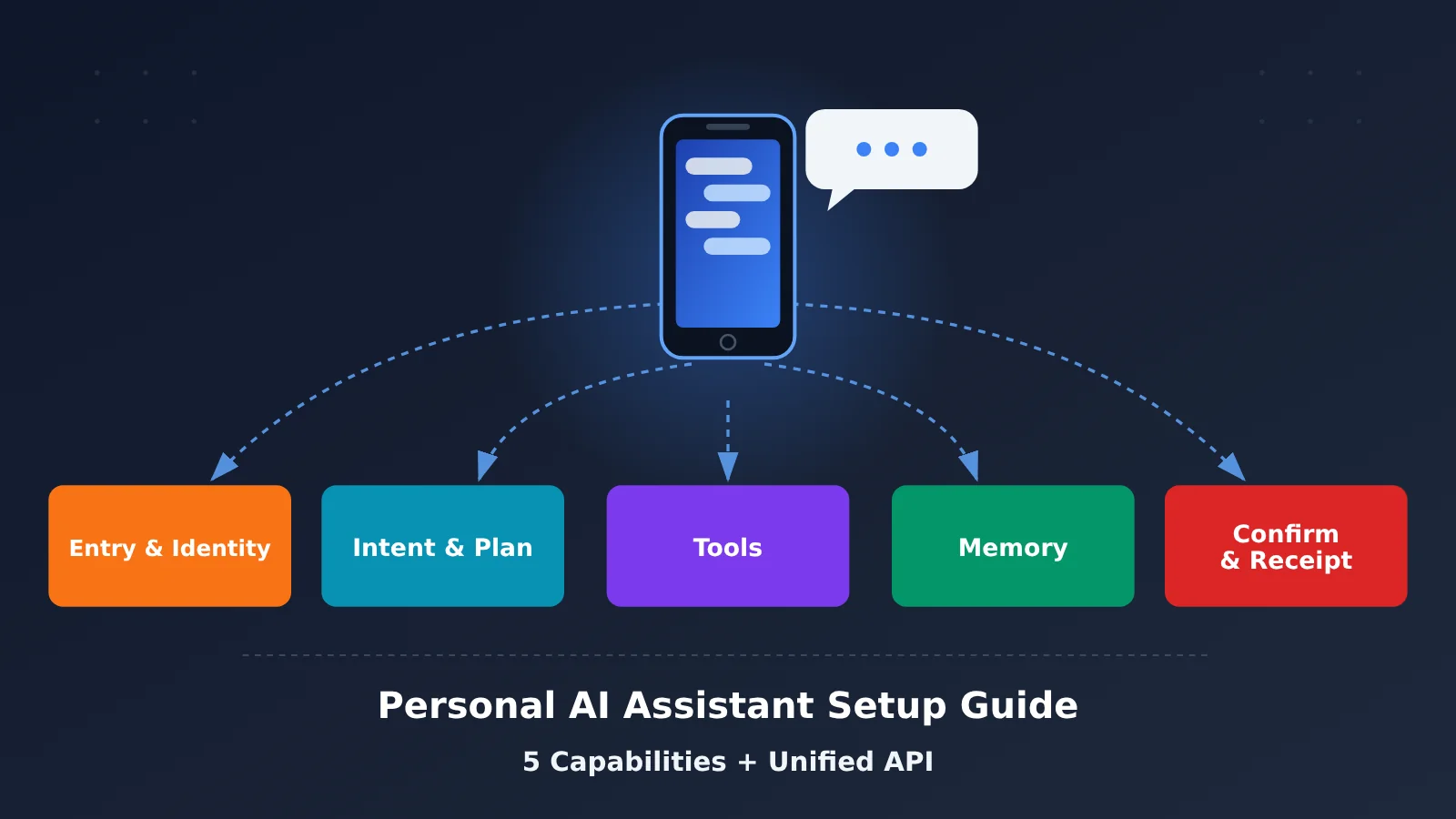
Nearly every third-party review of Instinct makes the same point: the minimalist entry point is its biggest product decision. Users only need to send one message, and the assistant takes it from there—breaking down, executing, and reporting back on the multi-step task behind it. If you work backward from that experience, a personal AI assistant can be split into the five capabilities below.
| Capability module | What it’s responsible for | Mainly handled by | Recommended model tier |
|---|---|---|---|
| Entry point and identity | Messaging channel (Telegram, WhatsApp, SMS, or email) + identifying who’s speaking | Program | No model required |
| Intent and planning | Break a single message into steps, decide which tool to call, and judge when to ask a follow-up question | Model | Mid-to-high tier for the main loop |
| Tools | Calendar, email, maps, price comparison, web operations | Program execution, model selection | No additional model usage |
| Memory | Preferences, frequently used locations, past decisions, unfinished tasks from last time | Program storage, model compression | Small tier for summaries |
| Confirmation and receipts | Spending money, sending outbound messages, or making bookings on the user’s behalf requires human sign-off; a receipt is sent afterward | Human confirmation, program sends receipt | No model required |
A Detailed Look at the Five Core Capabilities
Of the five, only two truly depend on a Large Language Model: intent and planning, and compressed summaries for memory. The entry point, tool execution, and confirmation flow are basically ordinary software—hard-coded rules are actually more reliable. That shapes the cost structure: you spend model calls only where “understanding” is required; everything else shouldn’t leave the model to guess.
Tools are what separate an assistant from a chatbot. Without tools, even the strongest model can only say, “I might be free tomorrow”; connect a calendar reader, and it can tell you the actual open slots. Memory is what makes an assistant feel like yours—it has to remember which district you live in, that you don’t eat cilantro, and that last week’s task still has one step left unfinished.
Choosing model tiers for a personal AI assistant with a unified API
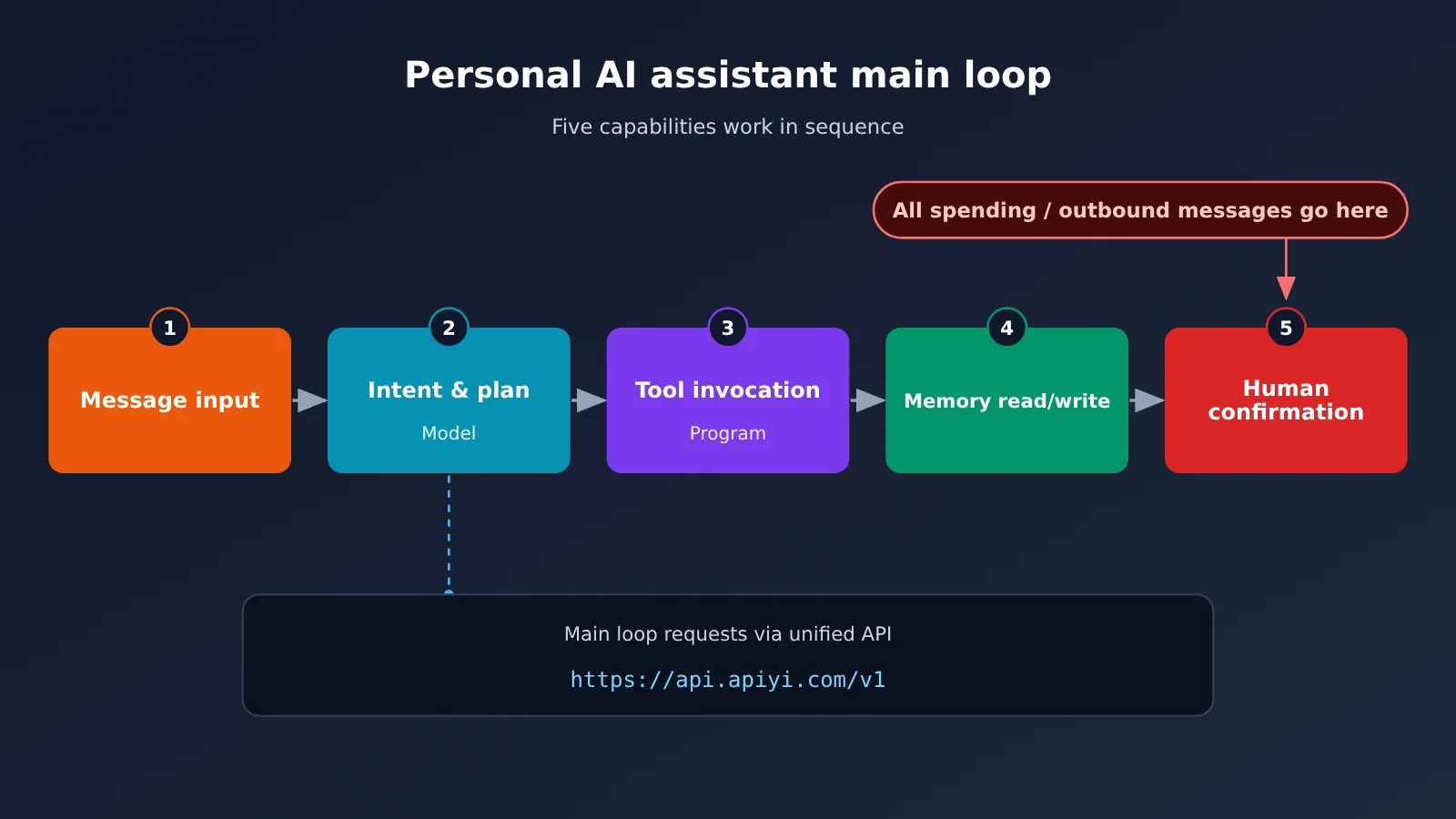
Every turn in a personal assistant conversation consumes tokens: system prompts, memory snippets, and tool responses all count toward input. So the approach isn’t “pick the most powerful model” — it’s “use a solid tier for the main loop and a smaller tier for background chores.” The advantage of a unified API is that switching tiers only means changing the model name in the request body; the code stays the same.
APIYI offers an OpenAI-compatible interface. Set base_url to https://api.apiyi.com/v1 and put the model name in the request body’s model field, just like the official SDK. The prices below are per 1M tokens in USD, dated 2026-11-26. Model variants and prices are subject to the model list on apiyi.com.
| Model ID | Input | Output | Cache read | Role in the assistant |
|---|---|---|---|---|
gemini-4-neon |
3 | 15 | 0.15 | Upgrade tier for complex multi-step planning |
gemini-4-hydrogen |
1.5 | 7.5 | 0.075 | Main loop: intent understanding and tool selection |
qwen4-max |
1.5 | 4.5 | 0.075 | Main loop alternative |
glm-5.3 |
1.4 | 4.396 | 0.259 | Main loop alternative |
deepseek-v4.1-flash |
0.07 | 0.30 | 0.006 | Lightweight main loop, classification |
hy4-flash |
0.04 | 0.14 | 0.0014 | Background summary compression, intent classification |
There’s one detail you should know upfront: thinking tokens in the Gemini 4 series count toward max_tokens. If max_tokens is too small, the reasoning process eats up the entire budget and the API returns an empty body. In your client, don’t set max_tokens below 1024, or you’ll mistake it for a network issue.
🎯 Tier recommendation: Start by getting the main loop working with
gemini-4-hydrogen, and offload summaries and classification tohy4-flash. On APIYI apiyi.com, these models share a single Key, so switching only requires changing themodelfield. That makes it easy to compare results on the same conversation before deciding on tiers.
The Personal AI Assistant Monthly Cost Formula: Plug In Your Own Numbers
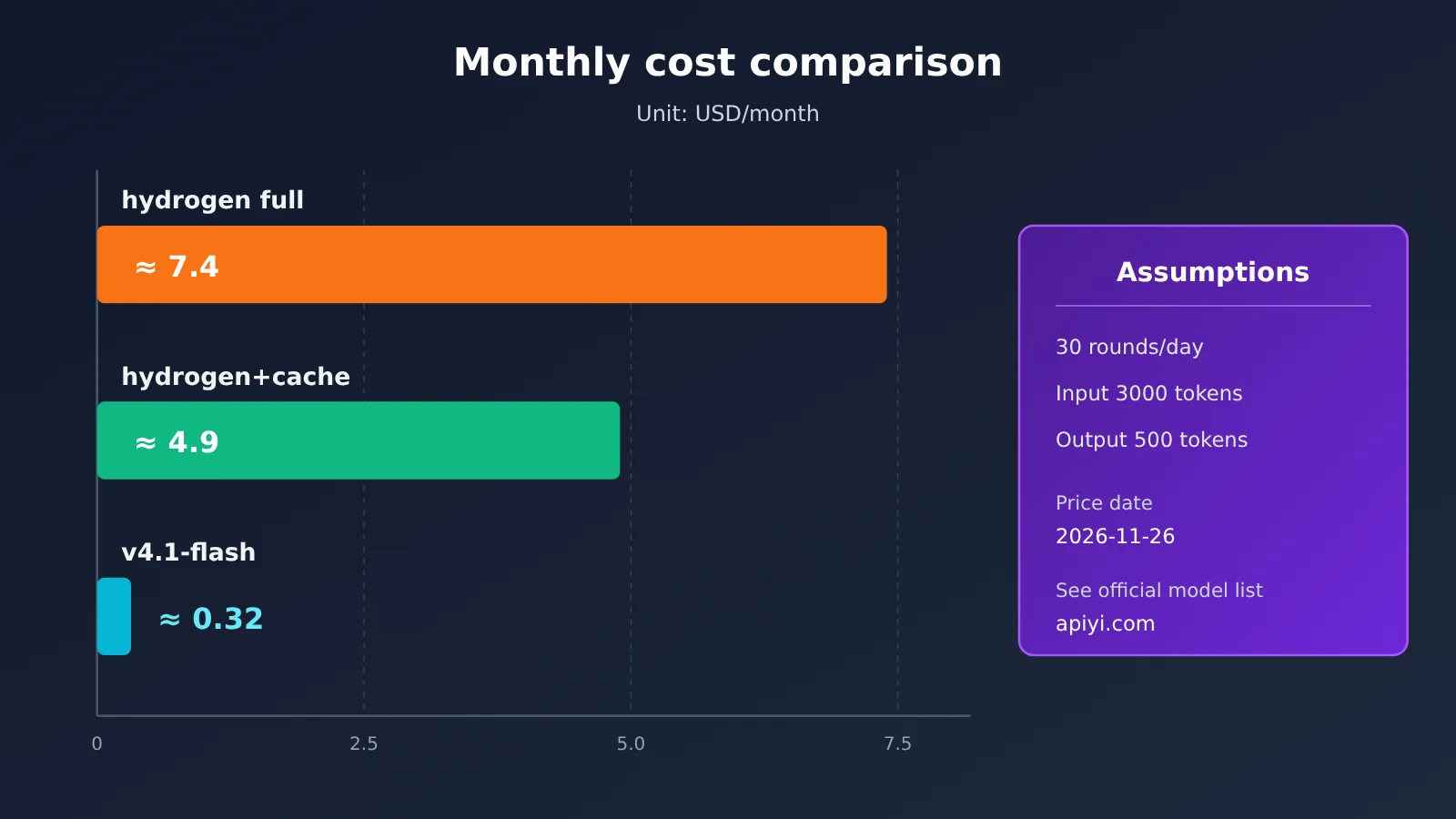
The cost formula is just one line: Daily cost = rounds per day × (input per round × input unit price + output per round × output unit price) ÷ 1,000,000. Let’s plug in a hypothetical scenario: 30 rounds of conversation a day, with 3,000 tokens of input per round (system prompt, memory, and tool returns all count), and 500 tokens of output.
| Option | Calculation | Daily cost (approx.) | 30-day cost (approx.) |
|---|---|---|---|
All on gemini-4-hydrogen |
30 × (3000×1.5 + 500×7.5) ÷ 1M | $0.25 | $7.4 |
All on deepseek-v4.1-flash |
30 × (3000×0.07 + 500×0.30) ÷ 1M | $0.011 | $0.32 |
gemini-4-hydrogen, assuming 2,000 input tokens hit the cache read |
30 × (1000×1.5 + 2000×0.075 + 500×7.5) ÷ 1M | $0.16 | $4.9 |
The third row in the table just illustrates the order of magnitude of cache reads—the actual hit rate depends on whether your prompt structure stays stable.
Where the Personal AI Assistant’s Costs Really Go
The gap in your bill doesn’t come mainly from unit prices—it comes from how you split the work. If background tasks like compression, summarization, and classification also run on the same tier as the main loop, the more often they run, the more expensive it gets; switch them to a smaller tier and this part becomes nearly negligible. The second big chunk is repeated input: the same memory segment gets carried along every round, so the longer a task runs, the longer the input gets.
So put memory segments early in the prompt, in a fixed position, so they hit the cache read as much as possible. Compare gemini-4-hydrogen‘s cache read of 0.075 with its input price of 1.5—a 20x difference; glm-5.3‘s cache read is 0.259, and you should factor this in when choosing a model.
💰 Cost tip: APIYI bills by usage, and you can create separate keys by purpose, each with its own quota and allowed-model whitelist. Create one key each for the main loop, summary compression, and web scraping—then in the apiyi.com console you can see exactly how much each capability costs.
Personal AI Assistant Quick Start: A Five-Step Minimal Pipeline
This pipeline adds only one capability per step, and each step has clear acceptance criteria. If it doesn’t pass acceptance, don’t move to the next step—that way, when something breaks, you know which piece failed.
| Step | What to do | Who does it | Acceptance criteria |
|---|---|---|---|
| 1. Connect an entry point | Connect a messaging channel; it can receive a message and reply with a message | Program + model | Send from your phone and get a reply within 10 seconds |
| 2. Connect a tool | Start with calendar read access only | Program | Ask “When am I free tomorrow?” and it reads out real free slots |
| 3. Add planning | Enable tool calling + JSON Schema structured output | Model selects, program executes | A single sentence with two actions can be split into two calls |
| 4. Add memory | Write preferences into a fixed system prompt snippet | Program stores; human supplies preferences | Ask again the next day, and it still knows which district your home is in |
| 5. Add confirmation | Before spending money or acting externally, it must send back a confirmation message | Program intercepts; human approves | Deliberately ask it to order something expensive; it asks first rather than acts first |
Step 1 and Step 2: Entry Point and the First Tool
Step 1 is handled by the program: after the messaging channel receives text, call the OpenAI-compatible SDK with base_url set to https://api.apiyi.com/v1 and model set to gemini-4-hydrogen; turn on stream so replies show up faster. Read the API key from an environment variable, such as OPENAI_API_KEY—don’t hard-code it in the code. If you later want to open an entry point for family members too, this step needs to distinguish identity by sender, with different identities reading different memories.
Step 2 only connects read-only calendar permission. The program calls the calendar API, and the model never touches credentials directly. For acceptance, ask a specific time question; the answer must match the real schedule in the calendar, not a “probably free in the afternoon” made up by the model.
Step 3: Planning and Tool Selection
Step 3 leaves the judgment to the model. In the request, declare available functions via tools, such as read_calendar and draft_email; for output that needs stable parsing, use response_format with a JSON Schema to constrain fields. After the model returns tool_calls, the program executes them and feeds the results back to the model. An acceptance sentence could be “Check whether I’m free tomorrow afternoon, and if I am, draft an email to set up a meeting.” It should call the calendar first, then the drafting tool, instead of making up an email in one go.
Step 4 and Step 5: Memory and Confirmation
For memory in Step 4, don’t jump to a vector database yet. Write “which district home is in, frequently used stations, dietary preferences” into a fixed system prompt snippet and place it at the very beginning of the prompt—it’s easier to debug and helps with cache reads. When the conversation gets long, use hy4-flash in the background to compress the history into a summary; create a separate token for this and give it its own quota.
Step 5 is a hard rule in the program, not something left to the model: any tool call that involves spending money or sending something externally is intercepted by the program before execution. It first sends you a confirmation message; only after you reply with approval does it proceed, and it sends a receipt after execution.
🚀 Getting started tip: New APIYI accounts need a top-up before they can call the API. The initial credits given at sign-up were suspended on 2026-05-28, and the resumption date is undecided. Online tutorials saying “sign-up gives you credits” are outdated. After a small top-up, create a token on apiyi.com that only allows
gemini-4-hydrogenandhy4-flash, and that’s enough to run through these five steps.
Which Steps of a Personal AI Assistant Must Stay with Humans
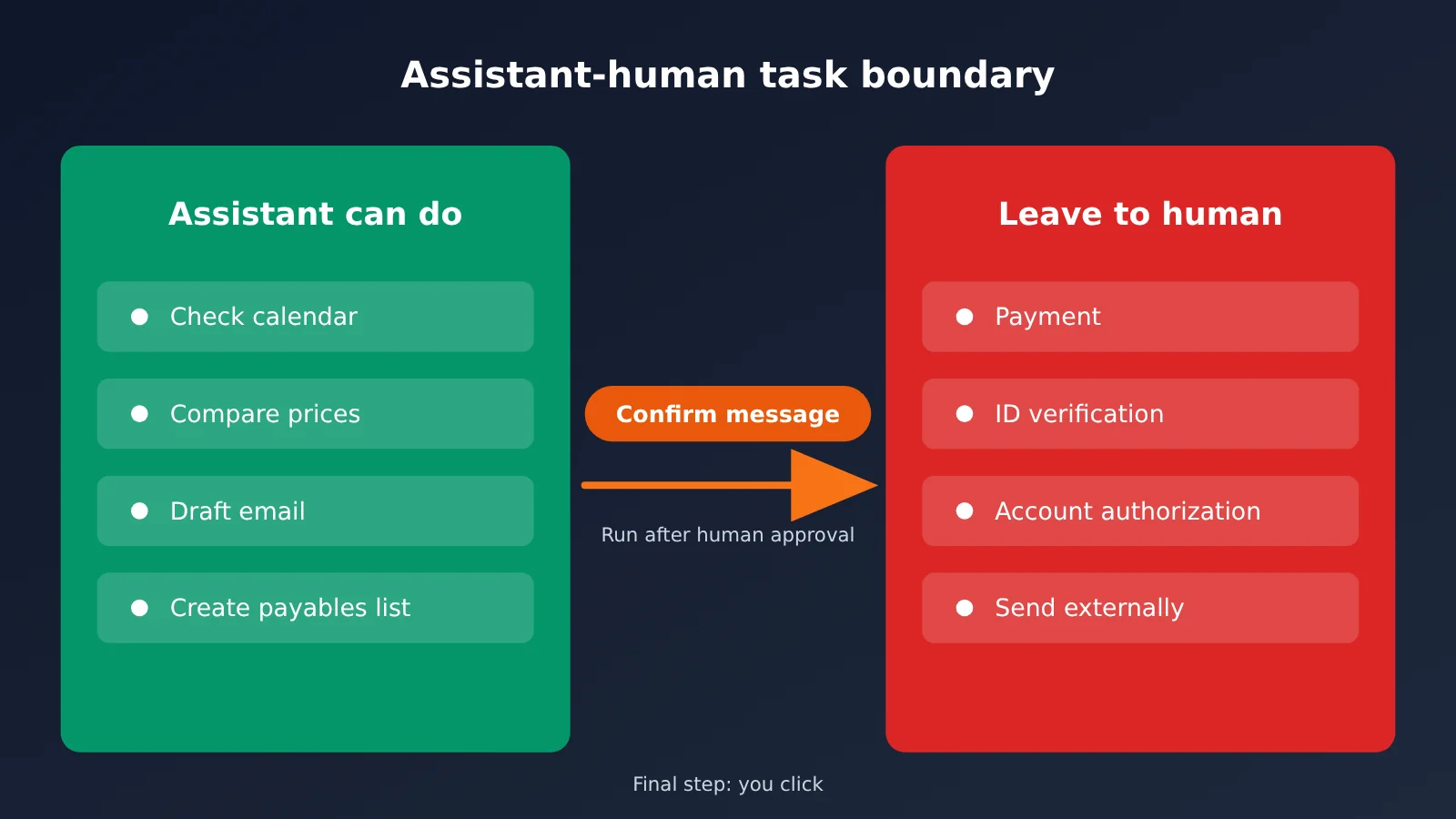
This section is where the whole article’s stance really sits. Instinct can use its own phone and computer to get things done, but for individual developers, I wouldn’t recommend letting the assistant handle the following steps on its own.
| Step | What not to let the assistant do | Right approach |
|---|---|---|
| Payment | Store card numbers, pay automatically, place orders automatically | The assistant generates a pending-payment list; the human pays manually |
| Real-name and verification | Handle ID cards or verification codes | Leave the human-confirmation step for ticket booking, appointment registration, and rebooking |
| Third-party account authorization | Use your main account password | Use one-time, revocable authorization; use read-only access whenever possible |
| Sending external messages | Send directly on your behalf | Default to human approval, especially for group chats and emails |
This list is also the source of the allowlist for the interception rules in step 5. What the assistant can do is gather all the information, break down the steps, and write the drafts. You press the final button.
FAQ
Q1: What is a personal AI assistant, and how is it different from a chatbot?
A personal AI assistant takes instructions through a messaging entry point, can call tools like calendars and email to actually get things done, and remembers your preferences. A chatbot only answers questions — it doesn’t connect to tools, doesn’t remember across conversations, and has no confirmation or receipt step.
Q2: Can a self-built assistant do what Instinct does?
You can get fairly close on the mechanics: a text-message-style entry point, calendar and email reading, multi-step task breakdown, and memory. Instinct uses its own phone and computer to book tickets and schedule appointments — that kind of errand-running involves payments and real-name verification, so it’s not something I’d recommend building yourself. It’s invitation-only right now, and there’s no word on paid tiers or open registration.
Q3: Which model should the main loop use?
Start with a mid-tier model like `gemini-4-hydrogen` or `qwen4-max` to get things working, then try `gemini-4-neon` when complex plans get shaky. On APIYI (apiyi.com), switching models just means changing the `model` field — run the same set of test prompts through both and compare.
Q4: Why does Gemini 4 sometimes return empty content?
Thinking tokens count toward `max_tokens`, so if the budget is too small, thinking consumes it all and the actual response comes back empty. Just set `max_tokens` to 1024 or higher.
Q5: If it’s just me using it, do I need to worry about rate limits?
Usually not. Account-level rates under 100 RPM are generally fine, and TPM isn’t assessed. Multiple people sharing a single token doesn’t affect the rate, but it’s better to split tokens by purpose so you can check each one’s consumption and call logs separately in the apiyi.com console.
Q6: What are the known limitations of a personal AI assistant?
The model can misread your intent, so anything that spends money or acts externally must have human confirmation. The longer the memory, the more expensive the input, so you need periodic summarization and compression. Third-party tool authorizations can expire or be revoked, so favor read-only scopes and build in failure receipts.
Key Takeaways for Your Personal AI Assistant
- Five capability blocks: entry & identity, intent & planning, tools, memory, confirmation & receipts — only two of them actually depend on the model
- Tiered division of labor: use the mid tier for the main loop and the small tier for summaries and classification; the bill gap comes mostly from the division of labor, not the unit price
- Cost formula: rounds × (input × unit price + output × unit price) ÷ 1M — keep memory pinned up front to earn cache reads
- Minimum chain: add the five blocks one at a time, each with its own acceptance criteria; don’t move on until the current one passes
- Leave it to humans: payments, identity verification, account authorization, outbound messages — a human gives the nod by default
- Unified interface: switch between multiple models with a single key through APIYI apiyi.com; new accounts need to top up before making calls
Summary: Which Step to Do First Today
The approach to building a personal AI assistant comes down to three points:
- Build it piece by piece: connect the five capabilities one block at a time; the model is only responsible for understanding and planning
- Do the math: plug your own number of rounds and token volume into the cost formula, and let the small tier handle the background chores
- Guard the boundaries: anything that spends money or acts externally always asks you first, then executes
Today you only need to do step 1: connect the messaging channel you use most, point base_url to https://api.apiyi.com/v1, send one sentence from your phone, and if you get a receipt within 10 seconds, that counts as passing. Once this step is solid, go connect the calendar.
📚 References
-
Instinct Official Website & Privacy Policy: Product format and data usage details (privacy policy updated 11-17)
- Link:
instinct.com - Note: Learn about the SMS entry point, proactive reminders, data training opt-out, and deletion cycles
- Link:
-
Lindy Blog – Instinct Review: Third-party product analysis
- Link:
lindy.ai/blog/instinct-ai-vs-lindy - Note: Discussion of the minimalist entry point product decision and valuation risks
- Link:
-
aibyaakash – Instinct Breakdown: Third-party review
- Link:
aibyaakash.com/p/instinct - Note: A comparative perspective on the bubble risks facing early social products
- Link:
-
APIYI Documentation Center: Model list, tokens and groups, registration bonus suspension announcement
- Link:
docs.apiyi.com - Note: Model pricing (data as of 2026-11-26), token whitelist, and grouping rules
- Link:
Author: APIYI Technical Team
Technical Discussion: Feel free to contact us through the APIYI website homepage. For more resources, visit the docs.apiyi.com documentation center.