

Loops in C are used to repeatedly execute a block of code as long as a specified condition is satisfied. They reduce code repetition and are useful when the same task needs to be performed multiple times.
- C provides three main loops: for, while, and do-while.
- Loops can also be nested and can be controlled using statements such as break and continue.
- A loop can be made infinite when its condition never becomes false.
Using Loops to Repeat Code
Without a loop, the same statement must be written multiple times to repeat an operation.
#include <stdio.h>

int main() {
    printf( "Hello GfG\n");
    printf( "Hello GfG\n");
    printf( "Hello GfG");
    return 0;
}
Output
Hello GfG
Hello GfG
Hello GfG
Using a loop, the same output can be produced with fewer lines of code.
#include <stdio.h>

int main() {

    // Loop to print "Hello GfG" 3 times
    for (int i = 0; i < 3; i++) {
        printf("Hello GfG\n");
    }
    return 0;
}
Output
Hello GfG
Hello GfG
Hello GfG
The same loop can be used to repeat the statement 100 or 1000 times by changing the loop condition.
Types of loops
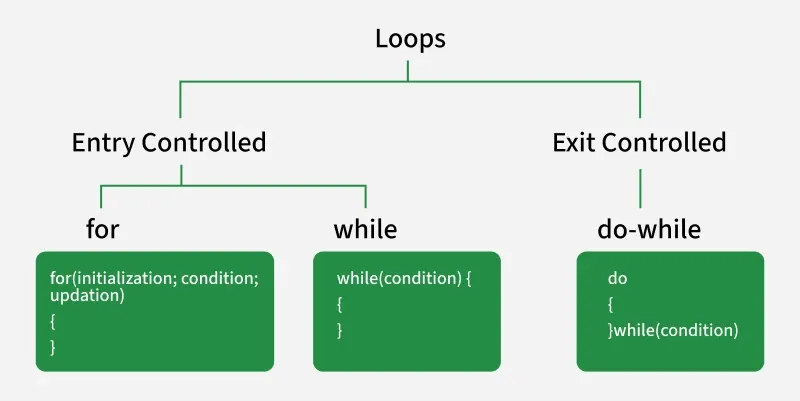
There are 3 looping statements in C:
for Loop
for loop is an entry-controlled loop, which means that the condition is checked before the loop's body executes.
Syntax
for (initialization; condition; update) {
// Body of loop
}
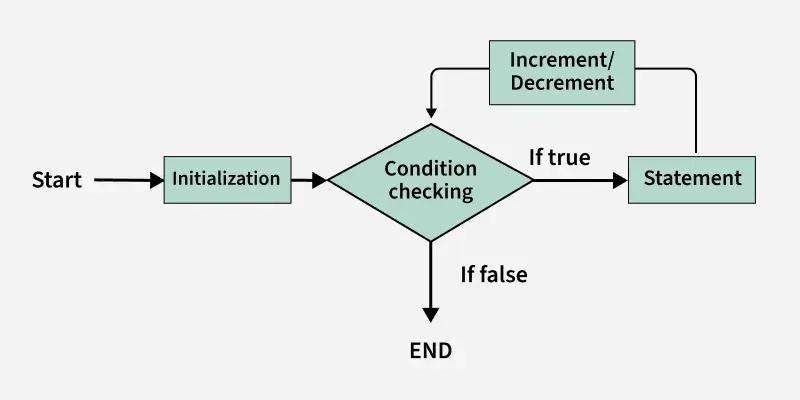
The main parts of a for loop are:
- Initialization: Sets the initial value of the loop variable.
- Condition: Determines whether the loop should continue executing.
- Update: Changes the loop variable after each iteration.
- Body: Contains the statements to be executed repeatedly.
#include <stdio.h>

int main() {

    // Loop to print numbers from 1 to 5
    for (int i = 0; i < 5; i++) {
        printf( "%d ", i + 1);
    }

    return 0;
}
Output
1 2 3 4 5
Flowchart of for Loop
while Loop
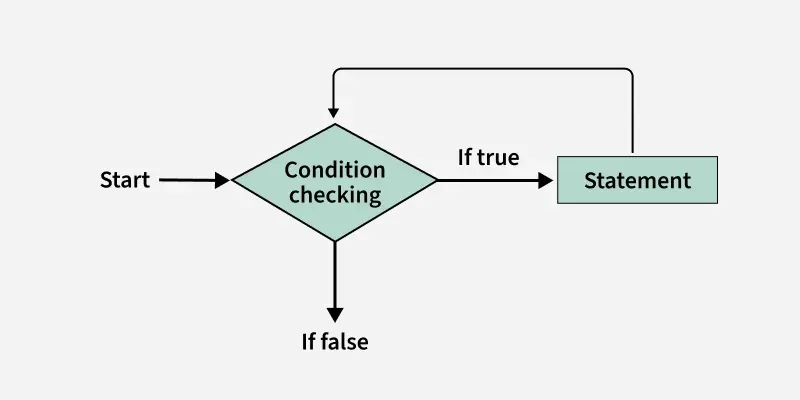
A while loop is also an entry-controlled loop in which the condition is checked before entering the body.
Syntax
while (condition) {
// Body of loop
}
The initialization and update of the loop variable are performed separately.
#include <stdio.h>
int main() {

  // Initialization expression
  int i = 0;

  // Test expression
  while(i <= 5) {
    printf("%d ", i + 1);

    // update expression
    i++;
  }

  return 0;
}
Output
1 2 3 4 5 6
Flowchart of while Loop
do-while Loop
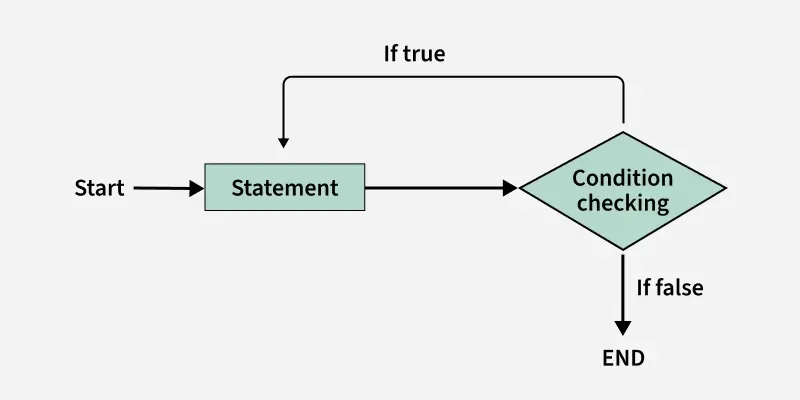
The do-while loop is an exit-controlled loop, which means that the condition is checked after executing the loop body. Due to this, the loop body will execute at least once irrespective of the test condition.
Syntax
do {
// Body of loop
} while (condition);
The initialization and update of the loop variable are performed separately.
#include <stdio.h>

int main() {

  // Initialization expression
  int i = 0;

  do
  {
    // loop body
    printf( "%d ", i);

    // Update expression
    i++;

    // Condition to check
  }  while (i <= 10);

  return 0;
}
Output
0 1 2 3 4 5 6 7 8 9 10
Flowchart of do-while Loop
Infinite Loop
An infinite loop is executed when the test expression never becomes false, and the body of the loop is executed repeatedly. A program is stuck in an Infinite loop when the condition is always true. Mostly this is an error that can be resolved by using Loop Control statements.
Using for loop:
#include <stdio.h>

int main () {

	// This is an infinite for loop
	// as the condition expression
	// is blank
	for ( ; ; ) {
		printf("This loop will run forever.");
	}
	return 0;
}
Output
This loop will run forever.
This loop will run forever.
This loop will run forever.
...
Using While loop:
#include <stdio.h>

int main()  {
	while (1)
		printf("This loop will run forever.\n");
	return 0;
}
Output
This loop will run forever.
This loop will run forever.
This loop will run forever.
...
Using the do-while loop:
#include <stdio.h>

int main() {
	do {
		printf("This loop will run forever.");
	} while (1);

	return 0;
}
Output
This loop will run forever.
This loop will run forever.
This loop will run forever.
...
Nested Loops
Nesting loops means placing one loop inside another. The inner loop runs fully for each iteration of the outer loop. This technique is helpful when you need to perform multiple iterations within each cycle of a larger loop, like when working with a two-dimensional array or performing tasks that require multiple levels of iteration.
#include <stdio.h>

int main() {
    // Outer loop runs 3 times
    for (int i = 0; i < 3; i++) {

        // Inner loop runs 2 times for each
        // outer loop iteration
        for (int j = 0; j < 2; j++) {
            printf("i = %d, j = %d\n", i, j);
        }
    }
    return 0;
}
Output
i = 0, j = 0
i = 0, j = 1
i = 1, j = 0
i = 1, j = 1
i = 2, j = 0
i = 2, j = 1
Loop Control Statements
Loop control statements in C programming are used to change execution from its normal sequence.
| Name | Description |
|---|---|
| break | The break statement is used to terminate the loop statement. |
| continue | When encountered, the continue statement skips the remaining body and jumps to the next iteration of the loop. |
| goto | goto statement transfers the control to the labeled statement. |
Example:
#include <stdio.h>

int main() {
    for (int i = 0; i < 5; i++) {
        if (i == 3) {

            // Exit the loop when i equals 3
            break;
        }
        printf("%d ", i);
    }
    printf("\n");

    for (int i = 0; i < 5; i++) {
        if (i == 3) {

            // Skip the current iteration
            // when i equals 3
            continue;
        }
        printf("%d ", i);
    }
    printf("\n");
    for (int i = 0; i < 5; i++) {
        if (i == 3) {

            // Jump to the skip label when
            // i equals 3
            goto skip;
        }
        printf("%d ", i);
    }

skip:
    printf("\nJumped to the 'skip' label %s",
    "when i equals 3.");

    return 0;
}
Output
0 1 2
0 1 2 4
0 1 2
Jumped to the 'skip' label when i equals 3.
Explanation: The first for loop uses break to terminate when i becomes 3, while the second loop uses continue to skip the iteration when i is 3. The third loop uses goto to transfer control to the skip label when i becomes 3, after which the corresponding message is printed.
