

An array is a fixed-size collection of elements of the same data type stored in contiguous memory locations. Each element is accessed using an index, allowing efficient direct access.
- Array indexing starts from 0, so the first element is stored at index 0.
- Arrays can store multiple values of the same data type under a single variable name.
- C supports one-dimensional arrays as well as multidimensional arrays such as 2D and 3D arrays.
#include <stdio.h>

int main() {

    int arr[] = {2, 4, 8, 12, 16, 18};
    int n = sizeof(arr)/sizeof(arr[0]);

    // Printing array elements
    for (int i = 0; i < n; i++) {
        printf("%d ", arr[i]);
    }

    return 0;
}
Output
2 4 8 12 16 18
The below image shows the array created in the above program.

Declaration of an Array
We can declare an array by specifying the data type, array name, and number of elements inside square brackets [].
Syntax
data_type array_name[size];
This statement declares an array named array_name that can store size elements of the specified data type.
Example:
int arr[5];
This declares an array named arr that can store 5 integer values.

Uninitialized Array
When a local array is declared without an initializer, its elements are uninitialized and have indeterminate values. Reading such values before assigning valid values to them results in undefined behavior.
int arr[5];
Here, memory is reserved for 5 integers, but the elements have not been initialized.
Note: Arrays with static storage duration, such as a static array or a file-scope array, are initialized to zero if no explicit initializer is provided.
Initialize an Array
Array initialization means assigning initial values to the elements of an array. We can initialize an array by providing values inside curly braces {}.
Example:
int arr[5] = {2, 4, 8, 12, 16};
The values are assigned sequentially, starting from index 0.
- arr[0] contains 2.
- arr[1] contains 4.
- arr[2] contains 8.
- arr[3] contains 12.
- arr[4] contains 16.
Operations on Array Elements
Arrays support several common operations for storing, accessing, modifying, and processing elements. Let's discuss them one by one.
1. Accessing Array Elements
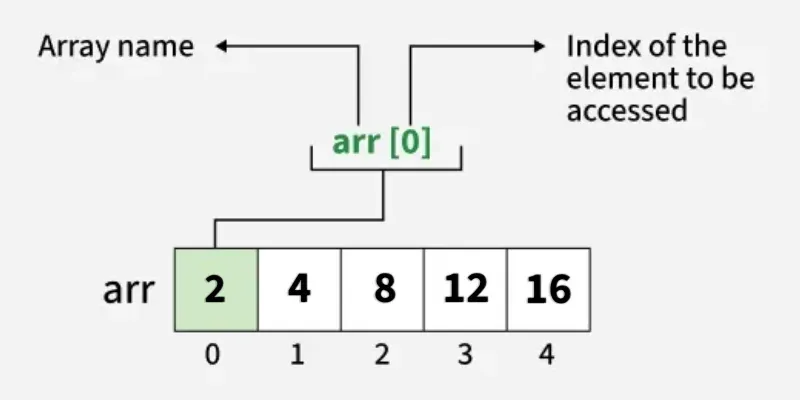
Array in C provides random access to its elements, which means that we can access any element of the array by providing the position of the element, called the index.
Syntax:
array_name[index];
Array indexing starts from 0, so for an array of n elements, valid indices range from 0 to n - 1.
#include <stdio.h>

int main() {

    // array declaration and initialization
    int arr[5] = {2, 4, 8, 12, 16};

    // accessing element at index 2 i.e 3rd element
    printf("%d ", arr[2]);

    // accessing element at index 4 i.e last element
    printf("%d ", arr[4]);

    // accessing element at index 0 i.e first element
    printf("%d ", arr[0]);
    return 0;
}
Output
8 16 2
Note: Accessing an array outside its valid index range results in undefined behavior in C.
2. Update Array Element
We can update the value of array elements at the given index i in a similar way to accessing an element by using the array square brackets [] and assignment operator (=).
Syntax:
array_name[index] = value;
#include <stdio.h>

int main() {
    int arr[5] = {2, 4, 8, 12, 16};

    // Update the first value
    // of the array
    arr[0] = 1;
    printf("%d", arr[0]);
    return 0;
}
Output
1
3. Traverse an Array
Array Traversal is the process in which we visit every element of the array in a specific order. For C array traversal, we use loops to iterate through each element of the array.

#include <stdio.h>

int main() {
    int arr[5] = {2, 4, 8, 12, 16};

    // Print each element of
    // array using loop
    printf("Printing Array Elements\n");
    for(int i = 0; i < 5; i++){
        printf("%d ", arr[i]);
    }
    printf("\n");

    // Printing array element in reverse
    printf("Printing Array Elements in Reverse\n");
    for(int i = 4; i>=0; i--){
        printf("%d ", arr[i]);
    }

    return 0;
}
Output
Printing Array Elements
2 4 8 12 16
Printing Array Elements in Reverse
16 12 8 4 2
4. Size of an Array
The size of the array refers to the number of elements that can be stored in the array. The array does not contain the information about its size but we can extract the size using sizeof() operator.
For an array, the number of elements can be calculated as:
sizeof(array) / sizeof(array[0])
#include <stdio.h>

int main() {
    int arr[5] = {2, 4, 8, 12, 16};

    // Size of the array
    int size = sizeof(arr)/sizeof(arr[0]);
    printf("%d", size);
    return 0;
}
Output
5
The sizeof() operator returns the size in bytes. sizeof(arr) returns the total number of bytes of the array. In an array, each element is of type int, which is 4 bytes. Therefore, we can calculate the size of the array by dividing the total number of bytes by the byte size of one element.
Practice Problems: Print Array in Reverse, Count the Zeros in an Array, Search an Element in an Array, First Repeating Element, Sum of All Array Elements, Count Smaller Than X, Largest Element in Array
