

A multidimensional array is an array with more than one dimension, used to organize data in rows, columns, layers, or other dimensions. The most commonly used multidimensional arrays are 2D and 3D arrays.
- A 2D array stores elements in rows and columns and is commonly used for matrices and tables.
- A 3D array consists of multiple 2D arrays and is useful for representing layered or volumetric data.
- Multidimensional arrays are stored in contiguous memory locations in row-major order in C.
#include <stdio.h>

int main() {
    /*
       Declare and initialize a 2×2 integer array.
       arr[0][0] = 10, arr[0][1] = 20,
       arr[1][0] = 30, arr[1][1] = 40
    */
    int arr[2][2] = { {10, 20}, {30, 40} };

    printf("2D Array Elements:\n");
    for (int i = 0; i < 2; i++) {
        for (int j = 0; j < 2; j++) {
            printf("%d ", arr[i][j]);
        }
        printf("\n");
    }

    return 0;
}
Output
2D Array Elements:
10 20
30 40
Explanation: In this example, arr is a 2D integer array with 2 rows and 2 columns. Nested loops are used to access and print each element row by row.
Syntax
The general form of declaring N-dimensional arrays is shown below
type arrName[size1][size2]....[sizeN];
- type: Type of data to be stored in the array.
- arrName: Name assigned to the array.
- size1, size2,..., sizeN: Size of each dimension.
Size of Multidimensional Arrays
The total number of elements in a multidimensional array is obtained by multiplying the size of all its dimensions. The total memory occupied is the number of elements multiplied by the size of one element.
- For int arr[10][20], the total number of elements is 10 × 20 = 200.
- If the size of int is 4 bytes, the total size of the array is 10 × 20 × 4 = 800 bytes.
Types of Multidimensional Arrays
C supports arrays with any number of dimensions. However, 2D and 3D arrays are among the most commonly used.
1. 2D Arrays
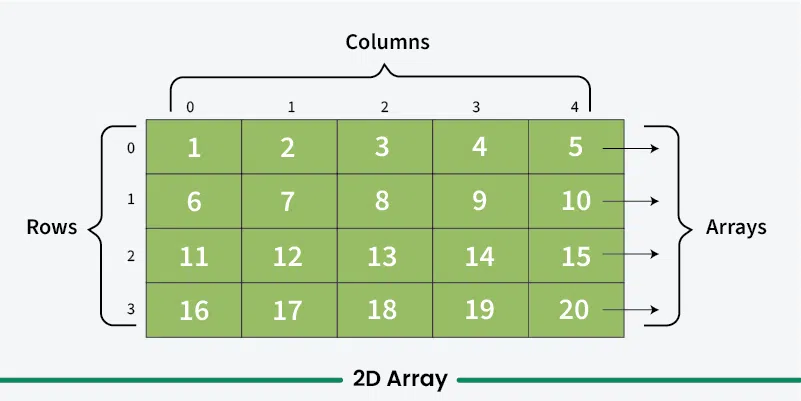
A two-dimensional (2D) array stores elements in rows and columns. It can be visualized as a table where each element is identified by a row index and a column index.
- If a 2D array has m rows and n columns, row indices range from 0 to m - 1.
- Column indices range from 0 to n - 1.
- Both row and column indexing starts from 0 in C.
Declaration of 2D Array
A 2D array with m rows and n columns can be created as:
type arr_name[m][n];
For example, we can declare a two-dimensional integer array with name 'arr' with 10 rows and 20 columns as:
int arr[10][20];
Initialization of 2D Arrays
We can initialize a 2D array by using a list of values enclosed inside '{ }' and separated by a comma as shown in the example below:
int arr[3][4] = {
{0, 1, 2, 3},
{4, 5, 6, 7},
{8, 9, 10, 11}
};
or
int arr[3][4] = {0, 1 ,2 ,3 ,4 , 5 , 6 , 7 , 8 , 9 , 10 , 11};
Explanation
- During initialization, elements are filled row by row from left to right and top to bottom, with each inner brace representing one row.
- When using list initialization, the row size can be omitted, and the compiler automatically determines it from the number of rows provided.
type arr_name[][n] = {...values...};
It is still compulsory to define the number of columns.
Note: The number of elements in initializer list should always be either less than or equal to the total number of elements in the array.
Accessing Elements
An element in two-dimensional array is accessed using row indexes and column indexes inside array subscript operator [].
arr_name[i][j]
2D Array Traversal
Traversal of a 2-D array means accessing every element one by one. It is done using nested loops, where the outer loop traverses rows and the inner loop traverses columns.
for(int i = 0; i < row; i++){
    for(int j = 0; j < col; j++){
        arr[i][j];
    }
}
The below example demonstrates the row-by-row traversal of a 2D array.
#include <stdio.h>

int main() {

    // Create and initialize an array with 3 rows
  	// and 2 columns
    int arr[3][2] = { { 0, 1 }, { 2, 3 }, { 4, 5 } };

    // Print each array element's value
    for (int i = 0; i < 3; i++) {
        for (int j = 0; j < 2; j++) {
            printf("arr[%d][%d]: %d    ", i, j, arr[i][j]);
        }
      	printf("\n");
    }
    return 0;
}
Output
arr[0][0]: 0    arr[0][1]: 1
arr[1][0]: 2    arr[1][1]: 3
arr[2][0]: 4    arr[2][1]: 5
Storage of 2D Arrays in Memory
A 2-D array is stored in contiguous memory locations. Since computer memory is linear, the array is stored in a linear form using either row-major or column-major order.
- Row-major order: Stores all elements of one row first, then the next row. (Used by C)
- Column-major order: Stores all elements of one column first, then the next column.
- The computer stores only the base address of the array and calculates the address of any element using that base address, enabling efficient random access.
Passing 2D Arrays to Functions
Passing 2D arrays to functions need a specialized syntax so that the function knows that the data being passed is 2d array. The function signature that takes 2D array as argument is shown below:
void printArray(int arr[][3], int rows) {
    for (int i = 0; i < rows; i++) {
        for (int j = 0; j < 3; j++) {
            printf("%d ", arr[i][j]);
        }
    }
}
2. 3D Array in C
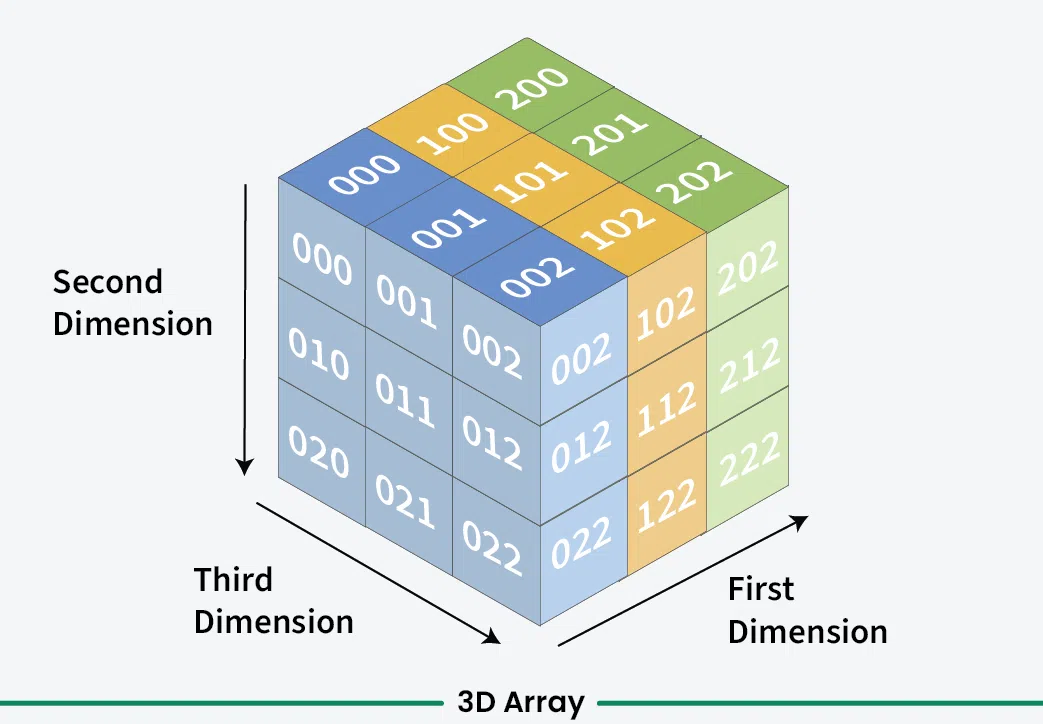
A Three-Dimensional Array or 3D array in C is a collection of two-dimensional arrays. It can be visualized as multiple 2D arrays stacked on top of each other.
Declaration of 3D Array in C
We can declare a 3D array with x 2D arrays each having m rows and n columns using the syntax shown below:
type arr_name[x][m][n];
For example
int arr[2][2][2];
This creates an array containing:
- 2 layers
- 2 rows in each layer
- 2 columns in each row
Initialization of 3D Array in C
Initialization in a 3D array is the same as that of 2D arrays. The difference is as the number of dimensions increases so the number of nested braces will also increase.
int arr[2][3][2] = {0, 1, 2, 3, 4, 5, 6, 7 , 8, 9, 10, 11};
or
int arr[2][3][2] = { { { 1, 1 }, { 2, 3 }, { 4, 5 } },
{ { 6, 7 }, { 8, 9 }, { 10, 11 } } };
int arr[2][3][2] = {
{
{1, 1},
{2, 3},
{4, 5}
},
{
{6, 7},
{8, 9},
{10, 11}
}
};
It can also be initialized using a flat initializer list:
int arr[2][3][2] = {
1, 2, 3, 4, 5, 6,
7, 8, 9, 10, 11, 12
};
When initializing a 3D array, the first dimension can be omitted if enough initializer information is provided:
int arr[][3][2] = {
{
{1, 2},
{3, 4},
{5, 6}
}
};
The sizes of the second and subsequent dimensions must be specified.
Accessing Elements of a 3D Array
A 3D array element is accessed using three indices:
array_name[depth][row][column];
For example:
arr[1][2][0];
Here:
1represents the layer or depth.2represents the row.0represents the column.
3D Array Traversal
Traversing a 3-D array requires three nested loops: the outer loop traverses the depth, the middle loop traverses the rows, and the inner loop traverses the columns (elements).
for(int d = 0; d < depth; d++){
    for(int i = 0; i < row; i++){
        for(int j = 0; j < col; j++){
            arr[d][i][j];
        }
    }
}
The following example demonstrates the traversal of a 3D array:
#include <stdio.h>

int main() {

    // Create and Initialize the
    // 3-dimensional array
    int arr[2][3][2] = { { { 1, 1 }, { 2, 3 },
                       { 4, 5 } }, { { 6, 7 },
                       { 8, 9 }, { 10, 11 } } };

  	// Loop through the depth
    for (int i = 0; i < 2; ++i) {

      	// Loop through the
      	// rows of each depth
        for (int j = 0; j < 3; ++j) {

          	// Loop through the
          	// columns of each row
            for (int k = 0; k < 2; ++k)
                printf("arr[%i][%i][%i] = %d   ", i, j, k,
                       arr[i][j][k]);
          	printf("\n");
        }
      printf("\n\n");
    }
    return 0;
}
Output
arr[0][0][0] = 1   arr[0][0][1] = 1
arr[0][1][0] = 2   arr[0][1][1] = 3
arr[0][2][0] = 4   arr[0][2][1] = 5


arr[1][0][0] = 6   arr[1][0][1] = 7
arr[1][1][0] = 8   arr[1][1][1] = 9
arr[1][2][0] = 10   arr[1][2][1] = 11
Explanation: The outer loop traverses the layers, the middle loop traverses the rows within each layer, and the inner loop accesses the columns within each row.
Storage of 3D Arrays in Memory
A 3D array in C is also stored in contiguous memory locations in row-major order. The elements are stored by traversing the last dimension first.
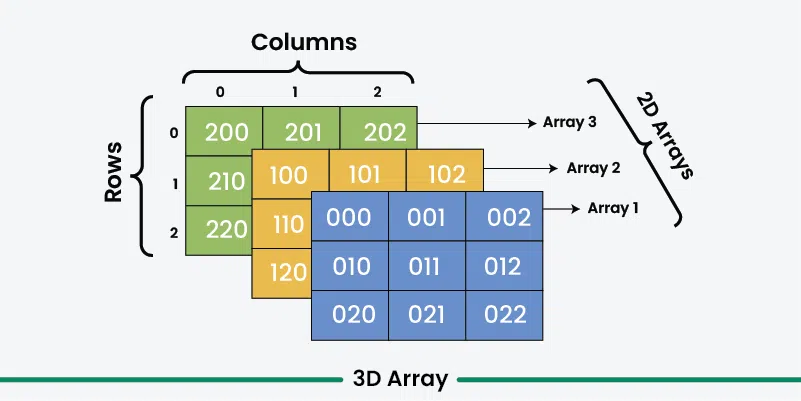
Since computer memory is linear, a 3-D array is also stored in a linear form. It can be stored using row-major or column-major order with an additional depth dimension.
- The array is stored layer by layer (one 2-D array at a time).
- Within each layer, elements are stored according to the chosen row-major or column-major order.
Passing 3D Arrays to Functions
Passing a 3D array to a function in C is similar to passing 2D arrays, but with an additional dimension. When passing a 3D array, you need to pass the sizes of all the dimensions separately because the size information of array is lost while passing.
void printArray(int arr[][3][2], int depth) {

    for (int d = 0; d < depth; d++) {
        for (int i = 0; i < 3; i++) {
            for (int j = 0; j < 2; j++) {
                printf("%d ", arr[d][i][j]);
            }
        }
    }
}

