

The rename() function is used to change the name of an existing file or directory without changing its contents. It is defined in the <stdio.h> header file.
- It takes the existing file name and the new file name as arguments.
- It returns 0 on successful renaming and a non-zero value if the operation fails.
Syntax of rename()
int rename (const char *old_name, const char *new_name);
Parameters
- old_name: Name or path of the existing file or directory.
- new_name: New name or path to be assigned to the file or directory.
Return Value: The rename() function returns an integer value:
- 0: The file or directory was renamed successfully.
- Non-zero: The renaming operation failed.
Example of rename()
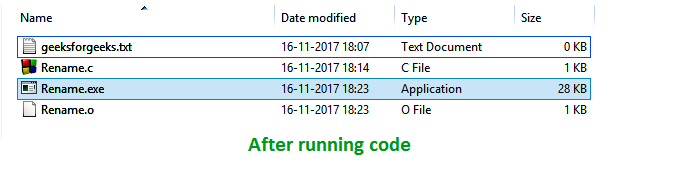
The following C program renames the file geeks.txt to geeksforgeeks.txt. The file should be present in the same directory as the program before execution.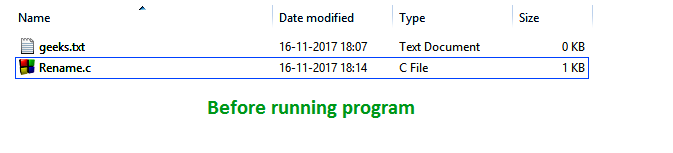
#include <stdio.h>

int main()
{
    // Old file name
    char old_name[] = "geeks.txt";

    // Any string
    char new_name[] = "geeksforgeeks.txt";
    int value;

    // File name is changed here
    value = rename(old_name, new_name);

    // Print the result
    if (!value) {
        printf("%s", "File name changed successfully");
    }
    else {
        perror("Error");
    }
    return 0;
}
Output
If file name changed
File name changed successfully
            OR
If file is not present
Error: No such file or directory
Explanation
- old_name stores the current file name, geeks.txt, and new_name stores the new file name, geeksforgeeks.txt.
- rename() changes the file name and returns 0 if the operation is successful.
- The if condition checks the return value and prints a success message; otherwise, perror() displays the error.
Renaming a File in Another Directory
The new_name argument can include a file path. This allows rename() to move a file to another directory when the source and destination are on the same filesystem.
#include <stdio.h>

int main()
{
    if (rename("geeks.txt", "docs/geeks.txt") == 0)
        printf("File moved successfully.\n");
    else
        perror("Error");

    return 0;
}
Explanation
- geeks.txt is the source file in the current directory.
- docs/geeks.txt specifies the new location and name of the file.
- If the operation is successful, the file is moved to the docs directory.
