

In SQL, the ALL and ANY operators are used to compare a value against a set of values returned by a subquery. They help filter results based on conditions evaluated over multiple values.
- ALL checks if a condition is true for every value in the subquery result.
- Must be used with comparison operators like >, <, >=, <=.
- Used in SELECT, WHERE and HAVING for advanced filtering.
SQL ALL
The SQL ALL operator compares a value to every value returned by a subquery. A condition using ALL is TRUE only if it holds for all values in the subquery result.
- Must be used with comparison operators: >, <, >=, <=.
- Useful for filtering data based on comparisons with multiple records.
Example: First, we will create a demo SQL database and table, on which we will use the ALL command.

Query:
SELECT *
FROM products
WHERE price > ALL (
    SELECT price
    FROM products
    WHERE price < 500
);
Output:

Syntax
SELECT column_name(s)
FROM table_name
WHERE column_name comparison_operator ALL
  (SELECT column_name
   FROM table_name
   WHERE condition(s));
- comparison_operator: This is the comparison operator that can be one of =, >, <, >=, <=, <>, etc.
- subquery: A query that returns the set of values to be compared with the column in the outer query.
SQL ALL with SELECT, WHERE & HAVING
The ALL operator can be used in conjunction with SELECT, WHERE and HAVING statements to refine your data filtering.
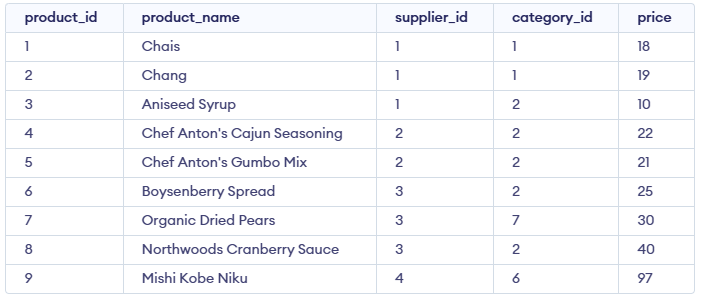
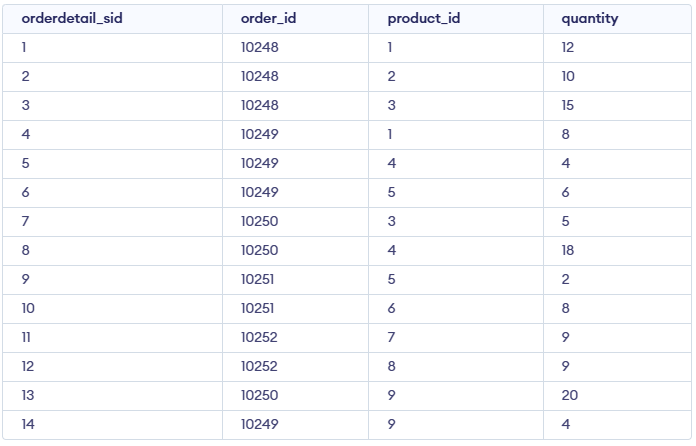
Example 1 : Retrieve all product names from the product table
Query:
SELECT product_name
FROM product
WHERE TRUE;
Output:
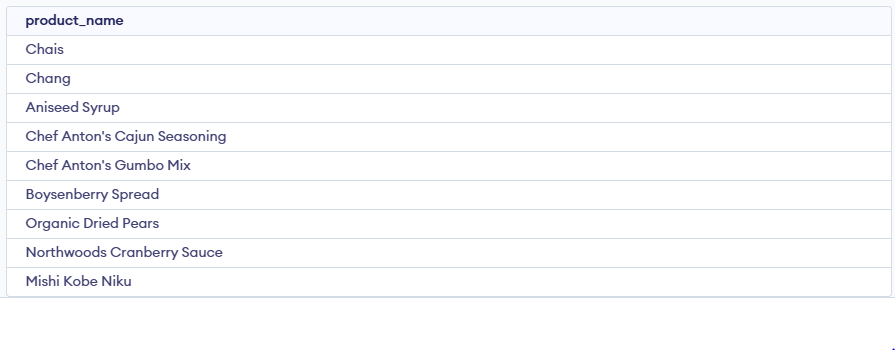
- This query retrieves all product names from the product table because TRUE always evaluates as true for every row.
Example 2: Retrieve product names if all records in the order_details table have a quantity of 6 or 2
SELECT product_name
FROM product
WHERE product_id = ALL (
    SELECT product_id
    FROM order_details
    WHERE quantity = 6 OR quantity = 2
);
Output:

- This query ensures that the product names returned have ALL quantities of 6 or 2 in the order_details table.
Example 3 : Find the order_id where the maximum quantity in the order exceeds the average quantity of all orders
SELECT order_id
FROM order_details
GROUP BY order_id
HAVING MAX(quantity) > ALL (
    SELECT AVG(quantity)
    FROM order_details
    GROUP BY order_id
);
Output:

- This query filters out order_id where the maximum quantity is greater than the average quantity of the orders.
SQL ANY Operator
The SQL ANY operator compares a value with the values returned by a subquery and evaluates to TRUE if at least one value satisfies the given condition.
- It must be used with comparison operators such as
=,>,<,>=,<=or<>. - The subquery used with ANY must return a single column of values.
Example: First, we will create a demo SQL database and table, on which we will use the ANY command.
Query:
SELECT * FROM products
WHERE price < ANY (SELECT price FROM products WHERE price > 500);
Output:

Syntax
SELECT column_name(s)
FROM table_name
WHERE column_name comparison_operator ANY
  (SELECT column_name
   FROM table_name
   WHERE condition(s));
SQL ANY with SELECT, WHERE & HAVING
The ANY operator can be used with SELECT, WHERE and HAVING clauses to filter data by matching a condition against any value in a subquery result.
Example 1 : Find distinct category IDs of products that appear in the order_details table.
Query:
SELECT DISTINCT category_id
FROM products
WHERE product_id = ANY (SELECT product_id
                       FROM order_details);
Output:

- This query finds the distinct category_id of products that exist in the order_details table.
Example 2 : Find product names with a quantity of 9 in the order_details table
Query:
SELECT product_name
FROM products
WHERE product_id = ANY (SELECT product_id
                       FROM order_details
                       WHERE quantity = 9);
Output:
- This query retrieves product names where at least one record in the order_details table has a quantity of 9.
To better understand comparison between operators, see our detailed comparison of ANY vs ALL in SQL
