

Assertions in Postman are checks used to verify whether an API response meets the expected conditions. They help validate response data and confirm that the API behaves as expected.
- Verify status codes, response bodies, headers, cookies, and response times.
- Identify unexpected API behavior by comparing actual and expected results.
- Assertions can be written in Postman scripts using methods such as pm.test() and pm.expect().
Why use Assertions in Postman?
Assertions help validate API responses automatically by checking whether the actual results match the expected results. They make API testing more reliable and reduce the need for manual verification.
- Automatically verify API response conditions.
- Detect incorrect or unexpected responses during testing.
- Support consistent and repeatable API validation.
How to Write Assertions in Postman
Assertions in Postman are written in the Scripts -> After-response section to validate whether an API response meets the expected conditions. Follow these steps to create and execute assertions in Postman.
Steps
- Create or Open an API Request: Open Postman and create a new API request, or select an existing request that you want to test.
- Configure the Request: Configure the required request details, such as the HTTP method, URL, headers, parameters, and request body.
- Open the Scripts Section: Open the Scripts section of the request.
- Select After-response: Select the After-response section. Scripts written here run after Postman receives the API response.
- Write an Assertion: Use
pm.test()to define a test and assertion methods such aspm.expect()to validate the API response.
pm.test("Status code is 200", function () {
pm.response.to.have.status(200);
});
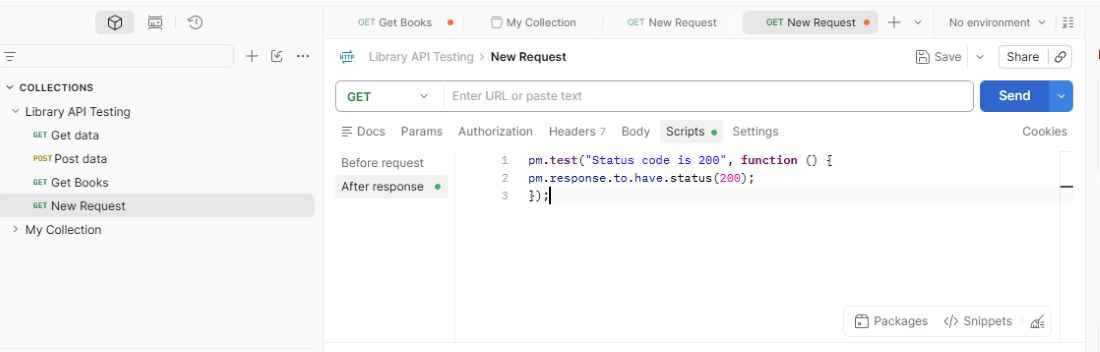
- Send the Request: Send the API request. Postman executes the request and then runs the assertions written in the After-response section.
- Check the Test Results: Check the test results to see whether each assertion has passed or failed. A passed test indicates that the response meets the expected condition, while a failed test indicates that the condition was not met.
Types of Assertions in Postman
Postman assertions can validate different parts of an API response, including status codes, response data, headers, cookies, and response times.
1. Checking Status Codes
Status code assertions verify whether an API returns the expected HTTP status code.
200commonly indicates a successful request.201commonly indicates that a resource was successfully created.401indicates that authentication is required or the provided credentials are invalid.500indicates an internal server error.
pm.test("Status code is 200", function () {
pm.response.to.have.status(200);
});
2. Checking Response Data
Response data assertions verify whether the response contains the expected data or meets specific conditions.
- Verify that filtered responses contain only the expected data.
- Verify that a login response contains an authentication token, such as a JWT.
- Verify specific property values in a JSON response.
pm.test("User name is John", function () {
const response = pm.response.json();
pm.expect(response.name).to.eql("John");
});
3. Checking Headers and Cookies
Assertions can verify whether an API response contains expected headers or cookies.
- Check whether the response contains the expected
Content-Typeheader. - Verify cookies returned by the server when required by the API.
pm.test("Content-Type is application/json", function () {
pm.expect(pm.response.headers.get("Content-Type"))
.to.include("application/json");
});
4. Checking Response Time
Response time assertions verify whether an API responds within an expected time limit.
pm.test("Response time is less than 500 ms", function () {
pm.expect(pm.response.responseTime).to.be.below(500);
});
This assertion passes when the API response time is less than 500 milliseconds.
Storing Response Data in Environment Variables
Postman scripts can extract data from an API response and store it in an environment variable. The stored value can then be used in subsequent API requests.
const jsonData = pm.response.json();
pm.environment.set("contactId", jsonData._id);
This is not an assertion itself, but it is a commonly used operation in Postman test scripts for passing data between requests.
Using Chai Assertions in Postman
Postman provides the Chai assertion library for writing clear and expressive API tests. Chai assertions can be used to validate response values, properties, data types, arrays, and other expected conditions.
Example: the following assertion verifies that the JSON response contains a location property with the value "India":
const response = pm.response.json();
pm.expect(response).to.have.property("location", "India");
Common Chai assertion methods include equal(), property(), include(), match(), a(), and lengthOf(). These methods help create readable and flexible assertions for validating API responses.
Advanced Assertions
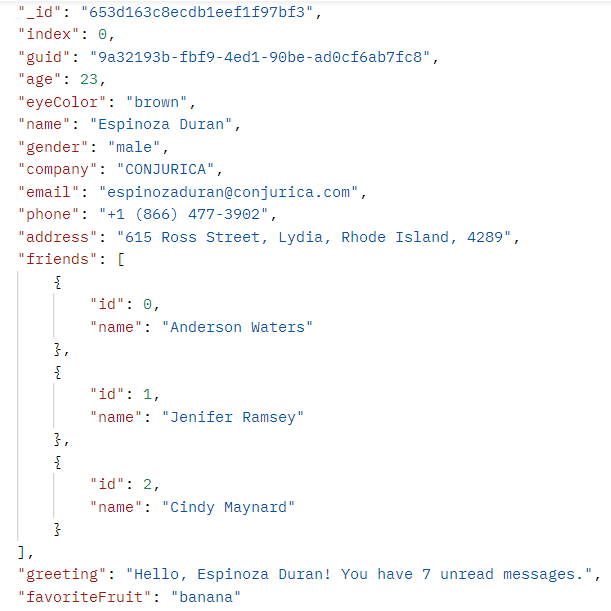
Advanced assertions allow you to validate more complex conditions in an API response, such as patterns, specific text, and relationships between different response values. You can use pm.response.json() to convert a JSON response into a JavaScript object and validate its properties.
Consider the following JSON response:
1. Validate an Email Using a Regular Expression
You can use a regular expression to verify whether an email value follows the expected format.
pm.test("Email format is valid", function () {
const responseData = pm.response.json();
const regexPattern = /^[a-zA-Z0-9+_.-]+@[a-zA-Z0-9.-]+$/;
pm.expect(responseData.email).to.match(regexPattern);});
2. Check Whether a String Contains Expected Text
You can verify whether a response value contains specific text.
pm.test("Greeting contains unread", function () {
const responseData = pm.response.json();
pm.expect(responseData.greeting).to.include("unread");});
3. Compare Related Response Values
You can extract values from the response and compare them to validate relationships between different properties.
pm.test("Email domain matches company name", function () {
const responseData = pm.response.json();
const email = responseData.email;
const domain = email.split("@")[1].split(".")[0];pm.expect(domain).to.equal(responseData.company.toLowerCase());});
Handling Assertion Failures
An assertion failure occurs when the actual API response does not match the expected condition defined in a test. Postman marks the assertion as failed, helping you identify and troubleshoot unexpected API behavior.
- Check the failed assertion and compare the actual value with the expected value.
- Verify the response status code, body, headers, and other relevant data.
- Correct the API, test condition, or expected value as required, and run the request again.
Example:
pm.test("Status code is 200", function () {
pm.response.to.have.status(200);
});
If the API returns 404 instead of the expected 200, Postman marks the test as failed.
Checking the Failure
You can inspect the following details to troubleshoot an assertion failure:
- Test Results: Identify which assertion failed.
- Response Body: Verify the returned data.
- Response Headers: Check the header values.
- Status Code: Confirm the HTTP response status.
- Response Time: Verify performance-related conditions.
After identifying the cause, update the API or assertion as appropriate and run the request again to confirm that the test passes.
