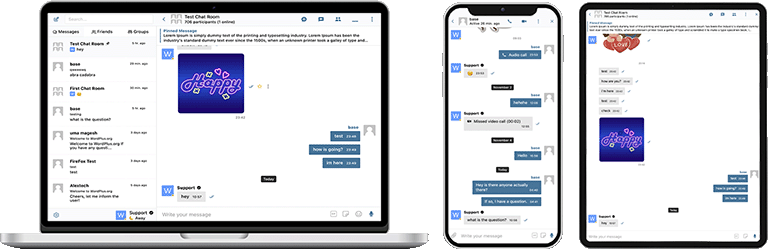

الوصف
Better Messages هو نظام المراسلة الخاصة الفوري لـ WordPress الأغنى بالميزات، مع تكاملات أصلية لـ BuddyPress، BuddyBoss Platform، Ultimate Member، PeepSo وأي مواقع أخرى مدعومة بـ WordPress.
حوّل موقع WordPress الخاص بك إلى منصة اتصال قوية مع المراسلة الخاصة، غرف الدردشة، مكالمات الفيديو والصوت، دردشة الفيديو الجماعية، روبوتات الدردشة بالذكاء الاصطناعي، وتطبيقات جوال أصلية.
سواء كنت تبني مجتمعاً خاصاً أو عاماً، شبكة اجتماعية، إنترانت، موقع غرف دردشة، سوقاً، موقع عضوية، منصة مواعدة، أو موقع اقتصاد المبدعين – توفر Better Messages ميزات مراسلة بمستوى المؤسسات مع واجهة سهلة الاستخدام.
جرّب Better Messages:
- عرض تجريبي مباشر — موقع تجريبي يعمل بكامل وظائفه
- التوثيق & قاعدة المعرفة — أدلة الإعداد، الميزات، الأسئلة الشائعة
- جميع التكاملات — كل إضافة وقالب مدعوم
- التسعير — مقارنة بين النسخة المجانية ونسخة WebSocket
- المدونة & الدروس — أدلة، شروحات، تعمقات في التكاملات
للمطورين:
- مرجع REST API — كل نقطة نهاية ومعامل
- خطافات PHP — الإجراءات، المرشحات، الوظائف المساعدة
- خطافات JavaScript — أحداث الواجهة الأمامية و API التخصيص
- سجل التغييرات — كل إصدار وإصلاح خطأ
- خارطة الطريق — الميزات القادمة والتصويتات
حالات الاستخدام الشائعة:
تُستخدم Better Messages على نطاق واسع لتشغيل المراسلة لـ:
- المجتمعات الخاصة — منصات مجتمعية مدفوعة وللأعضاء فقط، مجموعات العقول المدبرة، شبكات الخريجين، مجموعات الدورات، حلقات التدريب، مراسلة مقيدة حسب الدور، دردشات جماعية، روبوتات دردشة AI للتأهيل والأسئلة الشائعة، تشفير من طرف إلى طرف للمحادثات الحساسة
- المجتمعات العامة والشبكات الاجتماعية — منصات اجتماعية مفتوحة، مجتمعات الهوايات والاهتمامات، مواقع مدعومة بـ BuddyPress / BuddyBoss / PeepSo / FluentCommunity، مراسلة خاصة، محادثات جماعية، غرف دردشة، عناصر دردشة مصغرة تتبع المستخدمين عبر الموقع
- مواقع الإنترانت والشركات — اتصال داخلي بين الموظفين، قنوات الفرق والإدارات، وصول مقيد حسب دور WordPress، مشاركة الملفات، مكالمات صوتية ومرئية للفرق عن بُعد، خطة استضافة ذاتية للمواقع ذات متطلبات سيادة البيانات
- مواقع غرف الدردشة — مواقع مبنية حول غرف الدردشة في الوقت الفعلي كميزة أساسية، غرف عامة وخاصة، نقاشات حسب الموضوع، وصول الضيوف للزوار غير المسجلين، توصيل عبر AJAX أو WebSocket
- مواقع المواعدة والتوفيق — دردشة خاصة فردية، مرفقات صور وفيديو، مكالمات صوتية ومرئية، أزرار دردشة من ملف شخصي إلى آخر في أدلة الأعضاء، دردشة الضيوف للزوار المتصفحين، تشفير من طرف إلى طرف للمحادثات الخاصة
- منصات اقتصاد المبدعين والمعجبين — مراسلة مدفوعة مع فوترة لكل رسالة ولكل مكالمة عبر GamiPress أو MyCRED، مكالمات مرئية خاصة، مراسلة جماعية للمعجبين، عناصر دردشة مصغرة دائمة التشغيل
- منصات الرسائل المباشرة المدفوعة والمميزة — تحصيل رسوم لكل رسالة مباشرة أو لكل مكالمة مع تسعير حسب الدور، عرض الرصيد، مراسلة مقيدة حسب الدور، إشراف محتوى AI لتصفية محاولات البريد العشوائي والاحتيال
- منصات التدريب والإرشاد — رسائل خاصة من العميل إلى المدرب، مكالمات مرئية مجدولة، رسائل صوتية، مشاركة الملفات، غرف دردشة للدورات عبر تكاملات LMS
- المتاجر الإلكترونية (WooCommerce) — دردشة ما قبل البيع على صفحات المنتجات، دعم الطلبات بعد الشراء، رسائل تدرك سياق السلة، صندوق وارد مدمج في حسابي
- أسواق متعددة البائعين والإعلانات المبوبة — دردشة بين المشتري والبائع على كل قائمة، محادثات لكل قائمة، دردشة الضيوف للزوار غير المسجلين
- الدورات عبر الإنترنت (LMS) — غرف دردشة للدورات، رسائل خاصة من المدرب إلى الطالب، محادثات جماعية للدورات القائمة على المجموعات
- المنتديات ومجتمعات الأسئلة والأجوبة — رابط رسالة خاصة على كل رد، دردشة متابعة للمشاركين في الموضوع
- مواقع العقارات والقوائم — مراسلة استفسارات الوكلاء، محادثات دردشة بسياق العقار، دردشة الضيوف للزوار المتصفحين
- الفعاليات المباشرة والندوات عبر الإنترنت — غرف دردشة لردهة الفعالية، وصول الضيوف للحاضرين غير المسجلين، مكالمات صوتية ومرئية جماعية لجلسات AMA، رسائل مثبتة مع جداول أعمال الفعاليات
- منصات الحجز والمواعيد — مراسلة بين الضيف والمضيف على القوائم والحجوزات، مشاركة الملفات للمستندات، مكالمات صوتية ومرئية قبل تسجيل الدخول
- مجتمعات العملات الرقمية و Web3 — غرف دردشة محكومة بالرموز عبر إضافة العضوية وأدوار WordPress، مكالمات AMA جماعية، روبوتات AI معرفية لأسئلة الورقة البيضاء، تطبيقات الهاتف للتفاعل أثناء التنقل
إضافة “Better Messages” كانت تُعرف سابقاً بـ “BP Better Messages“.
ميزات المراسلة الأساسية:
- محادثات فورية مدعومة بـ AJAX أو WebSocket
- محادثات خاصة فردية
- محادثات جماعية مع عدد غير محدود من المشاركين
- غرف دردشة مع دعم وصول الضيوف
- رسائل لمجموعات BuddyPress و PeepSo و Ultimate Member و FluentCommunity
- مواضيع للمحادثات
- البحث في جميع الرسائل
- وضع علامة على الرسائل كمفضلة
- تثبيت الرسائل المهمة في أعلى المحادثة
- تثبيت المحادثات المفضلة في أعلى القائمة
- تصفية قائمة المحادثات لعرض المحادثات غير المقروءة فقط
- الرد على رسائل محددة
- تعديل الرسائل المرسلة (مع مؤشر التعديل)
- حذف الرسائل
- إعادة توجيه الرسائل إلى محادثات أخرى
- كتم إشعارات المحادثة
- حفظ تلقائي لمسودات الرسائل مع الاسترداد
الذكاء الاصطناعي & الأتمتة:
- روبوتات دردشة الذكاء الاصطناعي مدعومة بـ OpenAI و Anthropic (Claude) و Google Gemini
- روبوتات دردشة الذكاء الاصطناعي في المحادثات الجماعية مع ردود قائمة على الإشارة
- تلخيص المحادثات وملخصات مجدولة بالذكاء الاصطناعي
- تتبع استخدام الرموز مع تقدير التكلفة
- تحويل الرسائل الصوتية إلى نص بواسطة Better Messages Cloud AI أو OpenAI
- إمكانية البحث على الويب لروبوتات الذكاء الاصطناعي
- أداة البحث في الملفات لروبوتات الذكاء الاصطناعي
- توليد الصور بالذكاء الاصطناعي
- دعم ملفات PDF لمحادثات الذكاء الاصطناعي
الوسائط & المحتوى:
- مشاركة الملفات مع رفع قابل للاستئناف وإمكانية حماية الملفات من الوصول المباشر (صور، فيديو، مستندات)
- تحسين الصور والفيديو من جانب العميل لتوافق المتصفحات وتوفير مساحة التخزين (تحويل الصيغ، التحكم بالجودة، إزالة البيانات الوصفية)
- Voice and Video Messages (available as addon)
- روابط مضمنة مع صور مصغرة وأوصاف
- دعم oEmbed لـ YouTube و Vimeo و Spotify و SoundCloud و Flickr و20+ خدمة أخرى
- محدد الرموز التعبيرية
- حزم ملصقات مدمجة مع التحكم بالوصول حسب الدور ودعم اللغات المتعددة
- تكامل صور GIF مع موفري GIPHY و Klipy
- اقتراحات الملصقات أثناء الكتابة
- دعم تنسيق نص Markdown
الإشعارات:
- إشعارات البريد الإلكتروني للرسائل غير المقروءة (قوالب قابلة للتخصيص)
- دعم رابط إلغاء الاشتراك في البريد الإلكتروني
- إشعارات صوتية للرسائل الجديدة
- إشعارات فورية على الموقع في أي مكان على موقعك
الإشراف & الأمان:
- إشراف على المحتوى بالذكاء الاصطناعي مع مزوّدَين:
- Better Messages Moderation AI — مضمّن مع ترخيص WebSocket دون أي تكلفة إضافية، ولا يلزم توفير مفاتيح API من جهات خارجية. مدعوم من Better Messages Cloud مع فئات موسّعة وقواعد مخصصة وإدراك سياق المحادثة
- OpenAI Moderation API — مجانية الاستخدام، تتطلب مفتاح API من OpenAI
- قواعد إشراف مخصصة — حدّد قواعدك الخاصة بنص عادي
- إدراك سياق المحادثة — يكتشف الأنماط الموزّعة عبر رسائل متعددة
- اختر بين إجراءات الإشراف “الإبلاغ فقط” (مُوصى به) أو “الإيداع للمراجعة”
- رسائل خاضعة للإشراف المسبق – مراجعة الرسائل قبل التسليم
- ميزة الإبلاغ عن الرسائل
- فلتر الكلمات السيئة مع قائمة سوداء قابلة للتخصيص
- ميزة حظر المستخدم
- التحكم بالوصول حسب الدور
- قائمة بيضاء/سوداء للمستخدمين للإشراف
ميزات التفاعل:
- تفاعلات على الرسائل
- الإشارات (@اسم_المستخدم)
- رسائل جماعية من لوحة إدارة ووردبريس مع الجدولة ومرفقات الملفات والمعالجة في الخلفية
- محادثات مقترحة للمستخدمين الجدد
- ضمّن نقاط دخول المحادثات في أي مكان على موقعك دون استخدام الأكواد المختصرة
- خمس أدوات: الأصدقاء، المجموعات، المستخدمون، روبوتات الذكاء الاصطناعي، غرف الدردشة
- نمطان للعرض: الشريط الكلاسيكي أو الفقاعة العائمة (مع رؤوس الدردشة)
- ثلاثة أسطح للوضع: الشريط السفلي، اللوحة الجانبية، شريط علامات تبويب الجوال
- منتقي أيقونات لكل أداة، صندوق بحث، قيود الأدوار، ومفتاح “إخفاء علامة التبويب عند الفراغ”
- أداة المستخدمين بثلاثة أوضاع عرض (الكل / حسب الدور / مختارون يدوياً) مع الفرز حسب آخر نشاط أو تاريخ التسجيل
- ترتيب قابل للتخصيص لعلامات التبويب في الأدوات المصغرة واللوحة الجانبية وعرض الجوال
التخصيص:
- تصميم حديث وقابل للتخصيص بالكامل
- تخصيص سهل للألوان عبر WP Customizer
- أصوات إشعارات مخصصة
- دعم تخطيط RTL
- حل White Label
- قابل للترجمة بالكامل
- خيار الحذف التلقائي للرسائل القديمة
الخصوصية و GDPR:
- صفحة إعدادات مخصصة للخصوصية و GDPR
- تُخزَّن جميع بيانات الرسائل على خادمك الخاص
- يرسل إشراف AI (عند التفعيل) محتوى الرسالة للتحليل — لا تخزن Better Messages Cloud أي بيانات، راجع سياسة بيانات OpenAI إذا كنت تستخدم مزود OpenAI
- دعم تصدير ومحو البيانات الشخصية في WordPress (أدوات تصدير/محو البيانات الشخصية)
- نص سياسة خصوصية مقترح يتكيف بناءً على الميزات المفعلة
- خيار صور الرموز التعبيرية المستضافة ذاتياً — بدون طلبات CDN خارجية
- تضمينات فيديو صديقة للخصوصية — YouTube، Vimeo يتم تحميلها فقط بعد نقر المستخدم
- بدون ملفات تعريف ارتباط، بدون نصوص تحليلات أو تتبع
- وثائق الخصوصية و GDPR
هذه ليست قائمة كاملة بالميزات – يحتوي Better Messages على العديد من الميزات والخيارات الصغيرة غير المدرجة هنا. نضيف باستمرار ميزات وتحسينات جديدة بناءً على ملاحظات المستخدمين.
الإضافات & القوالب المتوافقة — أكثر من 35 تكاملاً أصلياً:
تعمل Better Messages على أي موقع WordPress جاهزاً للاستخدام. إذا كان موقعك يستخدم بالفعل إضافة مجتمع، أو LMS، أو سوقاً، أو دليلاً، فإن Better Messages تتصل بها مباشرة — مُورِّثة الأعضاء والملفات الشخصية والمجموعات والدورات والقوائم والمنشورات بحيث تظهر واجهات الدردشة في الأماكن الصحيحة دون إعداد.
منصات المجتمع & العضوية — يحل محل المراسل المدمج ويرث الأعضاء والملفات الشخصية والأصدقاء والمجموعات:
- BuddyPress
- BuddyBoss Platform — including BuddyBoss Theme and ReadyLaunch
- PeepSo
- Ultimate Member
- FluentCommunity — including Spaces and Courses
- SureDash
- ProfileGrid
- UsersWP
- WP User Manager
أنظمة إدارة التعلم (LMS) — غرف دردشة الدورات، مراسلة المدربين، ومحادثات بين الطلاب:
- LearnDash — including Instructor Role add-on
- LearnPress
- Tutor LMS
- MasterStudy LMS
- FluentCommunity Courses
التجارة الإلكترونية — WooCommerce — دردشة ما قبل البيع ودعم الطلبات للمتاجر الإلكترونية:
- WooCommerce — أزرار اتصال على صفحات المنتج، السلة، الدفع، والطلب. يتم نشر محتويات السلة تلقائياً في المحادثة كرسالة غنية بحيث يرى وكيل الدعم فوراً ما يبحث عنه العميل، صفحات الطلبات تنشر بطاقة سياق طلب منظمة. روابط المنتج العادية الملصقة في أي دردشة تتوسع إلى بطاقات منتج غنية. صندوق الوارد المدمج موجود داخل حسابي في WooCommerce. متوافق مع HPOS، متوافق مع قوالب الكتل، يعمل مع الدفع كضيف. متاح في كل من النسخة المجانية ونسخة WebSocket — تفتح نسخة WebSocket الدردشات كطبقة عنصر مصغر منبثقة بدلاً من الانتقال بعيداً.
الأسواق & متعدد البائعين — دردشة بين المشتري والبائع فوق WooCommerce، مع اشتراك لكل بائع وأزرار اتصال على متاجر البائعين وصفحات المنتجات وتفاصيل الطلبات:
القوائم، الأدلة & الإعلانات المبوبة — أزرار اتصال على كل قائمة، مع محادثات لكل قائمة:
- HivePress
- Directorist
- GeoDirectory
- Classified Listing
- Motors – Car Dealer, Classifieds & Listing
- WP Job Manager
قوالب العقارات — مراسلة الوكلاء والاستفسارات على قوائم العقارات:
المنتديات — رابط رسالة خاصة على كل رد:
- wpForo
- bbPress
التحفيز، النقاط & الوصول المدفوع — تحصيل رسوم لكل رسالة أو مكالمة مع تسعير حسب الدور وعرض الرصيد:
الأتمتة & منشئو الصفحات:
- Uncanny Automator — triggers and actions for chat events
- AutomatorWP — triggers and actions for chat events
- Crocoblock JetEngine Profile Builder — profile and chat shortcodes for JetEngine listings
الإشعارات الفورية & PWA:
- FluentNotify — web push through your own Firebase project
- OneSignal — web push notifications
- Progressify PWA — install-to-home-screen prompts on the messenger
منشئ الرموز القصيرة الشامل — أضف الدردشة إلى أي شيء آخر:
لا ترى إضافتك أو قالبك في القائمة؟ تأتي Better Messages مع منشئ الرموز القصيرة المرئي في لوحة تحكم WordPress Better Messages الرموز القصيرة الذي يتيح لك إسقاط زر دردشة مباشرة على أي نوع منشور مخصص، دليل، قائمة سوق، ملف وكيل، أو كتلة منشئ صفحات — دون كتابة PHP. وجّهه إلى منشور عينة، اختر كيفية حل المستخدم المستهدف (مؤلف المنشور، معرف المستخدم المخزّن في postmeta، أو صندوق وارد ثابت)، عيّن استراتيجية المحادثة والتسمية، وانسخ الرمز القصير المُولَّد. نفس الرمز القصير يعمل بعد ذلك لكل منشور بنفس الشكل، مع تخييط تلقائي لكل منشور وشريط اختياري داخل الدردشة. الصقه في Gutenberg أو Elementor أو Bricks أو Divi، أو مباشرة في قالب السمة.
لا تتردد في الإبلاغ عن أي عدم توافق أو طلب المزيد من التكاملات — هذا مهم جداً ويساعد في تحسين Better Messages!
إصدار WebSocket:
إصدار WebSocket هو خيار مدفوع، يمكنك الحصول على مفتاح الترخيص من موقعنا الإلكتروني.
نستخدم خوادمنا المخصصة لتنفيذ اتصالات WebSocket بين موقعك والمستخدمين. خوادمنا خاصة تماماً ولا تخزن أو تتعقب أي بيانات خاصة — تبقى جميع الرسائل في قاعدة بياناتك.
الأداء & الموثوقية:
- يقلل بشكل كبير الحمل على خادمك (حتى 200 ضعف أقل من الطلبات)
- تسليم فوري للرسائل في الوقت الفعلي
- يعمل مع أي استضافة بما في ذلك الاستضافة المشتركة
- لا حدود على الاتصالات المتزامنة أو المستخدمين النشطين شهرياً
مكالمات الفيديو & الصوت:
- مكالمات فيديو بجودة عالية (1 إلى 1)
- مكالمات صوتية بجودة عالية (1 إلى 1)
- دردشات فيديو جماعية (حتى 32 مشاركاً)
- دردشات صوتية جماعية (حتى 50 مشاركاً)
- مشاركة الشاشة في المكالمات والدردشات الجماعية
تطبيقات الجوال (ألفا):
- تطبيق iOS للجوال (أنشئ تطبيقك الخاص بعلامتك التجارية) – ألفا
- تطبيق Android للجوال (أنشئ تطبيقك الخاص بعلامتك التجارية) – ألفا
- إشعارات فورية للمكالمات والرسائل
- إشعارات VoIP للمكالمات الواردة
ملاحظة: تطبيقات الجوال حالياً في مرحلة ألفا. الوظائف الأساسية تعمل، لكن بعض الميزات قد تكون محدودة أو قيد التطوير.
ميزات الوقت الفعلي:
- حالة تسليم الرسائل (مُرسلة، مُسلّمة، مقروءة)
- مؤشرات نشاط الكتابة وتسجيل الصوت ورفع الملفات
- مؤشر التواجد متصل/غير متصل
- حالات المستخدم (متصل، بعيد، عدم الإزعاج)
- دردشات مصغرة – نوافذ دردشة في أي مكان على موقعك
- أداة المحادثات المصغرة – عرض ومتابعة المحادثات الحديثة من أي صفحة
- تصفية المتصلين فقط وترتيب يضع المتصلين أولاً لأداة المستخدمين المصغرة
Better Messages Cloud AI:
- ترجمة تلقائية للرسائل في المحادثات الفردية — 53 لغة، اكتشاف تلقائي
- إشراف ذكي على المحتوى — 23 فئة، قواعد مخصصة، وعي بسياق المحادثة
- تحويل الرسائل الصوتية إلى نص — 99+ لغة مع الكشف التلقائي
- لا حاجة لمفاتيح API من جهات خارجية — مضمّن مع ترخيص WebSocket بدون تكلفة إضافية
الأمان & التشفير:
- تشفير من طرف إلى طرف اختياري (E2EE) — يمكن تفعيله على مستوى الموقع ولكل محادثة، يتم تشفير الرسائل والملفات في متصفحات المستخدمين باستخدام AES-256-GCM، الخادم لا يرى النص الواضح أبداً
- تشفير المتصفح المحلي (AES256) لتخزين الرسائل دون اتصال
- إشعارات الويب الفورية (تعمل حتى عند إغلاق المتصفح)
- جميع البيانات مشفرة أثناء النقل، لذا لا يمكننا قراءتها على خوادمنا
الدعم:
- دعم بريد إلكتروني ذو أولوية
- تحديثات منتظمة وميزات جديدة
لماذا تعتبر WebSocket نقلة نوعية؟
احصل على مفتاح ترخيص إصدار WebSocket | شروط الاستخدام
تخطيط RTL مدمج في الإضافة.
يمكنك ترجمة الإضافة إلى لغتك باستخدام LocoTranslate أو المشاركة في ترجمة الإضافة.
لقطات الشاشة


المكوّنات
تقدّم هذه الإضافة مكوّنين اثنين (2).
- Messages The user's messages, where they can open any conversation they are part of
- Chat Room Embed a Better Messages chat room
التنصيب
- ارفع ملفات الإضافة إلى مجلد
/wp-content/plugins/bp-better-messages، أو قم بتثبيت الإضافة من خلال شاشة إضافات WordPress مباشرة. - قم بتفعيل الإضافة من خلال شاشة ‘الإضافات’ في WordPress
- استخدم الإعدادات -> Better Messages لتكوين الإضافة
الأسئلة المتكررّة
-
هل Better Messages مجاني؟
-
نعم — قم بتثبيت الإصدار المجاني من WordPress.org. يدعم المحادثات الخاصة والجماعية، وغرف الدردشة، ومشاركة الملفات، ومعاينات oEmbed، وإشعارات البريد الإلكتروني المجمّعة بذكاء، والوصول القائم على الأدوار، و guest chat، ومجموعة الميزات القياسية للـ messenger. إصدار WebSocket مدفوع ويفتح التسليم الفوري، والمكالمات الصوتية / المرئية الفردية والجماعية، و AI Chat Bots، و AI Content Moderation، و AI Message Translation، و Voice Message Transcription، وإشعارات الويب، والتشفير من طرف إلى طرف.
-
ما هي إضافات WordPress التي يتكامل معها Better Messages؟
-
أكثر من 35 تكاملاً أصلياً عبر منصات المجتمع (BuddyPress، BuddyBoss Platform، PeepSo، Ultimate Member، FluentCommunity، SureDash، ProfileGrid، UsersWP، WP User Manager)، LMS (LearnDash، LearnPress، Tutor LMS، MasterStudy LMS)، التجارة الإلكترونية (WooCommerce — دردشة ما قبل البيع ودعم الطلبات مع أزرار الاتصال على صفحات المنتج والسلة والدفع والطلب)، الأسواق متعددة البائعين (Dokan، WCFM، WC Vendors، MultiVendorX)، القوائم والأدلة (HivePress، Directorist، GeoDirectory، Classified Listing، Motors، WP Job Manager)، قوالب العقارات (Houzez، RealHomes)، المنتديات (wpForo، bbPress)، التحفيز (GamiPress، MyCRED)، الأتمتة (Uncanny Automator، AutomatorWP)، منشئو الصفحات (Crocoblock JetEngine)، والإشعارات الفورية / PWA (OneSignal، Progressify). إذا لم تكن إضافتك مدرجة، فإن منشئ الرموز القصيرة المرئي المدمج يتيح لك إضافة زر دردشة مباشرة إلى أي نوع منشور مخصص دون كتابة PHP. شاهد القائمة الكاملة للتكاملات.
-
هل يدعم المحادثات الجماعية؟
-
نعم — محادثات جماعية متكاملة مع سجل مشترك، وذكر، وتفاعلات، ورفع ملفات، وردود، وتحرير / حذف / إعادة توجيه، ومكالمات صوتية / مرئية جماعية (إصدار WebSocket). يمكن إقران المحادثات الجماعية تلقائيًا مع مجموعات BuddyPress / BuddyBoss / PeepSo / Ultimate Member / FluentCommunity، حيث يدخل الأعضاء ويغادرون المحادثة بالتزامن مع مجموعة المجتمع المصدر.
-
هل يستطيع الزوّار غير المسجّلين (الضيوف) الدردشة؟
-
نعم — يتيح Guest Chat للزوّار غير المسجَّلين الانضمام إلى غرف الدردشة، ومراسلة البائعين في أسواق التجارة الإلكترونية، وطرح الأسئلة على إعلانات الأدلة، أو التواصل مع دعم الموقع. يُدخل الضيف اسم العرض (واختياريًا بريدًا إلكترونيًا) ثم يشارك كمستخدم ضيف. ويتم الاحتفاظ بسجل محادثاته إذا قام بالتسجيل لاحقًا.
-
هل يدعم المكالمات الصوتية والمرئية على WordPress؟
-
نعم (نسخة WebSocket) — مكالمات صوتية / مرئية فردية وجماعية مباشرة داخل محادثة المراسل، وليست تكاملاً منفصلاً مع Zoom / Whereby. ترحيل الوسائط المستضاف مشمول مع ترخيص WebSocket، لا حاجة لحساب Twilio منفصل، أو اشتراك Daily / Whereby، أو خطة مطور Zoom. المكالمات بملء الشاشة على الهاتف وصورة داخل صورة على سطح المكتب.
-
هل Better Messages متوافق مع GDPR؟
-
نعم. تُخزَّن جميع بيانات الرسائل في قاعدة بيانات WordPress الخاصة بك فقط. مرحّل WebSocket السحابي لا يطّلع على محتوى الرسائل — فهو يوجّه الأحداث المشفّرة لكنه لا يقرأ ما يمرّ عبره ولا يحفظه ولا يفحصه. كما يتكامل Better Messages مع أدوات تصدير ومسح البيانات الشخصية المدمجة في WordPress. للمواقع ذات المتطلبات الأكثر صرامة في سيادة البيانات (المادة 9 من GDPR، أو ما يقارب HIPAA، أو أحمال البيانات الخاضعة للتنظيم)، تتوفر خطة استضافة ذاتية — تواصل مع الدعم.
-
هل يحتوي على ميزات AI؟
-
نعم (نسخة WebSocket، إضافة AI). تعمل روبوتات الدردشة AI (OpenAI، Anthropic Claude، Google Gemini) كمشاركين كاملين في أي محادثة، مع توجيهات نظام مخصصة وتحصيل نقاط لكل روبوت عبر GamiPress / MyCRED. توفر Better Messages Cloud AI إشراف محتوى AI (أكثر من 23 فئة بما في ذلك البريد العشوائي، الاحتيال، كشف الهوية، مشاركة جهات الاتصال)، ترجمة رسائل AI (53 لغة مع كشف تلقائي)، ونسخ الرسائل الصوتية (أكثر من 99 لغة) — جميعها مشمولة مع ترخيص WebSocket، لا حاجة لمفتاح API لطرف ثالث.
-
هل يحتوي على تطبيقات أصيلة لـ iOS و Android؟
-
نعم — يوفر Better Messages تطبيقات أصيلة لأنظمة iOS و Android مبنية على Capacitor، مع إشعارات الدفع، والتسليم الفوري، والمكالمات الصوتية / المرئية، وتعادل وظيفي كامل مع نسخة الويب. تتوفر إعادة بناء بعلامة بيضاء (White-label) للمواقع التي ترغب في تطبيق خاص بعلامتها التجارية على App Store / Play Store تحت حسابات المطوّر الخاصة بها.
-
هل يمكنني ترجمة واجهة messenger إلى لغتي؟
-
نعم — يمكن ترجمة Better Messages بالكامل من خلال أدوات الترجمة القياسية في WordPress (Loco Translate، WPML، Polylang) باستخدام نطاق النص
bp-better-messages. يأتي مع أكثر من 30 ترجمة من المجتمع. ساهم بترجمة أو حسّن إحداها عبر translate.wordpress.org. -
هل يدعم التشفير من طرف إلى طرف؟
-
نعم (نسخة WebSocket). يتم تفعيل التشفير من طرف إلى طرف لكل محادثة — يتم تشفير الرسائل ومرفقات الملفات في متصفح المرسل باستخدام AES-256-GCM قبل النقل، تبقى مشفرة أثناء التخزين في قاعدة البيانات، ولا يتم فك تشفيرها إلا في متصفح المستلم. يخزن الخادم النص المشفر فقط، ولا يستطيع أي مسؤول أو مهندس استضافة أو مهاجم لديه وصول إلى قاعدة البيانات قراءة محتوى رسائل محادثة E2E.
-
أين أجد الوثائق التفصيلية؟
-
تتوفر الوثائق الكاملة، وأدلة التكامل، ومرجع REST API، ومرجع الـ hooks، والدروس المرئية، وأكثر من 80 منشورًا في المدونة على www.better-messages.com.
المراجعات


المساهمون والمطوّرون
“Better Messages – غرف الدردشة، الدردشة الجماعية، الرسائل الخاصة & روبوتات الدردشة الذكية” هو برنامج مفتوح المصدر. وقد ساهم هؤلاء الأشخاص بالأسفل في هذه الإضافة.
المساهمون
لقد تم ترجمة ”Better Messages – غرف الدردشة، الدردشة الجماعية، الرسائل الخاصة & روبوتات الدردشة الذكية“ إلى 32 لغة. شكراً إلى جميع المُترجمين لمُساهماتهم.
مُهتم بالتطوير؟
تصفّح الشفرة، تحقق من مستودع SVN، أو الاشتراك في سجل التطوير بواسطة RSS.
سجل التغييرات
Better Messages 3.0 is coming soon — try it on the demo site and send your feedback to support.
2.15.33
- Added Unique Guest Names setting at Settings General — turn it off to let guests use a display name someone else already took
- Added
BetterMessages.openGroupCall()JavaScript function — take a member straight into a chat room’s group call from any page - Fixed an AI chat bot’s Conversations list failing with a critical error and reporting no conversations, when the bot was in a group or course
- Fixed a new encrypted conversation being created without a key when encryption was not yet set up on that device, leaving it unusable
- Fixed the other person’s video staying black in a one-to-one call answered in Firefox, while their audio and the call itself worked
- Fixed the default avatar at Settings Discussion being ignored on BuddyPress and BuddyBoss — users without a Gravatar showed the Gravatar logo
- Fixed a guest display name containing an underscore or percent sign being wrongly rejected as already taken
- Fixed unread counters bound to
better_messages_update_thread_unreadnever dropping back to zero once a conversation was read - Fixed text smiles containing
<,>or&, such as<3, never turning into an emoji, and the conversion staying on when it was switched off - Fixed a voice message shorter than a second arriving with no length shown, and the recording timer lagging up to a second behind
- Fixed a JavaScript error when an on-site notification was dismissed just as a new message reopened it
- Fixed conversations rendering blank when every emoji was removed from the reaction list
- Fixed the reaction picker still appearing on messages after reactions were switched off in the settings
- Fixed FluentCommunity’s pull to refresh reloading the page while scrolling a conversation in an installed iOS app
- Other minor bugfixes and improvements
2.15.32
- Chat rooms and conversations can now be exported as a transcript — plain text, a web page or a CSV spreadsheet
- Push notifications can now be delivered through FluentNotify, using a Firebase project you control
- Fixed a mini chat not opening for a chat room after the full screen view had been opened and closed
- Fixed incoming call notifications being hidden behind the full screen view, leaving no way to answer
- Added
get_group_call_participantsPHP function — read how many people are in a conversation’s group video or audio call - Added
BetterMessages.getGroupCallParticipants()JavaScript function — the same counts on the page, over the WebSocket, with no request to your own server - Added
better_messages_group_call_statusJavaScript action — fires whenever a group call’s participant count changes - Added
BetterMessages.subscribeGroupCallStatus()andunsubscribeGroupCallStatus()— watch the live count of any chat room, including one the visitor has not joined - Added
better_messages_group_call_participants_cache_timePHP filter — how long a group call participant count is cached - Added
better_messages_fluent_notify_integrationPHP filter — returnfalseto disable the FluentNotify integration - Other minor bugfixes and improvements
2.15.30 – 2.15.31
- Chat attachments are no longer listed by the WordPress media API
- Fixed guests being counted as BuddyPress members, which could report hundreds of members on a site with only a handful registered — updating clears the records already left behind
- Fixed a Send Message button in a members or friends list on a BuddyPress or Youzify profile page opening a conversation with the profile owner instead of the member it belongs to
- Fixed the Create encrypted conversation button being cut off at the bottom of a mini chat, with no way to scroll down to reach it
- Member and online counts in the chat rooms list no longer read “1 members” for a single member
- Presence-based chat rooms no longer carry an Open label in the chat rooms list
- The User Inbox block is now called Messages, and the settings that spoke of an “inbox” name the messages page or the conversation list instead
- Other minor bugfixes and improvements
2.15.29
- Fixed the messenger not loading at all on a site whose Ultimate Member Groups extension is too old for the installed Ultimate Member — the extension never starts up in that pairing, and the conversations list stayed permanently empty
- An Ultimate Member group with no picture of its own now shows a group marker, in place of an image that had been failing to load since the service hosting it shut down
- Fixed a chat room with no picture showing the generic person avatar in the chat rooms list, which made it look like a member — presence-based rooms, which keep no stored members, hit this every time
- A link to a chat room now opens the Chat Rooms tab only when that room is not in the conversations list — a room left in the inbox opens there, next to everything else the member is talking in
- Fixed the settings button missing from the messenger on phones — a site whose mobile tab bar comes from Chat Rooms, Users or AI Bots rather than Friends or Groups had no way to reach user settings there
- Fixed line breaks vanishing from messages typed over several lines when Enter starts a new line instead of sending — browser extensions that tag page elements, such as Bitdefender, were collapsing them into one run-on line
- Names decorated by the site keep that decoration in profile tooltips, as they did before 2.15.28 — only the avatar description, which is read aloud by screen readers, takes the name on its own
- Fixed a name decorated by the site through the username filters losing that decoration in the conversations and users lists — on a phone those lists are most of the messenger
- Fixed the confirmation for removing a participant, or for changing who moderates a conversation, spelling out the raw image markup of a badge the site attaches to member names — a PeepSo VIP icon printed as markup in the dialog, and in the notice that followed, in place of the plain name
- Fixed a desktop notification title breaking into placeholder text when the sender carries such a badge
- The Messages Window Roundness setting now also shapes the buttons inside the messenger and the name badges carried by the system messages and mentions, which stayed square whatever the setting was
- Other minor bugfixes and improvements
2.15.28
- Added Remember Last Tab at Settings Mini Widgets Layout — the messenger reopens on the tab each member used last, the way the mini widgets already do
- Users can now be given control over more of their own messenger — how Enter sends a message (Send on Enter Control, Settings Messaging), whether the new message popup appears (Popup Notification Control, Settings Notifications), and the sound played when they send one
- Sound switches are no longer offered to users for a sound that is silenced site-wide
- Fixed a “Send message” link from a forum or profile opening the side panel on the chat rooms list instead of the conversations list
- Fixed the call restriction at Settings Calls having no effect on guests — calls are now refused for every restricted role, not only hidden
- Fixed Auto-Delete Old Messages leaving an unread badge that could never be cleared, and conversations now refresh once the cleanup has run instead of keeping removed messages on screen
- Fixed guests losing their end-to-end encryption keys on every page load — a guest was asked for the password again on each visit
- Fixed the report reason arriving untranslated in the moderation email
- Fixed the sidebar collapse button doing nothing when Compact Mode was set to Always Expanded or Always Compact
- Fixed a name decorated by the site, such as a role badge, repeating itself in the avatar description and the profile tooltip
- Fixed a prefilled message on the new conversation screen being inserted as HTML instead of plain text
- Other minor bugfixes and improvements
2.15.27
- Added support for the gpt-image-2 image generation model in AI chat bots
- Added built-in pricing for the GPT-5.5 and GPT-5.6 models, and fixed gpt-5.4-mini / gpt-5.4-nano replies being charged at the full gpt-5.4 price
- The Context Messages Limit of an AI chat bot now also applies to OpenAI bots in one-to-one conversations, keeping long chats from getting more expensive with every message
- Fixed sending in a chat room getting slower with every member — in a room with tens of thousands of members a sticker took a minute to appear for the sender
- Fixed the AI chat bot model list offering models that cannot answer messages
- Fixed a bot whose model is no longer available answering with a generic error instead of saying the model needs to be changed
- Fixed the title and the YouTube logo on a shared video doing nothing when clicked
- Fixed shared videos not responding to clicks inside mini chats — they now open from a poster with a play button
- Fixed Privacy-friendly oEmbeds rendering a broken placeholder with the video title spilled into the message as text
- Video placeholders now start playback on the first tap, without a second click on the play button
- Fixed conversation list previews of video messages sometimes showing raw placeholder text
- Fixed the Conversations tab being listed last at Settings Mini Widgets Layout
- Fixed the unread counter on tabs covering the icon when tab labels are shown, and being unreadable in dark mode
- Stopped themes from reshaping the messenger’s own input fields — the side panel search box stays readable in dark mode
- Fixed the page appearing extremely tall while the messenger loads and then jumping once it is ready — the loading placeholder now fits the window exactly like the loaded messenger, including with Max Height set to a large value like 9999
- Renamed the Fixed Header Height setting to Window Height Offset, as it reserves window space for any fixed element on the page, not only a sticky header
- Other minor bugfixes and improvements
2.15.26
- Added
better_messages_push_notificationPHP filter — change the link, title and text of push notifications on every delivery path - Added
better_messages_mobile_push_contentPHP filter — change the wording of push notifications sent to the native mobile app - The messenger now opens on whichever tab is placed first at Settings Mini Widgets Layout, and the Conversations tab is now sortable like every other tab
- The collapsed side panel now keeps every tab usable as a vertical icon column, and on windows too narrow for the panel the tabs move to a strip at the top of the messenger
- Chat rooms now show unread and mention counters in the chat rooms list
- The Messages tab of the side panel and the mobile tab bar now shows an unread counter, configurable at Settings Mini Widgets Conversations
- The open conversation is now highlighted in every side panel list
- Fixed moderation in presence-based chat rooms — muting, banning and appointing moderators no longer fail with a permissions error, and bans and mutes are now enforced
- Fixed the muted and banned lists of a conversation returning expired bans and restrictions of other conversations
- Fixed the page scrolling to the chat on every conversation switch made from inside the messenger
- Fixed the Participants List Order setting being ignored by the online users sidebar and the participants list of presence-based rooms
- Fixed online counters not including the viewer right after logging in
- Fixed the browser tab title being emptied when an SEO plugin or theme outputs the title tag after the plugin scripts
- Fixed starting an end-to-end encrypted conversation failing with a “not on your friends list” error when messaging was restricted to friends or followers
- Fixed a new end-to-end encrypted conversation losing its encryption when the first message was held by pre-moderation — encrypted conversations now always skip the moderation queue
- Fixed AI chat bot replies occasionally left as unformatted, cut-off or garbled text after streaming finished, most often in the native mobile app
- Fixed tapping a shared YouTube or Vimeo video navigating the page to the video site instead of playing it — video players are now sandboxed, adjustable with the
better_messages_embed_sandboxPHP filter - Fixed links typed with a capitalised address, such as the
Https://phone keyboards produce, not being replaced by their preview - Fixed shared videos refusing to play in the mobile app on iPhone and iPad — video services now require the address of the embedding page, which an app cannot provide, so players are loaded through a small page served from your own site
- Fixed a conversation opening as an empty messenger when one of its messages quoted HTML or JSX source code, most often an AI chat bot reply — code in messages is now always shown as text
- User statuses, call messages and end-to-end encryption notices of the WebSocket version are now translatable on WordPress.org
- Other minor bugfixes and improvements
2.15.25
- Added
better_messages_thread_header_actionsJavaScript filter — the conversation header buttons (calls, minimize, maximize, the More menu) are now built as a single filterable list, so custom buttons can be added at any position and the built-in ones can be reordered, removed or replaced. Until now the header had no supported extension point: a button inserted into it by hand was moved or removed again whenever the header re-rendered. Custom buttons pick up the styling of the built-in ones, and the same filter also runs for mini chat headers - Added
better_messages_fluent_community_group_chat_membersandbetter_messages_fluent_community_course_chat_membersPHP filters — exclude specific users from the automatic membership sync of FluentCommunity Space and Course group chats: user IDs removed by the filter are taken out of the chat by the sync itself and are no longer re-added by later enrollment events - Fixed YouTube videos shared in messages staying locked inside the message bubble on iPhone and iPad — tapping one now opens the full screen player again, as it did before YouTube changed the default playback behaviour of its embeds
- Fixed link previews showing raw HTML codes such as
&in titles, and dropping the thumbnail when the image address contained one - Link previews now also find the page title when it is spread over several lines or carries attributes, and can no longer be spoofed by markup hidden inside a page’s scripts
- The minimum required WordPress version is now 6.3, matching what the Better Messages blocks have needed since they were introduced
- Added Button Icon setting at Settings Mobile Floating Chat Button — choose a preset icon or paste your own SVG for the floating chat button on mobile, which previously always used the built-in messages icon with no way to change it
- Fixed the “Chatting as” persona banner in the Houzez and RealHomes integrations briefly appearing to the other side of the conversation and vanishing from the persona side’s own view while messages were delivered in the WebSocket version — viewer-specific conversation details are no longer part of the shared realtime payloads
- Other minor bugfixes and improvements
2.15.20 – 2.15.24
- Added Chat Room Moderators — assign per-room moderators in the chat room editor: moderators can remove, mute and ban participants of their room, can reply while the room is closed, and see the participants list even when it is hidden from regular members
- Added Moderators can add participants per-room setting — moderators get an “Add new participants” action right in the chat interface, so room membership can be managed without contacting site administrators
- Added Presence-based chat rooms (WebSocket version) — a new chat room type where participants are only the users currently in the room: closing the page or navigating away removes them immediately, no membership is stored, and the participants list always shows who is really present
- Added per-room Group video calls and Group audio calls toggles to chat room settings — disable group calls in specific chat rooms while keeping them enabled globally
- Added Website Context setting to AI Content Moderation — describe what your website is used for and Better Messages Moderation AI will judge messages by your community norms, fixing overly aggressive moderation on dating sites and similar communities
- Added Roles that can send Bulk Messages setting — allow selected roles (for example HR or communications staff) to send bulk messages from the Administration page without full administrator access: they see and manage only their own bulk messages and cannot send on behalf of another user
- Added Roles that can access Administration setting — grant selected roles the Administration page and site-wide moderation powers without full administrator access, replacing the need for a role editor plugin to assign the moderation capability
- Added Markdown support to Bulk Messages — the bulk message editor now understands the same Markdown syntax as regular chat messages, so headings, bullet and numbered lists and links typed in the editor are delivered formatted
- Site administrators can now add participants to any regular chat room directly from the chat interface
- Fixed chat room moderators being unable to send messages in closed chat rooms
- Chat room moderators are never removed by Auto exclude users or Auto-remove inactive participants
- Fixed the Chat Rooms list showing only the first 100 rooms — rooms now load page by page as you scroll, search covers every room you have access to, and rooms you were added to are no longer missing from the list on sites with many chat rooms
- Fixed the Browser push notifications opt-in missing from the messenger user settings on sites where the email notification interval was set to 0 and Sound Notification Control was disabled, leaving users with no way to subscribe to web push
- Added
better_messages_onesignal_integrationPHP filter — returnfalseto fully disable the OneSignal integration, including the script which associates WordPress user IDs with OneSignal subscriptions - Added Open online users list by default per-room setting (WebSocket version) — when the online users sidebar is enabled, it can open automatically when users enter the chat room on desktop
- Added GTranslate integration — on GTranslate paid plans the messenger interface now follows the language of the page the visitor is on, instead of staying in the site default language on every translated sub-domain or sub-directory
- WebSocket version now stops AJAX fallback polling by default — when a visitor’s WebSocket connection cannot be established, their browser makes a single sync request per page load instead of polling the server every few seconds. The new Continuous Fallback Mode setting restores continuous fallback polling for the rare setups that need it, such as audiences behind country-level firewalls that block WebSocket traffic
- Improved settings page mobile menu layout
- Other minor bugfixes and improvements
2.15.13 – 2.15.19
- Added Automatic Message Cleanup for chat rooms
- Added Participants List Order setting at Settings Messaging Group Conversation Settings
- Better Messages Administration moderation area now showing message timestamps in the site timezone from Settings General
- Fixed user badge icons (e.g. PeepSo VIP icons) showing as HTML code instead of images in WP Admin user lists
- Fixed user badge icons (e.g. PeepSo VIP icons) appearing as raw HTML code in moderation and report email notifications
- Fixed encrypted conversations staying locked forever after a participant reset their encryption keys — the conversation key is now reliably re-shared as soon as any other participant visits the site or unlocks their encryption keys
- Fixed MasterStudy mobile bottom menu bar showing through the full-screen messenger on the student dashboard
- Fixed Better Messages mobile floating chat button and new-message notification being hidden behind the MasterStudy bottom menu bar on account pages
- Fixed SureDash integration message button on member profiles opening the messages page without starting a conversation with the selected member
- PeepSo integration: members banned in PeepSo can no longer send messages or start new conversations in Better Messages
- PeepSo integration: group chats are now accessible to group members only
- Fixed messenger failing to load with error 500 — infinite loop when an encrypted conversation awaiting encryption key sharing was deleted or no longer accessible
- Update Freemius SDK to 2.13.4
- Banned members in chat room cant join group video and audio calls anymore
- Added Weglot integration — the messenger interface now automatically follows the current Weglot language on multilingual sites
- Added
better_messages_i18n_localefilter to control which language the messenger interface loads - Fixed fatal PHP error (allowed memory size exhausted) when opening or starting a private conversation on sites with a very large accumulated history of no-reply bulk messages
- Fixed the LMS Courses tab (LearnPress, LearnDash, MasterStudy, TutorLMS, FluentCommunity) not showing in the mobile tab bar even when enabled — it now appears on mobile devices as it does on desktop
- Fixed MOV videos not playing in Safari on iPhone, iPad and macOS when File Protection Proxy is enabled
- Fixed OneSignal JavaScript error
- Other minor bugfixes and improvements
2.15.9 – 2.15.12
- Migration to new Roadmap
- Added Shortcode Builder — visual admin tool at Settings Shortcodes that configures the
[better_messages_live_chat_button]shortcode without code. - Added initial BuddyBoss ReadyLaunch theme integration
- Added new BuddyBoss settings group at Better Messages Settings Integrations BuddyPress — separate Full-page messenger, Full Width, Page Title, and Hide Mini Widget on Messages Page toggles for the ReadyLaunch theme and the classic BuddyBoss Theme
- Fixed FluentCommunity integration script throwing
Cannot read properties of nullon non-FluentCommunity pages - Hide the messenger Minimize button on the FluentCommunity
/messagesroute — the mini widgets are hidden there, so minimize had no surface to restore from - Fixed image download from the lightbox opening a stuck Quick Look preview when Better Messages is used in an iPhone PWA — now uses the native iOS share sheet
- Fixed guest authentication being silently dropped after long tab-idle periods in some websites
- Fixed BuddyBoss user-dropdown My Messages item not showing the unread counter on sites where the BuddyBoss Theme renders the user dropdown from a WordPress nav menu instead of the standard admin-bar nodes
- Fixed MultiVendorX vendor dashboard “Messages” sidebar link missing on some sites
- Fixed in-thread message Delivered tick rendering white in dark mode
- Added Settings Integrations WooCommerce MultiVendorX toggle “Hide Messages tab when vendor disables live chat” — off by default
- Fixed the “Sound Notification Control” setting not hiding the sound mute toggle from user settings when disabled
- Fixed the Guest Messages Page rendering the raw
[bp-better-messages]placeholder instead of the messenger when no main Messages Location page is set - Fixed user avatars and names not loading for not-yet-registered guests in chat rooms and the mini widget
- Other minor bugfixes and improvements
2.15.8
- Fixed pages with the slug
messagesreturning 404 on sites that use WooCommerce as the Messages Location - Fixed the compact-sidebar hover tooltip lingering on the conversation screen after tapping an avatar on mobile
- Added Guest Messages Page setting
- Added per-thread participant override mechanism — addons can display a participant under a different name, avatar and profile URL inside one specific thread without touching their real WordPress identity elsewhere. Same WP user can wear different identities in different threads at the same time. See the developer guide for the reusable pattern
- Added initial Houzez Real Estate Theme integration
- Added initial RealHomes Real Estate Theme integration
- Other minor bugfixes and improvements
2.15.7
- Added Send Message, Audio Call and Video Call buttons to the PeepSo user hovercard
- Added emoji search translations — admin can download per-locale annotations so emoji picker search works in 30+ languages (e.g. German “gesicht” finds 😀)
- Optimized emoji and stickers data delivery
- Fixed guest users seeing their own name and avatar in one-on-one conversation headers, mini chat heads, and thread list previews instead of the other participant in some cases
- Fixed MasterStudy LMS account mobile bottom menu overlapping the chat on the Messages page in full-screen mobile view
- Other minor bugfixes and improvements
2.15.6
- Added JavaScript filter slots in the guest authentication screen —
better_messages_auth_required_top,better_messages_auth_required_between, andbetter_messages_auth_required_bottom— for injecting custom HTML into the pre-chat popup, mini-widget banner, and full messages page wall - Added live unread counter badge to the BuddyBoss Theme profile dropdown Messages item
- Added Audio Call and Video Call buttons to the members directory and group member rows for both BuddyPress (Nouveau theme) and BuddyBoss Platform
- Added
better_messages_group_call_join_custom_errorPHP filter for blocking group audio/video call join with a custom error message, mirroring the existingbetter_messages_call_join_custom_errorfilter for 1-to-1 calls - Settings Integrations tab label and section titles now read “BuddyBoss” instead of “BuddyPress” when the BuddyBoss Platform is active
- Improved the bbPress reply Private Message link layout in BuddyBoss Theme
- Added initial Motors – Car Dealer, Classifieds & Listing integration
- Added initial Classified Listing integration
- Other minor bugfixes and improvements
2.15.5
- Added per-role filter for the auto-remove inactive chat room participants feature, so an admin can target guests or other specific roles only and leave members untouched
- Fixed new chat room participants could be remove if auto-removal option is enabled for users who did not wrote any message in the chat room
- Fixed online participant count in the chat rooms list not updating in real time when a user joined or was added to a room
- Fixed some group chats threads could reappear after the admin deleted them
- Other minor bugfixes and improvements
2.15.3
- Added System Messages
- Added per-role restrictions for group calls — Settings Group Calls Group Call Restrictions lets admins block specific WordPress roles from starting and / or joining group audio and video calls
- Group calls are now available to guest visitors
- Added possibility to auto-remove inactive chat room participants
- Added possibility to enable group audio/video calls button in mini chats
- Added support for LearnDash Instructor Role add-on
- Added shortcodes for every Send Message / Message Instructor button in the GeoDirectory, Directorist, LearnDash, LearnPress, Tutor LMS and MasterStudy LMS integrations, so they are possible to use with page builder. Check Integrations tab in plugin settings to find appropriate shortcode
- Reorganized Settings General tab — added a Quick Actions dashboard with shortcuts to the Chat Rooms, AI Chat Bots and Administration screens and added easy access to detected integrations
- End to end encryption is moved to Messaging settings tab
- Fixed PHP 8.5 deprecation notices
- Fixed sticker images pointing to the previous site URL after a domain migration
- Fixed guest visitors being redirected to wp-login after starting a chat from a WooCommerce
2.15.2
- Added initial MasterStudy LMS integration
- Added initial Directorist integration
- Added initial GeoDirectory integration
- Remake database displaying in plugin settings which make it easier to fix database if something not migrated properly
- LMS course chats are now their own thread type in database
- Added “Email Notifications” and “Push Notifications” toggles for LMS course chats under Settings Integrations LMS Shared Course Settings
- Other minor bugfixes and improvements
2.15.1
- Added initial LearnPress LMS integration
- Added initial Tutor LMS integration
- Added initial LearnDash LMS integration
- Added MultiVendorX 5.0+ integration alongside the existing < 5.0 support
- Older MultiVendorX 4.x sites are unaffected — the previous integration continues to load on those installations
- Added FluentCommunity Courses integration
- Added a dedicated Courses widget to the Mini Widgets which will be showing user enrolled courses in LMS
- Added “Maximum Message Length” setting (Settings Messaging) — cap the number of characters allowed in each message
- Other minor bugfixes and improvements
2.15.0
- Added three new widgets: Users (browse and message any site member, with optional online-only filtering, online-first ordering, sort by last activity or registration date, and three display modes — all / by role / hand-picked), AI Bots (start or continue conversations with configured AI chat bots), and Chat Rooms (browse public chat rooms with optional online-count badge)
- Redesigned the Settings Mini Widgets page into per-widget sub-tabs, with each widget exposing its own icon picker, search-box toggle, role restrictions matrix (mini bar / side panel / mobile bar), and widget-specific options
- Added “Hide Tab When Empty” toggle per widget — hides the Friends / Groups / AI Bots / Chat Rooms / Users tab entirely when the current user has nothing to show, instead of rendering an empty list
- Added AI Chat Bot welcome message — bots can greet users with a configurable opening message and placeholder
- Added dynamic placeholders which allows to dynamically change ai chat bots system prompts and welcome messages
- Renamed
better_messages_open_ai_bot_instructionfilter tobetter_messages_ai_bot_instructionsince it applies to all AI providers, and added new$thread_idand$message_idarguments so callbacks can read the conversation context and the triggering user message — the old name remains available as a deprecated alias - Added per-message edit time limit — restrict how long users can edit their own messages after sending
- Fixed fatal error when uploading attachments at the bulk messages screen
- Fixed
hideParticipantschat room setting being ignored when the attachments browser was enabled - Fixed stale sticker suggestions remaining visible in …
