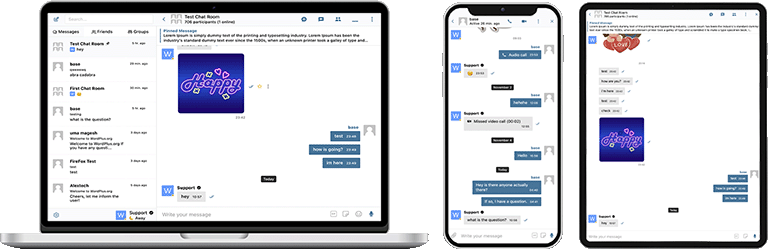

Apraksts
Better Messages ir funkcijām bagātākā reāllaika privāto ziņu sistēma WordPress vietnēm ar vietējām integrācijām BuddyPress, BuddyBoss Platform, Ultimate Member, PeepSo un jebkuras citas WordPress vietnes.
Pārveidojiet savu WordPress vietni par jaudīgu komunikācijas platformu ar privātām ziņām, čata istabām, video un audio zvaniem, grupu video čatiem, AI čatbotiem un vietējām mobilajām lietotnēm.
Neatkarīgi no tā, vai veidojat privātu vai publisku kopienu, sociālo tīklu, iekštīklu, čata istabu vietni, tirgus vietu, dalības vietni, iepazīšanās platformu vai radītāju ekonomikas vietni – Better Messages nodrošina uzņēmuma līmeņa ziņojumapmaiņas funkcijas ar viegli lietojamu saskarni.
Izmēģiniet Better Messages:
- Live Demo — pilnībā funkcionējoša demonstrācijas vietne
- Dokumentācija un zināšanu bāze — iestatīšanas ceļveži, funkcijas, BUJ
- Visas integrācijas — katrs atbalstītais spraudnis un tēma
- Cenas — bezmaksas un WebSocket versijas salīdzinājums
- Blogs & pamācības — ceļveži, soli pa solim aprakstītas instrukcijas, integrāciju padziļinātas analīzes
Izstrādātājiem:
- REST API Reference — katrs galapunkts un parametrs
- PHP Hooks — darbības, filtri un palīgfunkcijas
- JavaScript Hooks — priekšgala notikumi un pielāgošanas API
- Changelog — katrs izlaidums un kļūdu labojums
- Roadmap — gaidāmās funkcijas un balsojumi
Populāri lietošanas gadījumi:
Better Messages tiek plaši izmantots, lai nodrošinātu ziņojumapmaiņu:
- Privātas kopienas — maksas un tikai dalībniekiem paredzētas kopienas platformas, mastermind grupas, absolventu tīkli, kursu plūsmas, koučinga loki, ziņojumapmaiņa ar lomu ierobežojumiem, grupu čati, AI čata boti iesācējiem un BUJ, pilnīga šifrēšana sensitīvām sarunām
- Publiskas kopienas un sociālie tīkli — atvērtas sociālās platformas, hobiju un interešu kopienas, vietnes, kas balstītas uz BuddyPress / BuddyBoss / PeepSo / FluentCommunity, privāta ziņojumapmaiņa, grupu sarunas, čata istabas, mini čata logrīki, kas seko lietotājiem visā vietnē
- Iekštīkli un korporatīvās vietnes — iekšējā darbinieku saziņa, komandu un nodaļu kanāli, piekļuve ar lomu ierobežojumiem pēc WordPress lomām, failu kopīgošana, balss un video zvani attālinātām komandām, pašmitināts plāns vietnēm ar datu suverenitātes prasībām
- Čata istabu vietnes — vietnes, kas veidotas ap reāllaika čata istabām kā galveno funkciju, publiskas un privātas istabas, tematiskas diskusijas, viesu piekļuve nereģistrētiem apmeklētājiem, piegāde caur AJAX vai WebSocket
- Iepazīšanās un savedēju vietnes — privāts 1 pret 1 čats, foto un video pielikumi, balss un video zvani, čata pogas no profila uz profilu dalībnieku katalogos, viesu čats apmeklētājiem, kuri pārlūko vietni, pilnīga šifrēšana privātajām sarunām
- Radītāju ekonomikas un fanu platformas — maksas ziņojumapmaiņa ar iekasēšanu par ziņu un zvanu, izmantojot GamiPress vai MyCRED, privāti video zvani, masveida ziņojumapmaiņa faniem, vienmēr aktīvi mini čata logrīki
- Premium un monetizētas DM platformas — iekasēšana par tiešo ziņu vai zvanu ar cenu noteikšanu pēc lomām, atlikuma rādīšana, ziņojumapmaiņa ar lomu ierobežojumiem, AI satura moderācija, lai filtrētu surogātpastu un krāpšanas mēģinājumus
- Koučinga un mentoringa platformas — DM starp klientu un koučeri, plānoti video zvani, balss ziņojumi, failu kopīgošana, kursu čata istabas caur LMS integrācijām
- Tiešsaistes veikali (WooCommerce) — pirmspārdošanas čats produktu lapās, pēcpirkuma pasūtījumu atbalsts, ziņojumi, kuri ņem vērā groza kontekstu, iegultā iesūtne sadaļā Mans konts
- Daudzu pārdevēju tirgus vietas un sludinājumi — pircēja un pārdevēja čats pie katra sludinājuma, atsevišķas virknes katram sludinājumam, viesu čats nereģistrētiem apmeklētājiem
- Tiešsaistes kursi (LMS) — kursu čata istabas, DM starp pasniedzēju un studentu, grupu sarunas plūsmas kursiem
- Forumi un Q&A kopienas — privātās ziņas saite pie katras atbildes, papildu čats virknes dalībniekiem
- Nekustamā īpašuma un sludinājumu vietnes — pieprasījumu ziņojumi aģentiem, čata virknes nekustamā īpašuma kontekstā, viesu čats apmeklētājiem, kuri pārlūko vietni
- Tiešraides pasākumi un vebināri — pasākuma vestibila čata istabas, viesu piekļuve nereģistrētiem dalībniekiem, grupu balss un video zvani AMA, piespraustas ziņas ar pasākuma darba kārtību
- Rezervāciju un tikšanos platformas — viesa un saimnieka saziņa par sludinājumiem un rezervācijām, failu kopīgošana dokumentiem, balss un video zvani pirms ierašanās
- Kripto un Web3 kopienas — čata istabas ar piekļuvi pēc žetoniem caur dalības spraudni un WordPress lomām, AMA grupu zvani, AI zināšanu boti whitepaper jautājumiem, mobilās lietotnes saziņai ceļā
Spraudnis “Better Messages” iepriekš tika saukts par “BP Better Messages“.
Tulkojiet Better Messages savā valodā
Ziņojumapmaiņas pamatfunkcijas:
- AJAX vai WebSocket darbināmas sarunas reāllaikā
- Privātas sarunas viens pret vienu
- Grupu sarunas ar neierobežotu dalībnieku skaitu
- Čata istabas ar viesu piekļuves atbalstu
- Ziņas BuddyPress grupām, PeepSo grupām, Ultimate Member grupām, FluentCommunity grupām
- Sarunu tēmas
- Meklēt visās ziņās
- Atzīmēt ziņas kā izlasi
- Piespraust svarīgas ziņas sarunas augšā
- Piespraust iecienītās sarunas saraksta augšā
- Filtrēt sarunu sarakstu, lai rādītu tikai nelasītās sarunas
- Atbildēt uz konkrētām ziņām
- Rediģēt nosūtītās ziņas (ar rediģēšanas indikatoru)
- Dzēst ziņas
- Pārsūtīt ziņas uz citām sarunām
- Sarunas paziņojumu apklusināšana
- Ziņu melnrakstu automātiska saglabāšana ar atjaunošanu
AI & Automatizācija:
- AI čatboti, kuru darbību nodrošina OpenAI, Anthropic (Claude) un Google Gemini
- AI čatboti grupu sarunās ar atbildēm pēc pieminējumiem
- Sarunu apkopošana un ieplānoti kopsavilkumi ar AI palīdzību
- Žetonu lietojuma izsekošana ar izmaksu aprēķinu
- Balss ziņojumu transkripcija ar Better Messages Cloud AI vai OpenAI
- Tīmekļa meklēšanas iespēja AI botiem
- Failu meklēšanas rīks AI botiem
- Attēlu ģenerēšana ar AI
- PDF failu atbalsts AI sarunām
Mediji & Saturs:
- Failu koplietošana ar atsākamām augšupielādēm un iespēju aizsargāt failus no tiešas piekļuves (attēli, video, dokumenti)
- Attēlu un video optimizācija klienta pusē starpplatformu pārlūkprogrammu saderībai un krātuves vietas ietaupīšanai (formātu konvertēšana, kvalitātes kontrole, metadatu noņemšana)
- Voice and Video Messages (available as addon)
- Iegultās saites ar sīktēliem un aprakstiem
- oEmbed atbalsts YouTube, Vimeo, Spotify, SoundCloud, Flickr un 20+ pakalpojumiem
- Emocijzīmju atlasītājs
- Iebūvētas uzlīmju pakas ar piekļuvi pēc lomas un valodas atbalstu
- GIF integrācija ar GIPHY un Klipy pakalpojumu sniedzējiem
- Iebūvēti uzlīmju ieteikumi rakstīšanas laikā
- Markdown teksta formatēšanas atbalsts
Paziņojumi:
- E-pasta paziņojumi par nelasītām ziņām (pielāgojamas veidnes)
- Atrakstīšanās saites atbalsts e-pastos
- Skaņas paziņojumi par jaunām ziņām
- Uznirstošie paziņojumi jebkurā Jūsu vietnes vietā
Moderēšana & Drošība:
- AI satura moderēšana ar diviem pakalpojumu sniedzējiem:
- Better Messages Moderation AI — iekļauts WebSocket licencē bez papildu maksas, nav nepieciešamas trešo pušu API atslēgas. Darbību nodrošina Better Messages Cloud ar paplašinātām kategorijām, pielāgotiem noteikumiem un sarunas konteksta izpratni
- OpenAI Moderation API — bezmaksas lietošanai, nepieciešama OpenAI API atslēga
- Pielāgoti moderēšanas noteikumi — definējiet savus noteikumus vienkāršā tekstā
- Sarunas konteksta izpratne — atklāj modeļus, kas sadalīti vairākās ziņās
- Izvēlieties starp “Tikai atzīmēt” (ieteicams) vai “Aizturēt pārskatīšanai” moderēšanas darbībām
- Iepriekš moderētas ziņas — ziņu pārskatīšana pirms piegādes
- Ziņu ziņošanas funkcija
- Necenzētu vārdu filtrs ar pielāgojamu melno sarakstu
- Lietotāja bloķēšanas funkcija
- Uz lomām balstīta piekļuves kontrole
- Lietotāju baltais/melnais saraksts moderēšanai
Iesaistes funkcijas:
- Reakcijas uz ziņām
- Pieminējumi (@lietotājvārds)
- Masveida ziņu sūtīšana no WP Admin ar plānošanu, failu pielikumiem un apstrādi fonā
- Ieteiktās sarunas jauniem lietotājiem
- Iegult sarunu sākumpunktus jebkurā vietnes vietā, neizmantojot īskodus
- Pieci logrīki: Draugi, Grupas, Lietotāji, AI boti, Čata istabas
- Divi attēlošanas stili: klasiskā josla vai peldošais burbulis (ar čata galvām)
- Trīs izvietošanas vietas: apakšējā josla, sānu panelis, mobilā ciļņu josla
- Ikonu izvēlētājs katram logrīkam, meklēšanas lauks, lomu ierobežojumi un slēdzis “Slēpt cilni, kad tukša”
- Lietotāju logrīks ar trim attēlošanas režīmiem (visi / pēc lomas / izlasīti manuāli) un kārtošanu pēc pēdējās aktivitātes vai reģistrācijas datuma
- Pielāgojama ciļņu secība mini logrīkos, sānu panelī un mobilajā skatā
Pielāgošana:
- Moderns, pilnībā pielāgojams dizains
- Vienkārša krāsu pielāgošana caur WP pielāgotāju
- Pielāgoti paziņojumu skaņas signāli
- RTL izkārtojuma atbalsts
- Baltā etiķetes risinājums
- Pilnībā tulkojams
- Veco ziņu automātiskas dzēšanas opcija
Privātums & VDAR:
- Īpaša Privātuma & VDAR iestatījumu lapa
- Visi ziņu dati tiek glabāti Jūsu serverī
- AI moderācija (ja iespējota) nosūta ziņas saturu analīzei — Better Messages Cloud neglabā nekādus datus, izmantojot OpenAI pakalpojumu sniedzēju, izskatiet OpenAI datu politiku
- WordPress personas datu eksporta un dzēšanas atbalsts (Rīki Eksportēt/Dzēst personas datus)
- Ieteiktais privātuma politikas teksts, kas pielāgojas atkarībā no iespējotajām funkcijām
- Pašmitinātu emocijzīmju attēlu opcija — bez ārējiem CDN pieprasījumiem
- Privātumam draudzīgi video iegulumi — YouTube, Vimeo ielādējas tikai pēc lietotāja klikšķa
- Netiek iestatīti sīkfaili, nav analītikas vai izsekošanas skriptu
- Privātuma & VDAR dokumentācija
Šis nav pilns funkciju saraksts — Better Messages piedāvā vēl daudzas citas mazākas funkcijas un opcijas, kas šeit nav uzskaitītas. Mēs pastāvīgi pievienojam jaunas funkcijas un uzlabojumus, pamatojoties uz lietotāju atsauksmēm.
Saderīgi spraudņi & tēmas — vairāk nekā 35 vietējās integrācijas:
Better Messages darbojas jebkurā WordPress vietnē uzreiz pēc instalēšanas. Ja jūsu vietnē jau darbojas kopienas spraudnis, LMS, tirgus vieta vai katalogs, Better Messages tieši savienojas ar to — mantojot dalībniekus, profilus, grupas, kursus, sludinājumus un ierakstus, lai čata elementi parādītos pareizajās vietās bez papildu konfigurācijas.
Kopienu & dalības platformas — aizstāj iebūvēto ziņojumapmaiņu un manto dalībniekus, profilus, draugus un grupas:
- BuddyPress
- BuddyBoss Platform — including BuddyBoss Theme and ReadyLaunch
- PeepSo
- Ultimate Member
- FluentCommunity — including Spaces and Courses
- SureDash
- ProfileGrid
- UsersWP
- WP User Manager
Mācību pārvaldības sistēmas (LMS) — kursu čata istabas, pasniedzēju ziņojumi un studentu savstarpējās sarunas:
- LearnDash — including Instructor Role add-on
- LearnPress
- Tutor LMS
- MasterStudy LMS
- FluentCommunity Courses
E-komercija — WooCommerce — pirmspārdošanas un pasūtījumu atbalsta čats tiešsaistes veikaliem:
- WooCommerce — saziņas pogas produkta, groza, kases un pasūtījuma lapās. Groza saturs automātiski tiek nosūtīts sarunā kā bagātīga ziņa, lai jūsu atbalsta aģents uzreiz redzētu, ko klients aplūko, pasūtījuma lapas nosūta strukturētu pasūtījuma konteksta kartīti. Vienkārši produktu URL, ielīmēti čatā, tiek paplašināti par bagātīgām produkta kartītēm. Iegultā iesūtne atrodas tieši WooCommerce Manā kontā. Saderīgs ar HPOS, saderīgs ar bloku tēmām, darbojas ar viesu kasi. Pieejams gan bezmaksas, gan WebSocket versijās — WebSocket versija atver čatus kā uznirstoša mini logrīka pārklājumu, nevis pāriet uz citu lapu.
Tirgus vietas & daudzu pārdevēju — pircēja un pārdevēja čats virs WooCommerce ar katra pārdevēja izvēles iespējām un saziņas pogām pārdevēju veikalos, produktu lapās un pasūtījumu detaļās:
Sludinājumi, katalogi & klasificētie — saziņas pogas pie katra sludinājuma ar atsevišķām virknēm katram sludinājumam:
- HivePress
- Directorist
- GeoDirectory
- Classified Listing
- Motors – Car Dealer, Classifieds & Listing
- WP Job Manager
Nekustamā īpašuma tēmas — aģentu un pieprasījumu ziņojumi nekustamā īpašuma sludinājumos:
Forumi — privātās ziņas saite pie katras atbildes:
- wpForo
- bbPress
Spēļošana, punkti & maksas piekļuve — iekasēšana par ziņu vai zvanu ar cenu noteikšanu pēc lomām un atlikuma rādīšanu:
Automatizācija & lapu veidotāji:
- Uncanny Automator — triggers and actions for chat events
- AutomatorWP — triggers and actions for chat events
- Crocoblock JetEngine Profile Builder — profile and chat shortcodes for JetEngine listings
Push & PWA:
- FluentNotify — web push through your own Firebase project
- OneSignal — web push notifications
- Progressify PWA — install-to-home-screen prompts on the messenger
Universāls Shortcode Builder — pievienojiet čatu jebkam citam:
Neredzat savu spraudni vai tēmu sarakstā? Better Messages piedāvā vizuālo Shortcode Builder izvēlnē WP Admin Better Messages Shortcodes, kas ļauj ievietot Live Chat pogu jebkurā pielāgotā ieraksta veidā, katalogā, tirgus vietas sludinājumā, aģenta profilā vai lapu veidotāja blokā — bez PHP rakstīšanas. Norādiet to uz parauga ierakstu, izvēlieties, kā tiek noteikts mērķa lietotājs (ieraksta autors, postmeta saglabāts lietotāja ID vai fiksēta iesūtne), iestatiet virknes stratēģiju un etiķeti un kopējiet ģenerēto īso kodu. Tas pats īsais kods darbojas katram ieraksta veida ierakstam ar automātisku virknēšanu katram ierakstam un papildu reklāmkarogu čatā. Ielīmējiet to Gutenberg, Elementor, Bricks, Divi vai tieši tēmas veidnē.
Droši ziņojiet par jebkādu nesaderību vai pieprasiet vairāk integrāciju — tas ir ļoti svarīgi un palīdz uzlabot Better Messages!
WebSocket versija:
WebSocket versija ir maksas opcija, licences atslēgu Jūs varat iegūt mūsu vietnē.
WebSocket sakaru īstenošanai starp jūsu vietni un lietotājiem mēs izmantojam savus dedicētos serverus. Mūsu serveri ir pilnīgi privāti un neglabā un neseko nekādiem privātiem datiem — visas ziņas paliek jūsu datu bāzē.
Veiktspēja & Uzticamība:
- Ievērojami samazina servera slodzi (līdz 200 reižu mazāk pieprasījumu)
- Tūlītēja ziņu piegāde reāllaikā
- Darbojas ar jebkuru hostingu, ieskaitot koplietošanas hostingu
- Nav ierobežojumu vienlaicīgu savienojumu vai mēneša aktīvo lietotāju skaitam
Video & audio zvani:
- HD video zvani (1 pret 1)
- HD audio zvani (1 pret 1)
- Grupu video čati (līdz 32 dalībniekiem)
- Grupu audio čati (līdz 50 dalībniekiem)
- Ekrāna koplietošana zvanos un grupu čatos
Mobilās lietotnes (Alfa):
- iOS mobilā lietotne (izveidojiet savu zīmola lietotni) — Alfa
- Android mobilā lietotne (izveidojiet savu zīmola lietotni) — Alfa
- Push paziņojumi par zvaniem un ziņām
- VoIP paziņojumi par ienākošajiem zvaniem
Piezīme: Mobilās lietotnes pašlaik ir alfa stadijā. Pamata funkcionalitāte darbojas, taču dažas funkcijas var būt ierobežotas vai izstrādes stadijā.
Reāllaika funkcijas:
- Ziņu piegādes statuss (nosūtīts, piegādāts, izlasīts)
- Aktivitātes indikatori: rakstīšana, balss ierakstīšana un failu augšupielāde
- Tiešsaistes/Bezsaistes klātbūtnes indikators
- Lietotāju statusi (Tiešsaistē, Projām, Netraucēt)
- Mini čati — čata logi jebkurā Jūsu vietnes vietā
- Mini sarunu logrīks — uzskaitiet un turpiniet nesenās sarunas no jebkuras lapas
- Filtrs “Tikai tiešsaistē” un kārtošana ar tiešsaistes lietotājiem priekšplānā lietotāju mini logrīkam
Better Messages Cloud AI:
- Automātiska ziņojumu tulkošana divvirzienu sarunās — 53 valodas, automātiska noteikšana
- AI Content Moderation — 23 kategorijas, pielāgoti noteikumi, sarunas konteksta apzināšanās
- Balss ziņojumu transkripcija — 99+ valodas ar automātisku noteikšanu
- Nav nepieciešamas trešo pušu API atslēgas — iekļauts WebSocket licencē bez papildu maksas
Drošība & Šifrēšana:
- Pēc izvēles pilnīgā šifrēšana (E2EE) — var iespējot vietnes līmenī un katrai sarunai, ziņas un faili tiek šifrēti lietotāju pārlūkprogrammās ar AES-256-GCM, serveris nekad neredz atklātu tekstu
- Lokāla pārlūkprogrammas šifrēšana (AES256) ziņu glabāšanai bezsaistē
- Tīmekļa push paziņojumi (darbojas pat tad, kad pārlūkprogramma ir aizvērta)
- Visi dati šifrēti pārsūtīšanas laikā, tāpēc mēs tos nevaram nolasīt savos serveros
Atbalsts:
- Prioritārs e-pasta atbalsts
- Regulāri atjauninājumi un jaunas funkcijas
Kāpēc WebSockets maina spēles noteikumus?
Iegūstiet WebSocket versijas licences atslēgu | Lietošanas noteikumi
RTL izkārtojums ir iebūvēts spraudnī.
Jūs varat tulkot spraudni savā valodā ar LocoTranslate vai piedalīties spraudņa tulkošanā.
Ekrānuzņēmumi


Bloki
Šis spraudnis nodrošina 2 blokus.
- Messages The user's messages, where they can open any conversation they are part of
- Chat Room Embed a Better Messages chat room
Uzstādīšana
- Augšupielādējiet spraudņa failus mapē
/wp-content/plugins/bp-better-messagesvai instalējiet spraudni tieši caur WordPress spraudņu sadaļu. - Aktivizējiet spraudni caur WordPress sadaļu ‘Spraudņi’
- Izmantojiet Iestatījumi -> Better Messages, lai konfigurētu spraudni
BUJ
-
Vai Better Messages ir bezmaksas?
-
Jā — instalējiet bezmaksas versiju no WordPress.org. Tā atbalsta privātas un grupu sarakstes, čatu telpas, failu kopīgošanu, oEmbed priekšskatījumus, gudri grupētus e-pasta paziņojumus, lomās balstītu piekļuvi, guest chat un standarta messenger funkciju kopumu. WebSocket versija ir maksas, un tā atver tūlītēju piegādi, balss / video zvanus viens pret vienu un grupās, AI Chat Bots, AI Content Moderation, AI Message Translation, Voice Message Transcription, tīmekļa push paziņojumus un end-to-end šifrēšanu.
-
Ar kuriem WordPress spraudņiem Better Messages integrējas?
-
Vairāk nekā 35 vietējās integrācijas dažādās kopienu platformās (BuddyPress, BuddyBoss Platform, PeepSo, Ultimate Member, FluentCommunity, SureDash, ProfileGrid, UsersWP, WP User Manager), LMS (LearnDash, LearnPress, Tutor LMS, MasterStudy LMS), e-komercijā (WooCommerce — pirmspārdošanas un pasūtījumu atbalsta čats ar saziņas pogām produkta, groza, kases un pasūtījuma lapās), daudzu pārdevēju tirgus vietās (Dokan, WCFM, WC Vendors, MultiVendorX), sludinājumos un katalogos (HivePress, Directorist, GeoDirectory, Classified Listing, Motors, WP Job Manager), nekustamā īpašuma tēmās (Houzez, RealHomes), forumos (wpForo, bbPress), spēļošanā (GamiPress, MyCRED), automatizācijā (Uncanny Automator, AutomatorWP), lapu veidotājos (Crocoblock JetEngine) un push / PWA (OneSignal, Progressify). Ja jūsu spraudnis nav sarakstā, iebūvētais vizuālais Shortcode Builder ļauj pievienot pogu Live Chat jebkuram pielāgotam ieraksta veidam bez PHP rakstīšanas. Skatiet pilnu integrāciju sarakstu.
-
Vai tā atbalsta grupu sarakstes?
-
Jā — pilnvērtīgas grupu sarakstes ar koplietotu vēsturi, pieminējumiem, reakcijām, failu augšupielādēm, atbildēm, rediģēšanu / dzēšanu / pārsūtīšanu un grupu balss / video zvaniem (WebSocket versija). Grupu sarakstes var automātiski sasaistīt ar BuddyPress / BuddyBoss / PeepSo / Ultimate Member / FluentCommunity grupām — dalībnieki pievienojas sarakstei un to atstāj sinhroni ar avota kopienas grupu.
-
Vai nereģistrēti apmeklētāji (viesi) var sarakstīties?
-
Jā — Guest Chat ļauj nereģistrētiem apmeklētājiem pievienoties čatu telpām, sūtīt ziņas pārdevējiem tirgus platformās, uzdot jautājumus kataloga ierakstos vai sazināties ar vietnes atbalstu. Viesis ievada attēloto vārdu (un pēc izvēles e-pasta adresi), un tad piedalās kā lietotājs-viesis. Viņa sarakstes vēsture tiek saglabāta, ja viņš vēlāk reģistrējas.
-
Vai tā atbalsta balss un video zvanus WordPress vidē?
-
Jā (WebSocket versija) — divpusēji un grupu balss / video zvani notiek tieši ziņojumapmaiņas virknē, nevis kā atsevišķa Zoom / Whereby integrācija. Mitināts mediju retranslators ir iekļauts WebSocket licencē, nav vajadzīgs atsevišķs Twilio konts, Daily / Whereby abonements vai Zoom izstrādātāja plāns. Zvani mobilajā ierīcē ir pilnekrāna režīmā, bet datorā – attēls attēlā.
-
Vai Better Messages ir saderīga ar GDPR?
-
Jā. Visi ziņu dati tiek glabāti tikai jūsu WordPress datu bāzē. WebSocket mākoņa relejs ir „akls” pret ziņu saturu — tas maršrutē šifrētus notikumus, taču nelasa, neuzglabā un nepārbauda to, kas tam iet cauri. Better Messages integrējas arī ar WordPress iebūvētajiem personas datu eksportēšanas un dzēšanas rīkiem. Vietnēm ar stingrākām datu suverenitātes prasībām (GDPR 9. pants, HIPAA tuvi gadījumi, regulētas datu darba slodzes) ir pieejams self-hosted plāns — sazinieties ar atbalstu.
-
Vai ir AI funkcijas?
-
Jā (WebSocket versija, AI papildinājums). AI čata boti (OpenAI, Anthropic Claude, Google Gemini) darbojas kā pilntiesīgi dalībnieki jebkurā virknē, ar pielāgotām sistēmas pamudinājumiem un punktu iekasēšanu par katru botu, izmantojot GamiPress / MyCRED. Better Messages Cloud AI nodrošina AI satura moderāciju (vairāk nekā 23 kategorijas, ieskaitot surogātpastu, krāpšanu, doxing, kontaktinformācijas dalīšanos), AI ziņu tulkošanu (53 valodas ar automātisku atpazīšanu) un balss ziņu transkripciju (vairāk nekā 99 valodas) — viss iekļauts WebSocket licencē, nav nepieciešama trešās puses API atslēga.
-
Vai ir vietējās iOS un Android lietotnes?
-
Jā — Better Messages piedāvā uz Capacitor balstītas vietējās iOS un Android mobilās lietotnes ar push paziņojumiem, piegādi reāllaikā, balss / video zvaniem un pilnvērtīgu funkcionalitātes paritāti ar messenger tīmekļa versiju. Vietnēm, kuras vēlas savu zīmola lietotni App Store / Play Store ar savu izstrādātāju kontu, ir pieejama white-label pārbūve.
-
Vai varu pārtulkot messenger saskarni savā valodā?
-
Jā — Better Messages ir pilnībā tulkojama, izmantojot WordPress standarta tulkošanas rīkus (Loco Translate, WPML, Polylang) ar text domain
bp-better-messages. Tiek piegādāta ar vairāk nekā 30 kopienas tulkojumiem. Tulkojumu var pievienot vai uzlabot vietnē translate.wordpress.org. -
Vai tas atbalsta end-to-end šifrēšanu?
-
Jā (WebSocket versija). Pilnīgā šifrēšana tiek iespējota katrai virknei — ziņas un failu pielikumi sūtītāja pārlūkprogrammā tiek šifrēti ar AES-256-GCM pirms pārsūtīšanas, paliek šifrēti datu bāzē miera stāvoklī un tiek atšifrēti tikai saņēmēja pārlūkprogrammā. Serveris glabā tikai šifrētu tekstu, neviens administrators, mitināšanas inženieris vai uzbrucējs ar piekļuvi datu bāzei nevar nolasīt E2E virknes ziņu saturu.
-
Kur atrodama detalizēta dokumentācija?
-
Pilnā dokumentācija, integrāciju ceļveži, REST API atsauce, hooks atsauce, video pamācības un vairāk nekā 80 emuāra ierakstu atrodami vietnē www.better-messages.com.
Atsauksmes


Autori un izstrādātāji
“Better Messages – čata istabas, grupu čats, privāti ziņojumi & AI čata boti” ir atvērtā pirmkoda programmatūra. Šo spraudni ir veidojuši šādi cilvēki.
Līdzdalībnieki
“Better Messages – čata istabas, grupu čats, privāti ziņojumi & AI čata boti” ir tulkots lokalizācijās 32. Paldies tulkotājiem par ieguldījumu.
Vai jūs interesē attīstība?
Pārlūkojiet kodu, apmeklējiet SVN krātuvi vai abonējiet attīstības žurnālu, ko izveidojis RSS.
Izmaiņu žurnāls
Better Messages 3.0 is coming soon — try it on the demo site and send your feedback to support.
2.15.33
- Added Unique Guest Names setting at Settings General — turn it off to let guests use a display name someone else already took
- Added
BetterMessages.openGroupCall()JavaScript function — take a member straight into a chat room’s group call from any page - Fixed an AI chat bot’s Conversations list failing with a critical error and reporting no conversations, when the bot was in a group or course
- Fixed a new encrypted conversation being created without a key when encryption was not yet set up on that device, leaving it unusable
- Fixed the other person’s video staying black in a one-to-one call answered in Firefox, while their audio and the call itself worked
- Fixed the default avatar at Settings Discussion being ignored on BuddyPress and BuddyBoss — users without a Gravatar showed the Gravatar logo
- Fixed a guest display name containing an underscore or percent sign being wrongly rejected as already taken
- Fixed unread counters bound to
better_messages_update_thread_unreadnever dropping back to zero once a conversation was read - Fixed text smiles containing
<,>or&, such as<3, never turning into an emoji, and the conversion staying on when it was switched off - Fixed a voice message shorter than a second arriving with no length shown, and the recording timer lagging up to a second behind
- Fixed a JavaScript error when an on-site notification was dismissed just as a new message reopened it
- Fixed conversations rendering blank when every emoji was removed from the reaction list
- Fixed the reaction picker still appearing on messages after reactions were switched off in the settings
- Fixed FluentCommunity’s pull to refresh reloading the page while scrolling a conversation in an installed iOS app
- Other minor bugfixes and improvements
2.15.32
- Chat rooms and conversations can now be exported as a transcript — plain text, a web page or a CSV spreadsheet
- Push notifications can now be delivered through FluentNotify, using a Firebase project you control
- Fixed a mini chat not opening for a chat room after the full screen view had been opened and closed
- Fixed incoming call notifications being hidden behind the full screen view, leaving no way to answer
- Added
get_group_call_participantsPHP function — read how many people are in a conversation’s group video or audio call - Added
BetterMessages.getGroupCallParticipants()JavaScript function — the same counts on the page, over the WebSocket, with no request to your own server - Added
better_messages_group_call_statusJavaScript action — fires whenever a group call’s participant count changes - Added
BetterMessages.subscribeGroupCallStatus()andunsubscribeGroupCallStatus()— watch the live count of any chat room, including one the visitor has not joined - Added
better_messages_group_call_participants_cache_timePHP filter — how long a group call participant count is cached - Added
better_messages_fluent_notify_integrationPHP filter — returnfalseto disable the FluentNotify integration - Other minor bugfixes and improvements
2.15.30 – 2.15.31
- Chat attachments are no longer listed by the WordPress media API
- Fixed guests being counted as BuddyPress members, which could report hundreds of members on a site with only a handful registered — updating clears the records already left behind
- Fixed a Send Message button in a members or friends list on a BuddyPress or Youzify profile page opening a conversation with the profile owner instead of the member it belongs to
- Fixed the Create encrypted conversation button being cut off at the bottom of a mini chat, with no way to scroll down to reach it
- Member and online counts in the chat rooms list no longer read “1 members” for a single member
- Presence-based chat rooms no longer carry an Open label in the chat rooms list
- The User Inbox block is now called Messages, and the settings that spoke of an “inbox” name the messages page or the conversation list instead
- Other minor bugfixes and improvements
2.15.29
- Fixed the messenger not loading at all on a site whose Ultimate Member Groups extension is too old for the installed Ultimate Member — the extension never starts up in that pairing, and the conversations list stayed permanently empty
- An Ultimate Member group with no picture of its own now shows a group marker, in place of an image that had been failing to load since the service hosting it shut down
- Fixed a chat room with no picture showing the generic person avatar in the chat rooms list, which made it look like a member — presence-based rooms, which keep no stored members, hit this every time
- A link to a chat room now opens the Chat Rooms tab only when that room is not in the conversations list — a room left in the inbox opens there, next to everything else the member is talking in
- Fixed the settings button missing from the messenger on phones — a site whose mobile tab bar comes from Chat Rooms, Users or AI Bots rather than Friends or Groups had no way to reach user settings there
- Fixed line breaks vanishing from messages typed over several lines when Enter starts a new line instead of sending — browser extensions that tag page elements, such as Bitdefender, were collapsing them into one run-on line
- Names decorated by the site keep that decoration in profile tooltips, as they did before 2.15.28 — only the avatar description, which is read aloud by screen readers, takes the name on its own
- Fixed a name decorated by the site through the username filters losing that decoration in the conversations and users lists — on a phone those lists are most of the messenger
- Fixed the confirmation for removing a participant, or for changing who moderates a conversation, spelling out the raw image markup of a badge the site attaches to member names — a PeepSo VIP icon printed as markup in the dialog, and in the notice that followed, in place of the plain name
- Fixed a desktop notification title breaking into placeholder text when the sender carries such a badge
- The Messages Window Roundness setting now also shapes the buttons inside the messenger and the name badges carried by the system messages and mentions, which stayed square whatever the setting was
- Other minor bugfixes and improvements
2.15.28
- Added Remember Last Tab at Settings Mini Widgets Layout — the messenger reopens on the tab each member used last, the way the mini widgets already do
- Users can now be given control over more of their own messenger — how Enter sends a message (Send on Enter Control, Settings Messaging), whether the new message popup appears (Popup Notification Control, Settings Notifications), and the sound played when they send one
- Sound switches are no longer offered to users for a sound that is silenced site-wide
- Fixed a “Send message” link from a forum or profile opening the side panel on the chat rooms list instead of the conversations list
- Fixed the call restriction at Settings Calls having no effect on guests — calls are now refused for every restricted role, not only hidden
- Fixed Auto-Delete Old Messages leaving an unread badge that could never be cleared, and conversations now refresh once the cleanup has run instead of keeping removed messages on screen
- Fixed guests losing their end-to-end encryption keys on every page load — a guest was asked for the password again on each visit
- Fixed the report reason arriving untranslated in the moderation email
- Fixed the sidebar collapse button doing nothing when Compact Mode was set to Always Expanded or Always Compact
- Fixed a name decorated by the site, such as a role badge, repeating itself in the avatar description and the profile tooltip
- Fixed a prefilled message on the new conversation screen being inserted as HTML instead of plain text
- Other minor bugfixes and improvements
2.15.27
- Added support for the gpt-image-2 image generation model in AI chat bots
- Added built-in pricing for the GPT-5.5 and GPT-5.6 models, and fixed gpt-5.4-mini / gpt-5.4-nano replies being charged at the full gpt-5.4 price
- The Context Messages Limit of an AI chat bot now also applies to OpenAI bots in one-to-one conversations, keeping long chats from getting more expensive with every message
- Fixed sending in a chat room getting slower with every member — in a room with tens of thousands of members a sticker took a minute to appear for the sender
- Fixed the AI chat bot model list offering models that cannot answer messages
- Fixed a bot whose model is no longer available answering with a generic error instead of saying the model needs to be changed
- Fixed the title and the YouTube logo on a shared video doing nothing when clicked
- Fixed shared videos not responding to clicks inside mini chats — they now open from a poster with a play button
- Fixed Privacy-friendly oEmbeds rendering a broken placeholder with the video title spilled into the message as text
- Video placeholders now start playback on the first tap, without a second click on the play button
- Fixed conversation list previews of video messages sometimes showing raw placeholder text
- Fixed the Conversations tab being listed last at Settings Mini Widgets Layout
- Fixed the unread counter on tabs covering the icon when tab labels are shown, and being unreadable in dark mode
- Stopped themes from reshaping the messenger’s own input fields — the side panel search box stays readable in dark mode
- Fixed the page appearing extremely tall while the messenger loads and then jumping once it is ready — the loading placeholder now fits the window exactly like the loaded messenger, including with Max Height set to a large value like 9999
- Renamed the Fixed Header Height setting to Window Height Offset, as it reserves window space for any fixed element on the page, not only a sticky header
- Other minor bugfixes and improvements
2.15.26
- Added
better_messages_push_notificationPHP filter — change the link, title and text of push notifications on every delivery path - Added
better_messages_mobile_push_contentPHP filter — change the wording of push notifications sent to the native mobile app - The messenger now opens on whichever tab is placed first at Settings Mini Widgets Layout, and the Conversations tab is now sortable like every other tab
- The collapsed side panel now keeps every tab usable as a vertical icon column, and on windows too narrow for the panel the tabs move to a strip at the top of the messenger
- Chat rooms now show unread and mention counters in the chat rooms list
- The Messages tab of the side panel and the mobile tab bar now shows an unread counter, configurable at Settings Mini Widgets Conversations
- The open conversation is now highlighted in every side panel list
- Fixed moderation in presence-based chat rooms — muting, banning and appointing moderators no longer fail with a permissions error, and bans and mutes are now enforced
- Fixed the muted and banned lists of a conversation returning expired bans and restrictions of other conversations
- Fixed the page scrolling to the chat on every conversation switch made from inside the messenger
- Fixed the Participants List Order setting being ignored by the online users sidebar and the participants list of presence-based rooms
- Fixed online counters not including the viewer right after logging in
- Fixed the browser tab title being emptied when an SEO plugin or theme outputs the title tag after the plugin scripts
- Fixed starting an end-to-end encrypted conversation failing with a “not on your friends list” error when messaging was restricted to friends or followers
- Fixed a new end-to-end encrypted conversation losing its encryption when the first message was held by pre-moderation — encrypted conversations now always skip the moderation queue
- Fixed AI chat bot replies occasionally left as unformatted, cut-off or garbled text after streaming finished, most often in the native mobile app
- Fixed tapping a shared YouTube or Vimeo video navigating the page to the video site instead of playing it — video players are now sandboxed, adjustable with the
better_messages_embed_sandboxPHP filter - Fixed links typed with a capitalised address, such as the
Https://phone keyboards produce, not being replaced by their preview - Fixed shared videos refusing to play in the mobile app on iPhone and iPad — video services now require the address of the embedding page, which an app cannot provide, so players are loaded through a small page served from your own site
- Fixed a conversation opening as an empty messenger when one of its messages quoted HTML or JSX source code, most often an AI chat bot reply — code in messages is now always shown as text
- User statuses, call messages and end-to-end encryption notices of the WebSocket version are now translatable on WordPress.org
- Other minor bugfixes and improvements
2.15.25
- Added
better_messages_thread_header_actionsJavaScript filter — the conversation header buttons (calls, minimize, maximize, the More menu) are now built as a single filterable list, so custom buttons can be added at any position and the built-in ones can be reordered, removed or replaced. Until now the header had no supported extension point: a button inserted into it by hand was moved or removed again whenever the header re-rendered. Custom buttons pick up the styling of the built-in ones, and the same filter also runs for mini chat headers - Added
better_messages_fluent_community_group_chat_membersandbetter_messages_fluent_community_course_chat_membersPHP filters — exclude specific users from the automatic membership sync of FluentCommunity Space and Course group chats: user IDs removed by the filter are taken out of the chat by the sync itself and are no longer re-added by later enrollment events - Fixed YouTube videos shared in messages staying locked inside the message bubble on iPhone and iPad — tapping one now opens the full screen player again, as it did before YouTube changed the default playback behaviour of its embeds
- Fixed link previews showing raw HTML codes such as
&in titles, and dropping the thumbnail when the image address contained one - Link previews now also find the page title when it is spread over several lines or carries attributes, and can no longer be spoofed by markup hidden inside a page’s scripts
- The minimum required WordPress version is now 6.3, matching what the Better Messages blocks have needed since they were introduced
- Added Button Icon setting at Settings Mobile Floating Chat Button — choose a preset icon or paste your own SVG for the floating chat button on mobile, which previously always used the built-in messages icon with no way to change it
- Fixed the “Chatting as” persona banner in the Houzez and RealHomes integrations briefly appearing to the other side of the conversation and vanishing from the persona side’s own view while messages were delivered in the WebSocket version — viewer-specific conversation details are no longer part of the shared realtime payloads
- Other minor bugfixes and improvements
2.15.20 – 2.15.24
- Added Chat Room Moderators — assign per-room moderators in the chat room editor: moderators can remove, mute and ban participants of their room, can reply while the room is closed, and see the participants list even when it is hidden from regular members
- Added Moderators can add participants per-room setting — moderators get an “Add new participants” action right in the chat interface, so room membership can be managed without contacting site administrators
- Added Presence-based chat rooms (WebSocket version) — a new chat room type where participants are only the users currently in the room: closing the page or navigating away removes them immediately, no membership is stored, and the participants list always shows who is really present
- Added per-room Group video calls and Group audio calls toggles to chat room settings — disable group calls in specific chat rooms while keeping them enabled globally
- Added Website Context setting to AI Content Moderation — describe what your website is used for and Better Messages Moderation AI will judge messages by your community norms, fixing overly aggressive moderation on dating sites and similar communities
- Added Roles that can send Bulk Messages setting — allow selected roles (for example HR or communications staff) to send bulk messages from the Administration page without full administrator access: they see and manage only their own bulk messages and cannot send on behalf of another user
- Added Roles that can access Administration setting — grant selected roles the Administration page and site-wide moderation powers without full administrator access, replacing the need for a role editor plugin to assign the moderation capability
- Added Markdown support to Bulk Messages — the bulk message editor now understands the same Markdown syntax as regular chat messages, so headings, bullet and numbered lists and links typed in the editor are delivered formatted
- Site administrators can now add participants to any regular chat room directly from the chat interface
- Fixed chat room moderators being unable to send messages in closed chat rooms
- Chat room moderators are never removed by Auto exclude users or Auto-remove inactive participants
- Fixed the Chat Rooms list showing only the first 100 rooms — rooms now load page by page as you scroll, search covers every room you have access to, and rooms you were added to are no longer missing from the list on sites with many chat rooms
- Fixed the Browser push notifications opt-in missing from the messenger user settings on sites where the email notification interval was set to 0 and Sound Notification Control was disabled, leaving users with no way to subscribe to web push
- Added
better_messages_onesignal_integrationPHP filter — returnfalseto fully disable the OneSignal integration, including the script which associates WordPress user IDs with OneSignal subscriptions - Added Open online users list by default per-room setting (WebSocket version) — when the online users sidebar is enabled, it can open automatically when users enter the chat room on desktop
- Added GTranslate integration — on GTranslate paid plans the messenger interface now follows the language of the page the visitor is on, instead of staying in the site default language on every translated sub-domain or sub-directory
- WebSocket version now stops AJAX fallback polling by default — when a visitor’s WebSocket connection cannot be established, their browser makes a single sync request per page load instead of polling the server every few seconds. The new Continuous Fallback Mode setting restores continuous fallback polling for the rare setups that need it, such as audiences behind country-level firewalls that block WebSocket traffic
- Improved settings page mobile menu layout
- Other minor bugfixes and improvements
2.15.13 – 2.15.19
- Added Automatic Message Cleanup for chat rooms
- Added Participants List Order setting at Settings Messaging Group Conversation Settings
- Better Messages Administration moderation area now showing message timestamps in the site timezone from Settings General
- Fixed user badge icons (e.g. PeepSo VIP icons) showing as HTML code instead of images in WP Admin user lists
- Fixed user badge icons (e.g. PeepSo VIP icons) appearing as raw HTML code in moderation and report email notifications
- Fixed encrypted conversations staying locked forever after a participant reset their encryption keys — the conversation key is now reliably re-shared as soon as any other participant visits the site or unlocks their encryption keys
- Fixed MasterStudy mobile bottom menu bar showing through the full-screen messenger on the student dashboard
- Fixed Better Messages mobile floating chat button and new-message notification being hidden behind the MasterStudy bottom menu bar on account pages
- Fixed SureDash integration message button on member profiles opening the messages page without starting a conversation with the selected member
- PeepSo integration: members banned in PeepSo can no longer send messages or start new conversations in Better Messages
- PeepSo integration: group chats are now accessible to group members only
- Fixed messenger failing to load with error 500 — infinite loop when an encrypted conversation awaiting encryption key sharing was deleted or no longer accessible
- Update Freemius SDK to 2.13.4
- Banned members in chat room cant join group video and audio calls anymore
- Added Weglot integration — the messenger interface now automatically follows the current Weglot language on multilingual sites
- Added
better_messages_i18n_localefilter to control which language the messenger interface loads - Fixed fatal PHP error (allowed memory size exhausted) when opening or starting a private conversation on sites with a very large accumulated history of no-reply bulk messages
- Fixed the LMS Courses tab (LearnPress, LearnDash, MasterStudy, TutorLMS, FluentCommunity) not showing in the mobile tab bar even when enabled — it now appears on mobile devices as it does on desktop
- Fixed MOV videos not playing in Safari on iPhone, iPad and macOS when File Protection Proxy is enabled
- Fixed OneSignal JavaScript error
- Other minor bugfixes and improvements
2.15.9 – 2.15.12
- Migration to new Roadmap
- Added Shortcode Builder — visual admin tool at Settings Shortcodes that configures the
[better_messages_live_chat_button]shortcode without code. - Added initial BuddyBoss ReadyLaunch theme integration
- Added new BuddyBoss settings group at Better Messages Settings Integrations BuddyPress — separate Full-page messenger, Full Width, Page Title, and Hide Mini Widget on Messages Page toggles for the ReadyLaunch theme and the classic BuddyBoss Theme
- Fixed FluentCommunity integration script throwing
Cannot read properties of nullon non-FluentCommunity pages - Hide the messenger Minimize button on the FluentCommunity
/messagesroute — the mini widgets are hidden there, so minimize had no surface to restore from - Fixed image download from the lightbox opening a stuck Quick Look preview when Better Messages is used in an iPhone PWA — now uses the native iOS share sheet
- Fixed guest authentication being silently dropped after long tab-idle periods in some websites
- Fixed BuddyBoss user-dropdown My Messages item not showing the unread counter on sites where the BuddyBoss Theme renders the user dropdown from a WordPress nav menu instead of the standard admin-bar nodes
- Fixed MultiVendorX vendor dashboard “Messages” sidebar link missing on some sites
- Fixed in-thread message Delivered tick rendering white in dark mode
- Added Settings Integrations WooCommerce MultiVendorX toggle “Hide Messages tab when vendor disables live chat” — off by default
- Fixed the “Sound Notification Control” setting not hiding the sound mute toggle from user settings when disabled
- Fixed the Guest Messages Page rendering the raw
[bp-better-messages]placeholder instead of the messenger when no main Messages Location page is set - Fixed user avatars and names not loading for not-yet-registered guests in chat rooms and the mini widget
- Other minor bugfixes and improvements
2.15.8
- Fixed pages with the slug
messagesreturning 404 on sites that use WooCommerce as the Messages Location - Fixed the compact-sidebar hover tooltip lingering on the conversation screen after tapping an avatar on mobile
- Added Guest Messages Page setting
- Added per-thread participant override mechanism — addons can display a participant under a different name, avatar and profile URL inside one specific thread without touching their real WordPress identity elsewhere. Same WP user can wear different identities in different threads at the same time. See the developer guide for the reusable pattern
- Added initial Houzez Real Estate Theme integration
- Added initial RealHomes Real Estate Theme integration
- Other minor bugfixes and improvements
2.15.7
- Added Send Message, Audio Call and Video Call buttons to the PeepSo user hovercard
- Added emoji search translations — admin can download per-locale annotations so emoji picker search works in 30+ languages (e.g. German “gesicht” finds 😀)
- Optimized emoji and stickers data delivery
- Fixed guest users seeing their own name and avatar in one-on-one conversation headers, mini chat heads, and thread list previews instead of the other participant in some cases
- Fixed MasterStudy LMS account mobile bottom menu overlapping the chat on the Messages page in full-screen mobile view
- Other minor bugfixes and improvements
2.15.6
- Added JavaScript filter slots in the guest authentication screen —
better_messages_auth_required_top,better_messages_auth_required_between, andbetter_messages_auth_required_bottom— for injecting custom HTML into the pre-chat popup, mini-widget banner, and full messages page wall - Added live unread counter badge to the BuddyBoss Theme profile dropdown Messages item
- Added Audio Call and Video Call buttons to the members directory and group member rows for both BuddyPress (Nouveau theme) and BuddyBoss Platform
- Added
better_messages_group_call_join_custom_errorPHP filter for blocking group audio/video call join with a custom error message, mirroring the existingbetter_messages_call_join_custom_errorfilter for 1-to-1 calls - Settings Integrations tab label and section titles now read “BuddyBoss” instead of “BuddyPress” when the BuddyBoss Platform is active
- Improved the bbPress reply Private Message link layout in BuddyBoss Theme
- Added initial Motors – Car Dealer, Classifieds & Listing integration
- Added initial Classified Listing integration
- Other minor bugfixes and improvements
2.15.5
- Added per-role filter for the auto-remove inactive chat room participants feature, so an admin can target guests or other specific roles only and leave members untouched
- Fixed new chat room participants could be remove if auto-removal option is enabled for users who did not wrote any message in the chat room
- Fixed online participant count in the chat rooms list not updating in real time when a user joined or was added to a room
- Fixed some group chats threads could reappear after the admin deleted them
- Other minor bugfixes and improvements
2.15.3
- Added System Messages
- Added per-role restrictions for group calls — Settings Group Calls Group Call Restrictions lets admins block specific WordPress roles from starting and / or joining group audio and video calls
- Group calls are now available to guest visitors
- Added possibility to auto-remove inactive chat room participants
- Added possibility to enable group audio/video calls button in mini chats
- Added support for LearnDash Instructor Role add-on
- Added shortcodes for every Send Message / Message Instructor button in the GeoDirectory, Directorist, LearnDash, LearnPress, Tutor LMS and MasterStudy LMS integrations, so they are possible to use with page builder. Check Integrations tab in plugin settings to find appropriate shortcode
- Reorganized Settings General tab — added a Quick Actions dashboard with shortcuts to the Chat Rooms, AI Chat Bots and Administration screens and added easy access to detected integrations
- End to end encryption is moved to Messaging settings tab
- Fixed PHP 8.5 deprecation notices
- Fixed sticker images pointing to the previous site URL after a domain migration
- Fixed guest visitors being redirected to wp-login after starting a chat from a WooCommerce
2.15.2
- Added initial MasterStudy LMS integration
- Added initial Directorist integration
- Added initial GeoDirectory integration
- Remake database displaying in plugin settings which make it easier to fix database if something not migrated properly
- LMS course chats are now their own thread type in database
- Added “Email Notifications” and “Push Notifications” toggles for LMS course chats under Settings Integrations LMS Shared Course Settings
- Other minor bugfixes and improvements
2.15.1
- Added initial LearnPress LMS integration
- Added initial Tutor LMS integration
- Added initial LearnDash LMS integration
- Added MultiVendorX 5.0+ integration alongside the existing < 5.0 support
- Older MultiVendorX 4.x sites are unaffected — the previous integration continues to load on those installations
- Added FluentCommunity Courses integration
- Added a dedicated Courses widget to the Mini Widgets which will be showing user enrolled courses in LMS
- Added “Maximum Message Length” setting (Settings Messaging) — cap the number of characters allowed in each message
- Other minor bugfixes and improvements
2.15.0
- Added three new widgets: Users (browse and message any site member, with optional online-only filtering, online-first ordering, sort by last activity or registration date, and three display modes — all / by role / hand-picked), AI Bots (start or continue conversations with configured AI chat bots), and Chat Rooms (browse public chat rooms with optional online-count badge)
- Redesigned the Settings Mini Widgets page into per-widget sub-tabs, with each widget exposing its own icon picker, search-box toggle, role restrictions matrix (mini bar / side panel / mobile bar), and widget-specific options
- Added “Hide Tab When Empty” toggle per widget — hides the Friends / Groups / AI Bots / Chat Rooms / Users tab entirely when the current user has nothing to show, instead of rendering an empty list
- Added AI Chat Bot welcome message — bots can greet users with a configurable opening message and placeholder
- Added dynamic placeholders which allows to dynamically change ai chat bots system prompts and welcome messages
- Renamed
better_messages_open_ai_bot_instructionfilter tobetter_messages_ai_bot_instructionsince it applies to all AI providers, and added new$thread_idand$message_idarguments so callbacks can read the conversation context and the triggering user message — the old name remains available as a deprecated alias - Added per-message edit time limit — restrict how long users can edit their own messages after sending
- Fixed fatal error when uploading attachments at the bulk messages screen
- Fixed
hideParticipantschat room setting being ignored when the attachments browser was enabled - Fixed stale sticker suggestions remaining visible in …
