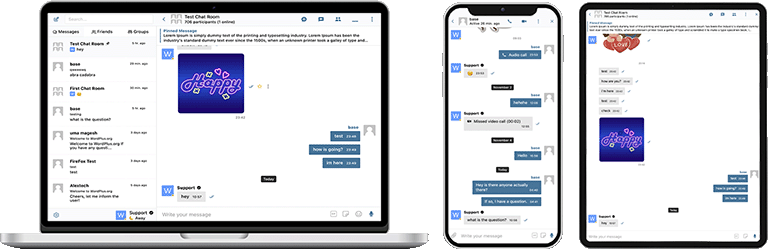

Açıklama
Better Messages, BuddyPress, BuddyBoss Platform, Ultimate Member, PeepSo ve WordPress tabanlı diğer tüm web siteleri için yerel entegrasyonlara sahip, WordPress için en zengin özellikli gerçek zamanlı özel mesajlaşma sistemidir.
WordPress sitenizi özel mesajlaşma, sohbet odaları, görüntülü ve sesli aramalar, grup görüntülü sohbetler, AI sohbet botları ve yerel mobil uygulamalar ile güçlü bir iletişim platformuna dönüştürün.
Özel ya da herkese açık bir topluluk, sosyal ağ, intranet, sohbet odası sitesi, pazar yeri, üyelik sitesi, çevrimiçi tanışma platformu veya creator economy sitesi oluşturuyor olun – Better Messages, kullanımı kolay bir arayüzle kurumsal düzeyde mesajlaşma özellikleri sunar.
Better Messages’ı deneyin:
- Live Demo — tam işlevsel demo site
- Dokümantasyon & Bilgi Bankası — kurulum kılavuzları, özellikler, SSS
- Tüm Entegrasyonlar — desteklenen tüm eklentiler ve temalar
- Fiyatlandırma — ücretsiz sürüm ile WebSocket version karşılaştırması
- Blog & Eğitimler — rehberler, adım adım anlatımlar, entegrasyonların ayrıntılı incelemeleri
Geliştiriciler için:
- REST API Referansı — her uç nokta ve parametre
- PHP Hooks — aksiyonlar, filtreler, yardımcı fonksiyonlar
- JavaScript Hooks — ön yüz olayları ve özelleştirme API’si
- Değişiklik Günlüğü — her sürüm ve hata düzeltmesi
- Yol Haritası — yaklaşan özellikler ve oylamalar
Popüler kullanım senaryoları:
Better Messages, aşağıdaki alanlarda mesajlaşmayı sağlamak için yaygın olarak kullanılır:
- Özel topluluklar — ücretli ve yalnızca üyelere açık topluluk platformları, mastermind grupları, mezun ağları, kurs kohortları, koçluk çevreleri, role kısıtlı mesajlaşma, grup sohbetleri, onboarding ve SSS için AI Chat Bots, hassas konuşmalar için uçtan uca şifreleme
- Herkese açık topluluklar ve sosyal ağlar — açık sosyal platformlar, hobi ve ilgi alanı toplulukları, BuddyPress / BuddyBoss / PeepSo / FluentCommunity tabanlı siteler, özel mesajlaşma, grup konuşmaları, sohbet odaları, kullanıcıları site genelinde takip eden mini sohbet widget’ları
- İntranet ve kurumsal web siteleri — şirket içi çalışan iletişimi, ekip ve departman kanalları, WordPress rolüne göre kısıtlı erişim, dosya paylaşımı, uzak ekipler için sesli ve görüntülü görüşmeler, veri egemenliği gereksinimi olan siteler için kendi sunucunuzda barındırma planı
- Sohbet odası web siteleri — gerçek zamanlı sohbet odalarını temel özellik olarak sunan siteler, herkese açık ve özel odalar, konu bazlı tartışmalar, kayıtlı olmayan ziyaretçiler için misafir erişimi, AJAX veya WebSocket aktarımı
- Tanışma ve eşleştirme siteleri — özel 1-e-1 sohbet, fotoğraf ve video ekleri, sesli ve görüntülü görüşmeler, üye dizinlerinde profilden profile sohbet düğmeleri, gezinen ziyaretçiler için misafir sohbeti, özel konuşmalar için uçtan uca şifreleme
- Creator economy ve hayran platformları — GamiPress veya MyCRED aracılığıyla mesaj ve görüşme başına faturalandırılan ücretli mesajlaşma, özel görüntülü görüşmeler, hayranlara toplu mesajlaşma, her zaman açık mini sohbet widget’ları
- Premium ve gelir getiren DM platformları — rol bazlı fiyatlandırma ile doğrudan mesaj veya görüşme başına ücretlendirme, bakiye gösterimi, role kısıtlı mesajlaşma, spam ve dolandırıcılık girişimlerini süzmek için AI İçerik Moderasyonu
- Koçluk ve mentorluk platformları — danışan ile koç arasında DM’ler, planlanmış görüntülü görüşmeler, sesli mesajlar, dosya paylaşımı, LMS entegrasyonları aracılığıyla kurs sohbet odaları
- Çevrimiçi mağazalar (WooCommerce) — ürün sayfalarında satış öncesi sohbet, satın alma sonrası sipariş desteği, sepet bağlamına duyarlı mesajlar, Hesabım sayfasına gömülü gelen kutusu
- Çok satıcılı pazar yerleri ve seri ilanlar — her ilanda alıcı ile satıcı arasında sohbet, ilan başına konular, kayıtlı olmayan ziyaretçiler için misafir sohbeti
- Çevrimiçi kurslar (LMS) — kurs sohbet odaları, eğitmen ile öğrenci arasında DM’ler, kohort tabanlı kurslar için grup konuşmaları
- Forumlar ve Soru-Cevap toplulukları — her yanıtta Özel Mesaj bağlantısı, konu katılımcıları için takip sohbeti
- Emlak ve ilan siteleri — emlakçı sorgu mesajlaşması, mülk bağlamlı sohbet konuları, gezinen ziyaretçiler için misafir sohbeti
- Canlı etkinlikler ve web seminerleri — etkinlik lobi sohbet odaları, kayıtlı olmayan katılımcılar için misafir erişimi, AMA’lar için grup sesli ve görüntülü görüşmeleri, etkinlik gündemini içeren sabitlenmiş mesajlar
- Rezervasyon ve randevu platformları — ilanlar ve rezervasyonlar üzerinde misafir ile ev sahibi arasında mesajlaşma, belgeler için dosya paylaşımı, giriş öncesi sesli ve görüntülü görüşmeler
- Kripto ve Web3 toplulukları — üyelik eklentisi ve WordPress rolleri aracılığıyla token erişimli sohbet odaları, AMA grup görüşmeleri, whitepaper soruları için AI bilgi botları, hareket halindeyken etkileşim için mobil uygulamalar
“Better Messages” eklentisi önceden “BP Better Messages” olarak adlandırılıyordu.
Better Messages’ı dilinize çevirin
Temel Mesajlaşma Özellikleri:
- AJAX veya WebSocket destekli gerçek zamanlı görüşmeler
- Özel bire bir görüşmeler
- Sınırsız katılımcılı grup görüşmeleri
- Misafir erişim desteğine sahip Sohbet Odaları
- BuddyPress Grupları, PeepSo Grupları, Ultimate Member Grupları, FluentCommunity Grupları için mesajlar
- Görüşmeler için konular
- Tüm mesajlarda ara
- Mesajları favori olarak işaretle
- Önemli mesajları görüşmenin en üstüne sabitle
- Favori görüşmeleri listenin en üstüne sabitle
- Yalnızca okunmamış görüşmeleri göstermek için görüşme listesini filtrele
- Belirli mesajlara yanıt ver
- Gönderilmiş mesajları düzenle (düzenleme göstergesi ile)
- Mesajları sil
- Mesajları diğer görüşmelere ilet
- Görüşme bildirimlerini sessize al
- Kurtarma ile mesaj taslağı otomatik kaydetme
AI & Otomasyon:
- OpenAI, Anthropic (Claude) ve Google Gemini tarafından desteklenen AI sohbet botları
- Bahsetme tabanlı yanıtlarla grup görüşmelerinde AI sohbet botları
- AI ile görüşme özetleme ve zamanlanmış özetler
- Maliyet tahmini ile token kullanım takibi
- Better Messages Cloud AI veya OpenAI ile sesli mesaj transkripsiyonu
- AI botları için Web Arama yeteneği
- AI botları için Dosya Arama aracı
- AI ile görsel oluşturma
- AI görüşmeleri için PDF dosya desteği
Medya & İçerik:
- Devam ettirilebilir yüklemeler ve dosyaları doğrudan erişimden koruma olanağı ile dosya paylaşımı (görseller, videolar, belgeler)
- Çapraz tarayıcı uyumluluğu ve depolama alanı tasarrufu için istemci tarafı görüntü ve video optimizasyonu (format dönüştürme, kalite kontrolü, meta veri kaldırma)
- Voice and Video Messages (available as addon)
- Küçük resimler ve açıklamalar ile gömülü bağlantılar
- oEmbed support for YouTube, Vimeo, Spotify, SoundCloud, Flickr and 20+ services
- Emoji seçici
- Role dayalı erişim ve dil desteği ile yerleşik çıkartma paketleri
- GIPHY ve Klipy sağlayıcıları ile GIF entegrasyonu
- Yazarken satır içi çıkartma önerileri
- Markdown metin biçimlendirme desteği
Bildirimler:
- Okunmamış mesajlar için e-posta bildirimleri (özelleştirilebilir şablonlar)
- E-postalarda abonelikten çıkma bağlantısı desteği
- Yeni mesajlar için ses bildirimleri
- Web sitenizin herhangi bir yerinde site içi bildirimler
Moderasyon & Güvenlik:
- İki sağlayıcıyla yapay zeka içerik moderasyonu:
- Better Messages Moderation AI — WebSocket lisansına ek ücret olmaksızın dahildir, üçüncü taraf API anahtarı gerekmez. Genişletilmiş kategoriler, özel kurallar ve konuşma bağlamı farkındalığı ile Better Messages Cloud tarafından desteklenir
- OpenAI Moderation API — ücretsiz kullanım, bir OpenAI API anahtarı gerektirir
- Özel moderasyon kuralları — kendi kurallarınızı düz metin olarak tanımlayın
- Konuşma bağlamı farkındalığı — birden fazla mesaja yayılan kalıpları tespit eder
- “Yalnızca İşaretle” (önerilen) veya “İnceleme İçin Beklet” moderasyon eylemleri arasından seçim yapın
- Ön Moderasyonlu Mesajlar – teslimden önce mesajları inceleyin
- Mesaj raporlama özelliği
- Özelleştirilebilir kara liste ile kötü söz filtresi
- Kullanıcı engelleme özelliği
- Rol tabanlı erişim kontrolü
- Moderasyon için kullanıcı beyaz liste/kara liste
Etkileşim Özellikleri:
- Mesajlara tepkiler
- Bahsetmeler (@kullanıcıadı)
- Zamanlama, dosya ekleri ve arka plan işleme ile WP Admin’den toplu mesajlaşma
- Yeni kullanıcılar için önerilen görüşmeler
- Kısa kod kullanmadan görüşme giriş noktalarını sitenizin herhangi bir yerine yerleştirin
- Beş widget: Arkadaşlar, Gruplar, Kullanıcılar, AI Botları, Sohbet Odaları
- İki görüntüleme stili: Klasik Çubuk veya Yüzen Baloncuk (sohbet başlıkları ile)
- Üç yerleşim yüzeyi: alt çubuk, yan panel, mobil sekme çubuğu
- Widget başına simge seçici, arama kutusu, rol kısıtlamaları ve “Boşken Sekmeyi Gizle” geçişi
- Üç görüntüleme moduna (tümü / role göre / elle seçilmiş) sahip Kullanıcılar widget’ı ve son etkinlik veya kayıt tarihine göre sıralama
- Mini widget’lar, yan panel ve mobil görünümdeki sekmelerin özelleştirilebilir sırası
Özelleştirme:
- Modern, tamamen özelleştirilebilir tasarım
- WP Customizer ile kolay renk özelleştirme
- Özel bildirim sesleri
- RTL düzen desteği
- White label çözüm
- Tamamen çevrilebilir
- Eski mesajları otomatik silme seçeneği
Gizlilik & GDPR:
- Özel Gizlilik & GDPR ayarları sayfası
- Tüm mesaj verileri kendi sunucunuzda depolanır
- AI moderasyonu (etkinleştirildiğinde) mesaj içeriğini analiz için gönderir — Better Messages Cloud hiçbir veriyi saklamaz; OpenAI sağlayıcısını kullanıyorsanız OpenAI’ın veri politikasını inceleyin
- WordPress kişisel veri dışa aktarma ve silme desteği (Araçlar Kişisel Verileri Dışa Aktar/Sil)
- Etkinleştirilmiş özelliklere göre uyarlanan önerilen gizlilik politikası metni
- Kendi sunucunuzda barındırılan emoji görselleri — harici CDN istekleri yok
- Gizlilik dostu video yerleştirmeleri — YouTube, Vimeo yalnızca kullanıcı tıkladıktan sonra yüklenir
- Çerez ayarlanmaz, analitik veya izleme komut dosyası yok
- Gizlilik & GDPR belgeleri
Bu özelliklerin tam listesi değildir – Better Messages burada listelenmeyen birçok küçük özellik ve seçeneğe sahiptir. Kullanıcı geri bildirimlerine dayanarak sürekli yeni özellikler ve iyileştirmeler ekliyoruz.
Uyumlu eklentiler & temalar — 35’ten fazla yerel entegrasyon:
Better Messages, her WordPress sitesinde kurulduğu anda çalışır. Sitenizde zaten bir topluluk eklentisi, LMS, pazar yeri veya dizin çalışıyorsa, Better Messages doğrudan bunlara entegre olur — üyeleri, profilleri, grupları, kursları, ilanları ve yazıları devralır, böylece sohbet yüzeyleri herhangi bir kurulum yapılmadan doğru yerlerde belirir.
Topluluk & Üyelik Platformları — yerleşik mesajlaşma sistemini değiştirir ve üyeleri, profilleri, arkadaşları ve grupları devralır:
- BuddyPress
- BuddyBoss Platform — including BuddyBoss Theme and ReadyLaunch
- PeepSo
- Ultimate Member
- FluentCommunity — including Spaces and Courses
- SureDash
- ProfileGrid
- UsersWP
- WP User Manager
Öğrenme Yönetim Sistemleri (LMS) — kurs sohbet odaları, eğitmen mesajlaşması ve öğrenciler arası konuşmalar:
- LearnDash — including Instructor Role add-on
- LearnPress
- Tutor LMS
- MasterStudy LMS
- FluentCommunity Courses
E-ticaret — WooCommerce — çevrimiçi mağazalar için satış öncesi ve sipariş destek sohbeti:
- WooCommerce — ürün, sepet, ödeme ve sipariş sayfalarında iletişim düğmeleri. Sepet içeriği, zengin bir mesaj olarak otomatik şekilde konuşmaya gönderilir, böylece destek temsilciniz müşterinin neye baktığını anında görür; sipariş sayfaları yapılandırılmış bir sipariş bağlam kartı paylaşır. Herhangi bir sohbete yapıştırılan düz ürün URL’leri zengin ürün kartlarına dönüştürülür. Gömülü gelen kutusu, WooCommerce’in Hesabım bölümünde yer alır. HPOS uyumlu, blok temasıyla uyumlu, misafir ödemesi ile çalışır. Hem ücretsiz hem de WebSocket version’da kullanılabilir — WebSocket version, sayfa değiştirmek yerine sohbetleri açılır mini widget bindirmesi olarak açar.
Pazar Yerleri & Çok Satıcılı — WooCommerce üzerinde alıcı ile satıcı arasında sohbet, satıcı bazında katılım seçeneği ve satıcı mağazaları, ürün sayfaları ve sipariş ayrıntılarında iletişim düğmeleri:
İlanlar, Dizinler & Seri İlanlar — her ilanda iletişim düğmeleri ve ilan başına konular:
- HivePress
- Directorist
- GeoDirectory
- Classified Listing
- Motors – Car Dealer, Classifieds & Listing
- WP Job Manager
Emlak Temaları — mülk ilanlarında emlakçı ve sorgu mesajlaşması:
Forumlar — her yanıtta Özel Mesaj bağlantısı:
- wpForo
- bbPress
Oyunlaştırma, Puanlar & Ücretli Erişim — rol bazlı fiyatlandırma ve bakiye gösterimi ile mesaj veya görüşme başına ücretlendirme:
Otomasyon & Sayfa Yapıcılar:
- Uncanny Automator — triggers and actions for chat events
- AutomatorWP — triggers and actions for chat events
- Crocoblock JetEngine Profile Builder — profile and chat shortcodes for JetEngine listings
Push & PWA:
- FluentNotify — web push through your own Firebase project
- OneSignal — web push notifications
- Progressify PWA — install-to-home-screen prompts on the messenger
Evrensel Shortcode Builder — sohbeti diğer her şeye ekleyin:
Eklentinizi veya temanızı listede göremiyor musunuz? Better Messages, WP Yönetim Better Messages Shortcodes altında görsel bir Shortcode Builder sunar. Bu araçla herhangi bir özel yazı türüne, dizine, pazar yeri ilanına, emlakçı profiline veya sayfa yapıcı bloğuna PHP yazmadan Live Chat düğmesi yerleştirebilirsiniz. Örnek bir gönderiye yöneltin, hedef kullanıcının nasıl belirleneceğini seçin (yazı sahibi, postmeta’da saklanan kullanıcı kimliği veya sabit bir gelen kutusu), bir konu stratejisi ve etiket belirleyin, ardından oluşturulan kısa kodu kopyalayın. Aynı kısa kod daha sonra aynı yapıdaki her gönderi için, her gönderiye özel otomatik konu oluşturma ve isteğe bağlı bir sohbet içi banner ile çalışır. Gutenberg, Elementor, Bricks, Divi’ye yapıştırın veya doğrudan bir tema şablonuna ekleyin.
Karşılaştığınız herhangi bir uyumsuzluğu bildirmekten veya yeni entegrasyonlar talep etmekten çekinmeyin — bu çok önemlidir ve Better Messages’ı geliştirmeye yardımcı olur!
WebSocket sürümü:
WebSocket sürümü ücretli bir seçenektir, lisans anahtarını web sitemizden alabilirsiniz.
Sitenizle kullanıcılarınız arasında WebSocket iletişimini sağlamak için kendi adanmış sunucularımızı kullanıyoruz. Sunucularımız tamamen özeldir ve hiçbir özel veriyi saklamaz veya takip etmez — tüm mesajlar sizin veritabanınızda kalır.
Performans & Güvenilirlik:
- Sunucunuzdaki yükü önemli ölçüde azaltır (200 kata kadar daha az istek)
- Gerçek zamanlı anında mesaj teslimi
- Paylaşımlı hosting dahil her türlü hosting ile çalışır
- Eş zamanlı bağlantı veya aylık aktif kullanıcı sınırı yok
Görüntülü & Sesli Aramalar:
- HD Görüntülü Aramalar (1’e 1)
- HD Sesli Aramalar (1’e 1)
- Grup Görüntülü Sohbetler (32 katılımcıya kadar)
- Grup Sesli Sohbetler (50 katılımcıya kadar)
- Aramalarda ve grup sohbetlerinde ekran paylaşımı
Mobil Uygulamalar (Alfa):
- iOS Mobil Uygulama (kendi markalı uygulamanızı oluşturun) – Alfa
- Android Mobil Uygulama (kendi markalı uygulamanızı oluşturun) – Alfa
- Aramalar ve mesajlar için push bildirimleri
- Gelen aramalar için VoIP bildirimleri
Not: Mobil uygulamalar şu anda alfa aşamasındadır. Temel işlevsellik çalışmaktadır, ancak bazı özellikler sınırlı olabilir veya geliştirme aşamasında olabilir.
Gerçek Zamanlı Özellikler:
- Mesaj Teslim Durumu (gönderildi, teslim edildi, görüldü)
- Yazma, ses kaydı ve dosya yükleme aktivite göstergeleri
- Çevrimiçi/Çevrimdışı varlık göstergesi
- Kullanıcı durumları (Çevrimiçi, Uzakta, Rahatsız Etmeyin)
- Mini Sohbetler – sitenizdeki herhangi bir yerde sohbet pencereleri
- Mini Görüşmeler widget’ı – son konuşmaları herhangi bir sayfadan listeleyin ve devam ettirin
- Kullanıcılar mini widget’ı için yalnızca çevrimiçi filtresi ve çevrimiçi öncelikli sıralama
Better Messages Cloud AI:
- Birebir sohbetlerde otomatik mesaj çevirisi — 53 dil, otomatik algılama
- Yapay zeka ile içerik moderasyonu — 23 kategori, özel kurallar, sohbet bağlamı farkındalığı
- Sesli mesaj transkripsiyonu — otomatik algılamalı 99+ dil
- Üçüncü taraf API anahtarı gerekmez — WebSocket lisansına ek ücret olmadan dahildir
Güvenlik & Şifreleme:
- İsteğe bağlı Uçtan Uca Şifreleme (E2EE) — site düzeyinde ve konuşma bazında etkinleştirilebilir; mesajlar ve dosyalar kullanıcıların tarayıcılarında AES-256-GCM ile şifrelenir, sunucu düz metni asla görmez
- Çevrimdışı mesaj depolama için yerel tarayıcı şifrelemesi (AES256)
- Web Push Bildirimleri (tarayıcı kapalıyken bile çalışır)
- Tüm veriler aktarım sırasında şifrelenir, bu nedenle sunucularımızda okuyamayız
Destek:
- Öncelikli e-posta desteği
- Düzenli güncellemeler ve yeni özellikler
WebSocket’ler neden oyunun kurallarını değiştiriyor?
WebSocket sürüm lisans anahtarı alın | Kullanım Koşulları
RTL düzeni eklentiye yerleşik olarak gelir.
Eklentiyi LocoTranslate ile dilinize çevirebilir veya eklenti çevirisine katılabilirsiniz.
Ekran Görüntüleri


Bloklar
Bu eklenti 2 blok sağlar.
- Messages The user's messages, where they can open any conversation they are part of
- Chat Room Embed a Better Messages chat room
Yükleme
- Eklenti dosyalarını
/wp-content/plugins/bp-better-messagesdizinine yükleyin veya eklentiyi doğrudan WordPress eklentiler ekranı üzerinden yükleyin. - WordPress’teki ‘Eklentiler’ ekranı üzerinden eklentiyi etkinleştirin
- Eklentiyi yapılandırmak için Ayarlar -> Better Messages’i kullanın
SSS
-
Better Messages ücretsiz mi?
-
Evet — ücretsiz sürümü WordPress.org’dan yükleyin. Özel ve grup sohbetleri, sohbet odaları, dosya paylaşımı, oEmbed önizlemeleri, akıllı toplu e-posta bildirimleri, rol tabanlı erişim, guest chat ve standart messenger özelliklerini destekler. WebSocket sürümü ücretlidir ve anında teslimat, birebir ve grup sesli / görüntülü aramalar, AI Chat Bots, AI Content Moderation, AI Message Translation, Voice Message Transcription, web push ve uçtan uca şifrelemenin kilidini açar.
-
Better Messages hangi WordPress eklentileriyle entegre olur?
-
Topluluk platformları (BuddyPress, BuddyBoss Platform, PeepSo, Ultimate Member, FluentCommunity, SureDash, ProfileGrid, UsersWP, WP User Manager), LMS (LearnDash, LearnPress, Tutor LMS, MasterStudy LMS), e-ticaret (WooCommerce — ürün, sepet, ödeme ve sipariş sayfalarında iletişim düğmeleriyle satış öncesi ve sipariş destek sohbeti), çok satıcılı pazar yerleri (Dokan, WCFM, WC Vendors, MultiVendorX), ilanlar ve dizinler (HivePress, Directorist, GeoDirectory, Classified Listing, Motors, WP Job Manager), emlak temaları (Houzez, RealHomes), forumlar (wpForo, bbPress), oyunlaştırma (GamiPress, MyCRED), otomasyon (Uncanny Automator, AutomatorWP), sayfa yapıcılar (Crocoblock JetEngine) ve push / PWA (OneSignal, Progressify) genelinde 35’ten fazla yerel entegrasyon. Eklentiniz listede yoksa, yerleşik görsel Shortcode Builder, PHP yazmadan herhangi bir özel yazı türüne Live Chat düğmesi eklemenize olanak tanır. Entegrasyonların tam listesini inceleyin.
-
Grup sohbetlerini destekliyor mu?
-
Evet — paylaşılan geçmiş, bahsetmeler, tepkiler, dosya yüklemeleri, yanıtlar, düzenleme / silme / iletme ve grup sesli / görüntülü aramalar (WebSocket sürümü) içeren tam donanımlı grup sohbetleri. Grup sohbetleri BuddyPress / BuddyBoss / PeepSo / Ultimate Member / FluentCommunity gruplarıyla otomatik olarak eşleştirilebilir; üyeler kaynak topluluk grubuyla senkron şekilde sohbete katılır ve ondan ayrılır.
-
Kayıtlı olmayan ziyaretçiler (misafirler) sohbet edebilir mi?
-
Evet — Guest Chat, kayıtlı olmayan ziyaretçilerin sohbet odalarına katılmasına, pazaryeri satıcılarıyla mesajlaşmasına, rehber listelemelerinde soru sormasına veya site desteğiyle iletişim kurmasına olanak tanır. Ziyaretçiler bir görünen ad (ve isteğe bağlı bir e-posta) girer ve ardından misafir kullanıcı olarak katılır. Daha sonra kayıt olurlarsa sohbet geçmişleri korunur.
-
WordPress üzerinde sesli ve görüntülü aramaları destekliyor mu?
-
Evet (WebSocket version) — bire bir ve grup sesli / görüntülü görüşmeler, ayrı bir Zoom / Whereby entegrasyonu olarak değil, doğrudan mesajlaşma konusunun içinde gerçekleşir. Barındırılan medya aktarımı WebSocket lisansına dahildir; ayrı bir Twilio hesabı, Daily / Whereby aboneliği veya Zoom geliştirici planı gerekmez. Görüşmeler mobilde tam ekran, masaüstünde resim içinde resim modundadır.
-
Better Messages GDPR uyumlu mu?
-
Evet. Tüm mesaj verileri yalnızca WordPress veritabanınızda saklanır. WebSocket bulut rölesi mesaj içeriğine kapalıdır — şifreli olayları yönlendirir, ancak içinden geçenleri okumaz, saklamaz veya incelemez. Better Messages ayrıca WordPress’in yerleşik Kişisel Veri Dışa Aktarma ve Silme araçlarıyla entegre olur. Daha katı veri egemenliği gereksinimleri olan siteler için (GDPR Madde 9, HIPAA’ya yakın, düzenlemeye tabi veri iş yükleri) self-hosted bir plan da mevcuttur — destek ekibiyle iletişime geçin.
-
AI özellikleri var mı?
-
Evet (WebSocket version, AI add-on). AI Chat Bots (OpenAI, Anthropic Claude, Google Gemini), özel sistem yönlendirmeleri ve GamiPress / MyCRED aracılığıyla bot bazında puan ücretlendirmesi ile herhangi bir konuda tam birer katılımcı olarak yer alır. Better Messages Cloud AI; AI İçerik Moderasyonu (spam, dolandırıcılık, doxxing, iletişim bilgisi paylaşımı dahil 23’ten fazla kategori), AI Mesaj Çevirisi (otomatik algılamayla 53 dil) ve Sesli Mesaj Transkripsiyonu (99’dan fazla dil) sunar — tümü WebSocket lisansına dahildir, üçüncü taraf API anahtarı gerekmez.
-
Yerel iOS ve Android uygulamaları var mı?
-
Evet — Better Messages, Capacitor üzerinde geliştirilmiş yerel iOS ve Android mobil uygulamalarıyla birlikte gelir; push bildirimleri, gerçek zamanlı teslimat, sesli / görüntülü aramalar ve web ile tam özellik denkliği sağlar. Kendi marka uygulamasını App Store / Play Store’da kendi geliştirici hesabıyla yayınlamak isteyen siteler için white-label yeniden yapı seçeneği mevcuttur.
-
Messenger arayüzünü kendi dilime çevirebilir miyim?
-
Evet — Better Messages,
bp-better-messagestext domain’i kullanılarak WordPress’in standart çeviri araçlarıyla (Loco Translate, WPML, Polylang) tamamen çevrilebilir. 30’dan fazla topluluk çevirisiyle birlikte gelir. translate.wordpress.org üzerinden bir çeviriye katkıda bulunabilir veya iyileştirebilirsiniz. -
Uçtan uca şifrelemeyi destekliyor mu?
-
Evet (WebSocket version). Uçtan uca şifreleme her konu için ayrı olarak etkinleştirilir — mesajlar ve dosya ekleri, iletilmeden önce gönderenin tarayıcısında AES-256-GCM ile şifrelenir, veritabanında da şifreli olarak saklanır ve yalnızca alıcının tarayıcısında çözümlenir. Sunucu yalnızca şifreli metin saklar; hiçbir yönetici, hosting mühendisi veya veritabanına erişim sağlayan saldırgan bir E2E konusundaki mesaj içeriğini okuyamaz.
-
Ayrıntılı belgelere nereden ulaşabilirim?
-
Tüm belgeler, entegrasyon kılavuzları, REST API referansı, hook referansı, video eğitimleri ve 80’den fazla blog yazısı www.better-messages.com adresinde yer alır.
İncelemeler


Katkıda Bulunanlar ve Geliştiriciler
“Better Messages – Sohbet Odaları, Grup Sohbeti, Özel Mesajlar & AI Chat Bots” açık kaynaklı yazılımdır. Aşağıdaki kişiler bu eklentiye katkıda bulunmuşlardır.
Katkıda bulunanlar
“Better Messages – Sohbet Odaları, Grup Sohbeti, Özel Mesajlar & AI Chat Bots” 32 dile çevrildi. Katkıda bulundukları için çevirmenlere teşekkürler.
Geliştirmeyle ilgilenir misiniz?
Kodu görüntüleyin, SVN deposuna göz atın ya da RSS ile geliştirme günlüğüne abone olun.
Değişiklik Kaydı
Better Messages 3.0 is coming soon — try it on the demo site and send your feedback to support.
2.15.33
- Added Unique Guest Names setting at Settings General — turn it off to let guests use a display name someone else already took
- Added
BetterMessages.openGroupCall()JavaScript function — take a member straight into a chat room’s group call from any page - Fixed an AI chat bot’s Conversations list failing with a critical error and reporting no conversations, when the bot was in a group or course
- Fixed a new encrypted conversation being created without a key when encryption was not yet set up on that device, leaving it unusable
- Fixed the other person’s video staying black in a one-to-one call answered in Firefox, while their audio and the call itself worked
- Fixed the default avatar at Settings Discussion being ignored on BuddyPress and BuddyBoss — users without a Gravatar showed the Gravatar logo
- Fixed a guest display name containing an underscore or percent sign being wrongly rejected as already taken
- Fixed unread counters bound to
better_messages_update_thread_unreadnever dropping back to zero once a conversation was read - Fixed text smiles containing
<,>or&, such as<3, never turning into an emoji, and the conversion staying on when it was switched off - Fixed a voice message shorter than a second arriving with no length shown, and the recording timer lagging up to a second behind
- Fixed a JavaScript error when an on-site notification was dismissed just as a new message reopened it
- Fixed conversations rendering blank when every emoji was removed from the reaction list
- Fixed the reaction picker still appearing on messages after reactions were switched off in the settings
- Fixed FluentCommunity’s pull to refresh reloading the page while scrolling a conversation in an installed iOS app
- Other minor bugfixes and improvements
2.15.32
- Chat rooms and conversations can now be exported as a transcript — plain text, a web page or a CSV spreadsheet
- Push notifications can now be delivered through FluentNotify, using a Firebase project you control
- Fixed a mini chat not opening for a chat room after the full screen view had been opened and closed
- Fixed incoming call notifications being hidden behind the full screen view, leaving no way to answer
- Added
get_group_call_participantsPHP function — read how many people are in a conversation’s group video or audio call - Added
BetterMessages.getGroupCallParticipants()JavaScript function — the same counts on the page, over the WebSocket, with no request to your own server - Added
better_messages_group_call_statusJavaScript action — fires whenever a group call’s participant count changes - Added
BetterMessages.subscribeGroupCallStatus()andunsubscribeGroupCallStatus()— watch the live count of any chat room, including one the visitor has not joined - Added
better_messages_group_call_participants_cache_timePHP filter — how long a group call participant count is cached - Added
better_messages_fluent_notify_integrationPHP filter — returnfalseto disable the FluentNotify integration - Other minor bugfixes and improvements
2.15.30 – 2.15.31
- Chat attachments are no longer listed by the WordPress media API
- Fixed guests being counted as BuddyPress members, which could report hundreds of members on a site with only a handful registered — updating clears the records already left behind
- Fixed a Send Message button in a members or friends list on a BuddyPress or Youzify profile page opening a conversation with the profile owner instead of the member it belongs to
- Fixed the Create encrypted conversation button being cut off at the bottom of a mini chat, with no way to scroll down to reach it
- Member and online counts in the chat rooms list no longer read “1 members” for a single member
- Presence-based chat rooms no longer carry an Open label in the chat rooms list
- The User Inbox block is now called Messages, and the settings that spoke of an “inbox” name the messages page or the conversation list instead
- Other minor bugfixes and improvements
2.15.29
- Fixed the messenger not loading at all on a site whose Ultimate Member Groups extension is too old for the installed Ultimate Member — the extension never starts up in that pairing, and the conversations list stayed permanently empty
- An Ultimate Member group with no picture of its own now shows a group marker, in place of an image that had been failing to load since the service hosting it shut down
- Fixed a chat room with no picture showing the generic person avatar in the chat rooms list, which made it look like a member — presence-based rooms, which keep no stored members, hit this every time
- A link to a chat room now opens the Chat Rooms tab only when that room is not in the conversations list — a room left in the inbox opens there, next to everything else the member is talking in
- Fixed the settings button missing from the messenger on phones — a site whose mobile tab bar comes from Chat Rooms, Users or AI Bots rather than Friends or Groups had no way to reach user settings there
- Fixed line breaks vanishing from messages typed over several lines when Enter starts a new line instead of sending — browser extensions that tag page elements, such as Bitdefender, were collapsing them into one run-on line
- Names decorated by the site keep that decoration in profile tooltips, as they did before 2.15.28 — only the avatar description, which is read aloud by screen readers, takes the name on its own
- Fixed a name decorated by the site through the username filters losing that decoration in the conversations and users lists — on a phone those lists are most of the messenger
- Fixed the confirmation for removing a participant, or for changing who moderates a conversation, spelling out the raw image markup of a badge the site attaches to member names — a PeepSo VIP icon printed as markup in the dialog, and in the notice that followed, in place of the plain name
- Fixed a desktop notification title breaking into placeholder text when the sender carries such a badge
- The Messages Window Roundness setting now also shapes the buttons inside the messenger and the name badges carried by the system messages and mentions, which stayed square whatever the setting was
- Other minor bugfixes and improvements
2.15.28
- Added Remember Last Tab at Settings Mini Widgets Layout — the messenger reopens on the tab each member used last, the way the mini widgets already do
- Users can now be given control over more of their own messenger — how Enter sends a message (Send on Enter Control, Settings Messaging), whether the new message popup appears (Popup Notification Control, Settings Notifications), and the sound played when they send one
- Sound switches are no longer offered to users for a sound that is silenced site-wide
- Fixed a “Send message” link from a forum or profile opening the side panel on the chat rooms list instead of the conversations list
- Fixed the call restriction at Settings Calls having no effect on guests — calls are now refused for every restricted role, not only hidden
- Fixed Auto-Delete Old Messages leaving an unread badge that could never be cleared, and conversations now refresh once the cleanup has run instead of keeping removed messages on screen
- Fixed guests losing their end-to-end encryption keys on every page load — a guest was asked for the password again on each visit
- Fixed the report reason arriving untranslated in the moderation email
- Fixed the sidebar collapse button doing nothing when Compact Mode was set to Always Expanded or Always Compact
- Fixed a name decorated by the site, such as a role badge, repeating itself in the avatar description and the profile tooltip
- Fixed a prefilled message on the new conversation screen being inserted as HTML instead of plain text
- Other minor bugfixes and improvements
2.15.27
- Added support for the gpt-image-2 image generation model in AI chat bots
- Added built-in pricing for the GPT-5.5 and GPT-5.6 models, and fixed gpt-5.4-mini / gpt-5.4-nano replies being charged at the full gpt-5.4 price
- The Context Messages Limit of an AI chat bot now also applies to OpenAI bots in one-to-one conversations, keeping long chats from getting more expensive with every message
- Fixed sending in a chat room getting slower with every member — in a room with tens of thousands of members a sticker took a minute to appear for the sender
- Fixed the AI chat bot model list offering models that cannot answer messages
- Fixed a bot whose model is no longer available answering with a generic error instead of saying the model needs to be changed
- Fixed the title and the YouTube logo on a shared video doing nothing when clicked
- Fixed shared videos not responding to clicks inside mini chats — they now open from a poster with a play button
- Fixed Privacy-friendly oEmbeds rendering a broken placeholder with the video title spilled into the message as text
- Video placeholders now start playback on the first tap, without a second click on the play button
- Fixed conversation list previews of video messages sometimes showing raw placeholder text
- Fixed the Conversations tab being listed last at Settings Mini Widgets Layout
- Fixed the unread counter on tabs covering the icon when tab labels are shown, and being unreadable in dark mode
- Stopped themes from reshaping the messenger’s own input fields — the side panel search box stays readable in dark mode
- Fixed the page appearing extremely tall while the messenger loads and then jumping once it is ready — the loading placeholder now fits the window exactly like the loaded messenger, including with Max Height set to a large value like 9999
- Renamed the Fixed Header Height setting to Window Height Offset, as it reserves window space for any fixed element on the page, not only a sticky header
- Other minor bugfixes and improvements
2.15.26
- Added
better_messages_push_notificationPHP filter — change the link, title and text of push notifications on every delivery path - Added
better_messages_mobile_push_contentPHP filter — change the wording of push notifications sent to the native mobile app - The messenger now opens on whichever tab is placed first at Settings Mini Widgets Layout, and the Conversations tab is now sortable like every other tab
- The collapsed side panel now keeps every tab usable as a vertical icon column, and on windows too narrow for the panel the tabs move to a strip at the top of the messenger
- Chat rooms now show unread and mention counters in the chat rooms list
- The Messages tab of the side panel and the mobile tab bar now shows an unread counter, configurable at Settings Mini Widgets Conversations
- The open conversation is now highlighted in every side panel list
- Fixed moderation in presence-based chat rooms — muting, banning and appointing moderators no longer fail with a permissions error, and bans and mutes are now enforced
- Fixed the muted and banned lists of a conversation returning expired bans and restrictions of other conversations
- Fixed the page scrolling to the chat on every conversation switch made from inside the messenger
- Fixed the Participants List Order setting being ignored by the online users sidebar and the participants list of presence-based rooms
- Fixed online counters not including the viewer right after logging in
- Fixed the browser tab title being emptied when an SEO plugin or theme outputs the title tag after the plugin scripts
- Fixed starting an end-to-end encrypted conversation failing with a “not on your friends list” error when messaging was restricted to friends or followers
- Fixed a new end-to-end encrypted conversation losing its encryption when the first message was held by pre-moderation — encrypted conversations now always skip the moderation queue
- Fixed AI chat bot replies occasionally left as unformatted, cut-off or garbled text after streaming finished, most often in the native mobile app
- Fixed tapping a shared YouTube or Vimeo video navigating the page to the video site instead of playing it — video players are now sandboxed, adjustable with the
better_messages_embed_sandboxPHP filter - Fixed links typed with a capitalised address, such as the
Https://phone keyboards produce, not being replaced by their preview - Fixed shared videos refusing to play in the mobile app on iPhone and iPad — video services now require the address of the embedding page, which an app cannot provide, so players are loaded through a small page served from your own site
- Fixed a conversation opening as an empty messenger when one of its messages quoted HTML or JSX source code, most often an AI chat bot reply — code in messages is now always shown as text
- User statuses, call messages and end-to-end encryption notices of the WebSocket version are now translatable on WordPress.org
- Other minor bugfixes and improvements
2.15.25
- Added
better_messages_thread_header_actionsJavaScript filter — the conversation header buttons (calls, minimize, maximize, the More menu) are now built as a single filterable list, so custom buttons can be added at any position and the built-in ones can be reordered, removed or replaced. Until now the header had no supported extension point: a button inserted into it by hand was moved or removed again whenever the header re-rendered. Custom buttons pick up the styling of the built-in ones, and the same filter also runs for mini chat headers - Added
better_messages_fluent_community_group_chat_membersandbetter_messages_fluent_community_course_chat_membersPHP filters — exclude specific users from the automatic membership sync of FluentCommunity Space and Course group chats: user IDs removed by the filter are taken out of the chat by the sync itself and are no longer re-added by later enrollment events - Fixed YouTube videos shared in messages staying locked inside the message bubble on iPhone and iPad — tapping one now opens the full screen player again, as it did before YouTube changed the default playback behaviour of its embeds
- Fixed link previews showing raw HTML codes such as
&in titles, and dropping the thumbnail when the image address contained one - Link previews now also find the page title when it is spread over several lines or carries attributes, and can no longer be spoofed by markup hidden inside a page’s scripts
- The minimum required WordPress version is now 6.3, matching what the Better Messages blocks have needed since they were introduced
- Added Button Icon setting at Settings Mobile Floating Chat Button — choose a preset icon or paste your own SVG for the floating chat button on mobile, which previously always used the built-in messages icon with no way to change it
- Fixed the “Chatting as” persona banner in the Houzez and RealHomes integrations briefly appearing to the other side of the conversation and vanishing from the persona side’s own view while messages were delivered in the WebSocket version — viewer-specific conversation details are no longer part of the shared realtime payloads
- Other minor bugfixes and improvements
2.15.20 – 2.15.24
- Added Chat Room Moderators — assign per-room moderators in the chat room editor: moderators can remove, mute and ban participants of their room, can reply while the room is closed, and see the participants list even when it is hidden from regular members
- Added Moderators can add participants per-room setting — moderators get an “Add new participants” action right in the chat interface, so room membership can be managed without contacting site administrators
- Added Presence-based chat rooms (WebSocket version) — a new chat room type where participants are only the users currently in the room: closing the page or navigating away removes them immediately, no membership is stored, and the participants list always shows who is really present
- Added per-room Group video calls and Group audio calls toggles to chat room settings — disable group calls in specific chat rooms while keeping them enabled globally
- Added Website Context setting to AI Content Moderation — describe what your website is used for and Better Messages Moderation AI will judge messages by your community norms, fixing overly aggressive moderation on dating sites and similar communities
- Added Roles that can send Bulk Messages setting — allow selected roles (for example HR or communications staff) to send bulk messages from the Administration page without full administrator access: they see and manage only their own bulk messages and cannot send on behalf of another user
- Added Roles that can access Administration setting — grant selected roles the Administration page and site-wide moderation powers without full administrator access, replacing the need for a role editor plugin to assign the moderation capability
- Added Markdown support to Bulk Messages — the bulk message editor now understands the same Markdown syntax as regular chat messages, so headings, bullet and numbered lists and links typed in the editor are delivered formatted
- Site administrators can now add participants to any regular chat room directly from the chat interface
- Fixed chat room moderators being unable to send messages in closed chat rooms
- Chat room moderators are never removed by Auto exclude users or Auto-remove inactive participants
- Fixed the Chat Rooms list showing only the first 100 rooms — rooms now load page by page as you scroll, search covers every room you have access to, and rooms you were added to are no longer missing from the list on sites with many chat rooms
- Fixed the Browser push notifications opt-in missing from the messenger user settings on sites where the email notification interval was set to 0 and Sound Notification Control was disabled, leaving users with no way to subscribe to web push
- Added
better_messages_onesignal_integrationPHP filter — returnfalseto fully disable the OneSignal integration, including the script which associates WordPress user IDs with OneSignal subscriptions - Added Open online users list by default per-room setting (WebSocket version) — when the online users sidebar is enabled, it can open automatically when users enter the chat room on desktop
- Added GTranslate integration — on GTranslate paid plans the messenger interface now follows the language of the page the visitor is on, instead of staying in the site default language on every translated sub-domain or sub-directory
- WebSocket version now stops AJAX fallback polling by default — when a visitor’s WebSocket connection cannot be established, their browser makes a single sync request per page load instead of polling the server every few seconds. The new Continuous Fallback Mode setting restores continuous fallback polling for the rare setups that need it, such as audiences behind country-level firewalls that block WebSocket traffic
- Improved settings page mobile menu layout
- Other minor bugfixes and improvements
2.15.13 – 2.15.19
- Added Automatic Message Cleanup for chat rooms
- Added Participants List Order setting at Settings Messaging Group Conversation Settings
- Better Messages Administration moderation area now showing message timestamps in the site timezone from Settings General
- Fixed user badge icons (e.g. PeepSo VIP icons) showing as HTML code instead of images in WP Admin user lists
- Fixed user badge icons (e.g. PeepSo VIP icons) appearing as raw HTML code in moderation and report email notifications
- Fixed encrypted conversations staying locked forever after a participant reset their encryption keys — the conversation key is now reliably re-shared as soon as any other participant visits the site or unlocks their encryption keys
- Fixed MasterStudy mobile bottom menu bar showing through the full-screen messenger on the student dashboard
- Fixed Better Messages mobile floating chat button and new-message notification being hidden behind the MasterStudy bottom menu bar on account pages
- Fixed SureDash integration message button on member profiles opening the messages page without starting a conversation with the selected member
- PeepSo integration: members banned in PeepSo can no longer send messages or start new conversations in Better Messages
- PeepSo integration: group chats are now accessible to group members only
- Fixed messenger failing to load with error 500 — infinite loop when an encrypted conversation awaiting encryption key sharing was deleted or no longer accessible
- Update Freemius SDK to 2.13.4
- Banned members in chat room cant join group video and audio calls anymore
- Added Weglot integration — the messenger interface now automatically follows the current Weglot language on multilingual sites
- Added
better_messages_i18n_localefilter to control which language the messenger interface loads - Fixed fatal PHP error (allowed memory size exhausted) when opening or starting a private conversation on sites with a very large accumulated history of no-reply bulk messages
- Fixed the LMS Courses tab (LearnPress, LearnDash, MasterStudy, TutorLMS, FluentCommunity) not showing in the mobile tab bar even when enabled — it now appears on mobile devices as it does on desktop
- Fixed MOV videos not playing in Safari on iPhone, iPad and macOS when File Protection Proxy is enabled
- Fixed OneSignal JavaScript error
- Other minor bugfixes and improvements
2.15.9 – 2.15.12
- Migration to new Roadmap
- Added Shortcode Builder — visual admin tool at Settings Shortcodes that configures the
[better_messages_live_chat_button]shortcode without code. - Added initial BuddyBoss ReadyLaunch theme integration
- Added new BuddyBoss settings group at Better Messages Settings Integrations BuddyPress — separate Full-page messenger, Full Width, Page Title, and Hide Mini Widget on Messages Page toggles for the ReadyLaunch theme and the classic BuddyBoss Theme
- Fixed FluentCommunity integration script throwing
Cannot read properties of nullon non-FluentCommunity pages - Hide the messenger Minimize button on the FluentCommunity
/messagesroute — the mini widgets are hidden there, so minimize had no surface to restore from - Fixed image download from the lightbox opening a stuck Quick Look preview when Better Messages is used in an iPhone PWA — now uses the native iOS share sheet
- Fixed guest authentication being silently dropped after long tab-idle periods in some websites
- Fixed BuddyBoss user-dropdown My Messages item not showing the unread counter on sites where the BuddyBoss Theme renders the user dropdown from a WordPress nav menu instead of the standard admin-bar nodes
- Fixed MultiVendorX vendor dashboard “Messages” sidebar link missing on some sites
- Fixed in-thread message Delivered tick rendering white in dark mode
- Added Settings Integrations WooCommerce MultiVendorX toggle “Hide Messages tab when vendor disables live chat” — off by default
- Fixed the “Sound Notification Control” setting not hiding the sound mute toggle from user settings when disabled
- Fixed the Guest Messages Page rendering the raw
[bp-better-messages]placeholder instead of the messenger when no main Messages Location page is set - Fixed user avatars and names not loading for not-yet-registered guests in chat rooms and the mini widget
- Other minor bugfixes and improvements
2.15.8
- Fixed pages with the slug
messagesreturning 404 on sites that use WooCommerce as the Messages Location - Fixed the compact-sidebar hover tooltip lingering on the conversation screen after tapping an avatar on mobile
- Added Guest Messages Page setting
- Added per-thread participant override mechanism — addons can display a participant under a different name, avatar and profile URL inside one specific thread without touching their real WordPress identity elsewhere. Same WP user can wear different identities in different threads at the same time. See the developer guide for the reusable pattern
- Added initial Houzez Real Estate Theme integration
- Added initial RealHomes Real Estate Theme integration
- Other minor bugfixes and improvements
2.15.7
- Added Send Message, Audio Call and Video Call buttons to the PeepSo user hovercard
- Added emoji search translations — admin can download per-locale annotations so emoji picker search works in 30+ languages (e.g. German “gesicht” finds 😀)
- Optimized emoji and stickers data delivery
- Fixed guest users seeing their own name and avatar in one-on-one conversation headers, mini chat heads, and thread list previews instead of the other participant in some cases
- Fixed MasterStudy LMS account mobile bottom menu overlapping the chat on the Messages page in full-screen mobile view
- Other minor bugfixes and improvements
2.15.6
- Added JavaScript filter slots in the guest authentication screen —
better_messages_auth_required_top,better_messages_auth_required_between, andbetter_messages_auth_required_bottom— for injecting custom HTML into the pre-chat popup, mini-widget banner, and full messages page wall - Added live unread counter badge to the BuddyBoss Theme profile dropdown Messages item
- Added Audio Call and Video Call buttons to the members directory and group member rows for both BuddyPress (Nouveau theme) and BuddyBoss Platform
- Added
better_messages_group_call_join_custom_errorPHP filter for blocking group audio/video call join with a custom error message, mirroring the existingbetter_messages_call_join_custom_errorfilter for 1-to-1 calls - Settings Integrations tab label and section titles now read “BuddyBoss” instead of “BuddyPress” when the BuddyBoss Platform is active
- Improved the bbPress reply Private Message link layout in BuddyBoss Theme
- Added initial Motors – Car Dealer, Classifieds & Listing integration
- Added initial Classified Listing integration
- Other minor bugfixes and improvements
2.15.5
- Added per-role filter for the auto-remove inactive chat room participants feature, so an admin can target guests or other specific roles only and leave members untouched
- Fixed new chat room participants could be remove if auto-removal option is enabled for users who did not wrote any message in the chat room
- Fixed online participant count in the chat rooms list not updating in real time when a user joined or was added to a room
- Fixed some group chats threads could reappear after the admin deleted them
- Other minor bugfixes and improvements
2.15.3
- Added System Messages
- Added per-role restrictions for group calls — Settings Group Calls Group Call Restrictions lets admins block specific WordPress roles from starting and / or joining group audio and video calls
- Group calls are now available to guest visitors
- Added possibility to auto-remove inactive chat room participants
- Added possibility to enable group audio/video calls button in mini chats
- Added support for LearnDash Instructor Role add-on
- Added shortcodes for every Send Message / Message Instructor button in the GeoDirectory, Directorist, LearnDash, LearnPress, Tutor LMS and MasterStudy LMS integrations, so they are possible to use with page builder. Check Integrations tab in plugin settings to find appropriate shortcode
- Reorganized Settings General tab — added a Quick Actions dashboard with shortcuts to the Chat Rooms, AI Chat Bots and Administration screens and added easy access to detected integrations
- End to end encryption is moved to Messaging settings tab
- Fixed PHP 8.5 deprecation notices
- Fixed sticker images pointing to the previous site URL after a domain migration
- Fixed guest visitors being redirected to wp-login after starting a chat from a WooCommerce
2.15.2
- Added initial MasterStudy LMS integration
- Added initial Directorist integration
- Added initial GeoDirectory integration
- Remake database displaying in plugin settings which make it easier to fix database if something not migrated properly
- LMS course chats are now their own thread type in database
- Added “Email Notifications” and “Push Notifications” toggles for LMS course chats under Settings Integrations LMS Shared Course Settings
- Other minor bugfixes and improvements
2.15.1
- Added initial LearnPress LMS integration
- Added initial Tutor LMS integration
- Added initial LearnDash LMS integration
- Added MultiVendorX 5.0+ integration alongside the existing < 5.0 support
- Older MultiVendorX 4.x sites are unaffected — the previous integration continues to load on those installations
- Added FluentCommunity Courses integration
- Added a dedicated Courses widget to the Mini Widgets which will be showing user enrolled courses in LMS
- Added “Maximum Message Length” setting (Settings Messaging) — cap the number of characters allowed in each message
- Other minor bugfixes and improvements
2.15.0
- Added three new widgets: Users (browse and message any site member, with optional online-only filtering, online-first ordering, sort by last activity or registration date, and three display modes — all / by role / hand-picked), AI Bots (start or continue conversations with configured AI chat bots), and Chat Rooms (browse public chat rooms with optional online-count badge)
- Redesigned the Settings Mini Widgets page into per-widget sub-tabs, with each widget exposing its own icon picker, search-box toggle, role restrictions matrix (mini bar / side panel / mobile bar), and widget-specific options
- Added “Hide Tab When Empty” toggle per widget — hides the Friends / Groups / AI Bots / Chat Rooms / Users tab entirely when the current user has nothing to show, instead of rendering an empty list
- Added AI Chat Bot welcome message — bots can greet users with a configurable opening message and placeholder
- Added dynamic placeholders which allows to dynamically change ai chat bots system prompts and welcome messages
- Renamed
better_messages_open_ai_bot_instructionfilter tobetter_messages_ai_bot_instructionsince it applies to all AI providers, and added new$thread_idand$message_idarguments so callbacks can read the conversation context and the triggering user message — the old name remains available as a deprecated alias - Added per-message edit time limit — restrict how long users can edit their own messages after sending
- Fixed fatal error when uploading attachments at the bulk messages screen
- Fixed
hideParticipantschat room setting being ignored when the attachments browser was enabled - Fixed stale sticker suggestions remaining visible in …
